If you've been in the Security Onion community for some time, you probably recognize the name Josh Brower. You may remember him from his many presentations at our annual Security Onion Conference and his work on integrating Security Onion with cloud environments, sysmon, autoruns, and osquery. We're excited to announce that Josh has joined Security Onion Solutions, LLC! Please join us in welcoming him to the team!
You can follow Josh on Twitter and you won't want to miss his talk at our upcoming Security Onion Conference!
Wednesday, August 14, 2019
Tuesday, August 13, 2019
Bro 2.6.3 now available for Security Onion!
Bro 2.6.3 is now available for Security Onion! The new package versions are as follows:
securityonion-bro - 2.6.3-1ubuntu1securityonion1
securityonion-bro-afpacket - 1.3.0-1ubuntu1securityonion12
securityonion-bro-scripts - 20121004-0ubuntu0securityonion72
These packages should resolve the following issue:
Bro 2.6.3 #1603
https://github.com/Security-Onion-Solutions/security-onion/issues/1603
Thanks
Thanks to the Bro/Zeek team for Bro 2.6.3!
Thanks to Wes Lambert for testing!
Updating
Please see the following page for full update instructions:
https://securityonion.net/docs/Upgrade
Conference
Registration is now open for Security Onion Conference 2019 on Friday, October 4, 2019!
https://socaugusta2019.eventbrite.com/
Documentation
We've got a brand new documentation site! Please let us know if anything needs to be updated:
https://securityonion.net/docs
Also, we're now offering a printed copy of our official documentation with foreword by Richard Bejtlich and proceeds going to Rural Technology Fund:
https://securityonion.net/book
Training
Security Onion Solutions is the only official authorized training provider for Security Onion and we have 4-day Security Onion Training classes coming up in Columbia MD and Augusta GA! If you can't make it to an onsite class, we have a new online training platform. For more information and other training options, please see:
https://securityonionsolutions.com
Appliances
We now offer hardware appliances! For more information, please see:
https://blog.securityonion.net/2018/10/introducing-security-onion-solutions.html
Support
Need support? Please see:
https://securityonion.net/docs/Support
Thanks!
securityonion-bro - 2.6.3-1ubuntu1securityonion1
securityonion-bro-afpacket - 1.3.0-1ubuntu1securityonion12
securityonion-bro-scripts - 20121004-0ubuntu0securityonion72
![]() |
| Bro 2.6.3 |
These packages should resolve the following issue:
Bro 2.6.3 #1603
https://github.com/Security-Onion-Solutions/security-onion/issues/1603
Thanks
Thanks to the Bro/Zeek team for Bro 2.6.3!
Thanks to Wes Lambert for testing!
Updating
Please see the following page for full update instructions:
https://securityonion.net/docs/Upgrade
Conference
Registration is now open for Security Onion Conference 2019 on Friday, October 4, 2019!
https://socaugusta2019.eventbrite.com/
Documentation
We've got a brand new documentation site! Please let us know if anything needs to be updated:
https://securityonion.net/docs
Also, we're now offering a printed copy of our official documentation with foreword by Richard Bejtlich and proceeds going to Rural Technology Fund:
https://securityonion.net/book
Training
Security Onion Solutions is the only official authorized training provider for Security Onion and we have 4-day Security Onion Training classes coming up in Columbia MD and Augusta GA! If you can't make it to an onsite class, we have a new online training platform. For more information and other training options, please see:
https://securityonionsolutions.com
Appliances
We now offer hardware appliances! For more information, please see:
https://blog.securityonion.net/2018/10/introducing-security-onion-solutions.html
Support
Need support? Please see:
https://securityonion.net/docs/Support
Thanks!
Thursday, July 25, 2019
Security Onion Hybrid Hunter 1.1.0 ALPHA Available for Testing!
We recently announced Security Onion Hybrid Hunter:
https://blog.securityonion.net/2018/11/security-onion-hybrid-hunter-101-tech.html
We're excited to announce that Hybrid Hunter 1.1.0 is now available for testing and is considered our ALPHA release!
https://github.com/Security-Onion-Solutions/securityonion-saltstack/blob/master/README.md
Major highlights of this ALPHA release:
Thanks to the following for all of their work on this release!
Mike Reeves
Wes Lambert
Dustin Lee
Josh Brower
William Wernert
And special thanks to Jason Ertel for his work on Sensoroni!
Screenshots
https://blog.securityonion.net/2018/11/security-onion-hybrid-hunter-101-tech.html
We're excited to announce that Hybrid Hunter 1.1.0 is now available for testing and is considered our ALPHA release!
https://github.com/Security-Onion-Solutions/securityonion-saltstack/blob/master/README.md
Major highlights of this ALPHA release:
- Alpha is here!! Check out the Hybrid Hunter Quick Start Guide.
- There is a new PCAP interface called Sensoroni. You can pivot directly from Kibana to Sensoroni via the _id field.
- Bond interface setup now uses nmcli for better compatibility in the network based setup script.
- Filebeat traffic for HH components now use a separate port (5644). This will allow you to send Beats to the default port (5044) and choose how you want to secure it. It is still recommended to use full SSL via Filebeat and if you already have this set up you will need to change to port 5044. We will continue to refine this in future versions.
- Authentication is now enabled by default for all the web based components. There will be some major changes before we get to BETA with how authentication in general is handled due to Elastic "Features" and other components.
- Add users to the web interface via so-user-add and follow the prompts.
- so-allow now exists to make your life easier.
- Bro 2.6.2.
- All Docker images were updated to reflect Alpha status.
- Disabled DEBUG logging on a lot of components to reduce space usage.
- Added a rule update cron job so the master pulls new rules down every day at 7AM UTC.
- You can now manually run a rule update using the so-rule-update command.
Thanks to the following for all of their work on this release!
Mike Reeves
Wes Lambert
Dustin Lee
Josh Brower
William Wernert
And special thanks to Jason Ertel for his work on Sensoroni!
Screenshots
![]() |
| Pivoting from Kibana to Sensoroni |
![]() |
| Sensoroni showing overview of pcap data |
![]() |
| Sensoroni showing detail of pcap data |
![]() |
| Sensoroni showing ASCII transcript of pcap data |
securityonion-rule-update - 20151201-1ubuntu1securityonion19 now available for Security Onion!
securityonion-rule-update - 20151201-1ubuntu1securityonion19 is now available for Security Onion! This package should resolve the following issues:
rule-update ossec backup local rules issue #1572
https://github.com/Security-Onion-Solutions/security-onion/issues/1572
rule-update: if non-master and salt is enabled, then just run state.highstate #1574
https://github.com/Security-Onion-Solutions/security-onion/issues/1574
rule-update: Add white_list.rules and black_list.rules to worker sync #1577
https://github.com/Security-Onion-Solutions/security-onion/issues/1577
Thanks
Thanks to Matt Svensson for submitting the following Pull Request:
https://github.com/Security-Onion-Solutions/securityonion-rule-update/pull/9
Thanks to Wes Lambert for testing!
Updating
Please see the following page for full update instructions:
https://securityonion.net/docs/Upgrade
Conference
Registration is now open for Security Onion Conference 2019 on Friday, October 4, 2019!
https://socaugusta2019.eventbrite.com/
Documentation
We've got a brand new documentation site! Please let us know if anything needs to be updated:
https://securityonion.net/docs
Also, we're now offering a printed copy of our official documentation with foreword by Richard Bejtlich and proceeds going to Rural Technology Fund!
https://securityonion.net/book
Training
Security Onion Solutions is the only official authorized training provider for Security Onion and we have 4-day Security Onion Training classes coming up in Columbia MD and Augusta GA! If you can't make it to an onsite class, we have a new online training platform. For more information and other training options, please see:
https://securityonionsolutions.com
Appliances
We now offer hardware appliances! For more information, please see:
https://blog.securityonion.net/2018/10/introducing-security-onion-solutions.html
Support
Need support? Please see:
https://securityonion.net/docs/Support
Thanks!
rule-update ossec backup local rules issue #1572
https://github.com/Security-Onion-Solutions/security-onion/issues/1572
rule-update: if non-master and salt is enabled, then just run state.highstate #1574
https://github.com/Security-Onion-Solutions/security-onion/issues/1574
rule-update: Add white_list.rules and black_list.rules to worker sync #1577
https://github.com/Security-Onion-Solutions/security-onion/issues/1577
Thanks
Thanks to Matt Svensson for submitting the following Pull Request:
https://github.com/Security-Onion-Solutions/securityonion-rule-update/pull/9
Thanks to Wes Lambert for testing!
Updating
Please see the following page for full update instructions:
https://securityonion.net/docs/Upgrade
Conference
Registration is now open for Security Onion Conference 2019 on Friday, October 4, 2019!
https://socaugusta2019.eventbrite.com/
Documentation
We've got a brand new documentation site! Please let us know if anything needs to be updated:
https://securityonion.net/docs
Also, we're now offering a printed copy of our official documentation with foreword by Richard Bejtlich and proceeds going to Rural Technology Fund!
https://securityonion.net/book
Training
Security Onion Solutions is the only official authorized training provider for Security Onion and we have 4-day Security Onion Training classes coming up in Columbia MD and Augusta GA! If you can't make it to an onsite class, we have a new online training platform. For more information and other training options, please see:
https://securityonionsolutions.com
Appliances
We now offer hardware appliances! For more information, please see:
https://blog.securityonion.net/2018/10/introducing-security-onion-solutions.html
Support
Need support? Please see:
https://securityonion.net/docs/Support
Thanks!
Thursday, July 18, 2019
Registration is now open for Security Onion Conference 2019 in beautiful Augusta GA!
Security Onion Conference is now in its sixth year! You can see pictures, videos, and slides from previous years at https://securityonion.net/conference.
As always, we've got some great speakers lined up to talk about some really cool topics. And you don't want to miss hearing about the latest in Security Onion development!
For more information and to register, please see:
https://socaugusta2019.eventbrite.com
As always, we've got some great speakers lined up to talk about some really cool topics. And you don't want to miss hearing about the latest in Security Onion development!
For more information and to register, please see:
https://socaugusta2019.eventbrite.com
![]() |
| Security Onion Conference 2018 |
Tuesday, July 2, 2019
securityonion-sostat - 20120722-0ubuntu0securityonion128 now available for Security Onion!
securityonion-sostat - 20120722-0ubuntu0securityonion128 is now available for Security Onion! This package should resolve the following issues:
soup: if snort or suricata are updated, remind user to run rule-update #1536
https://github.com/Security-Onion-Solutions/security-onion/issues/1536
soup: if Wazuh is updated, remind user to review ossec.conf and update Wazuh agents #1544
https://github.com/Security-Onion-Solutions/security-onion/issues/1544
Thanks
Thanks to Wes Lambert for testing!
Updating
Please see the following page for full update instructions:
https://securityonion.net/docs/Upgrade
Conference
Please mark your calendar! Security Onion Conference 2019 will be on Friday, October 4, 2019 and registration will open July 18!
https://securityonion.net/conference
Documentation
We've got a brand new documentation site! Please let us know if anything needs to be updated:
https://securityonion.net/docs
Also, we're now offering a printed copy of our official documentation with foreword by Richard Bejtlich and proceeds going to Rural Technology Fund:
https://securityonion.net/book
Training
We have 4-day Security Onion Training classes coming up in Columbia MD and Augusta GA! If you can't make it to an onsite class, we have a new online training platform. For more information and other training options, please see:
https://securityonionsolutions.com
Appliances
We now offer hardware appliances! For more information, please see:
https://blog.securityonion.net/2018/10/introducing-security-onion-solutions.html
Support
Need support? Please see:
https://securityonion.net/docs/Support
Thanks!
soup: if snort or suricata are updated, remind user to run rule-update #1536
https://github.com/Security-Onion-Solutions/security-onion/issues/1536
soup: if Wazuh is updated, remind user to review ossec.conf and update Wazuh agents #1544
https://github.com/Security-Onion-Solutions/security-onion/issues/1544
Thanks
Thanks to Wes Lambert for testing!
Updating
Please see the following page for full update instructions:
https://securityonion.net/docs/Upgrade
Conference
Please mark your calendar! Security Onion Conference 2019 will be on Friday, October 4, 2019 and registration will open July 18!
https://securityonion.net/conference
Documentation
We've got a brand new documentation site! Please let us know if anything needs to be updated:
https://securityonion.net/docs
Also, we're now offering a printed copy of our official documentation with foreword by Richard Bejtlich and proceeds going to Rural Technology Fund:
https://securityonion.net/book
Training
We have 4-day Security Onion Training classes coming up in Columbia MD and Augusta GA! If you can't make it to an onsite class, we have a new online training platform. For more information and other training options, please see:
https://securityonionsolutions.com
Appliances
We now offer hardware appliances! For more information, please see:
https://blog.securityonion.net/2018/10/introducing-security-onion-solutions.html
Support
Need support? Please see:
https://securityonion.net/docs/Support
Thanks!
Wednesday, June 19, 2019
Registration now open for 4-day Security Onion Basic Training class in Augusta GA part of Augusta Cyber Week 2019
Registration is now open for our 4-day Security Onion Basic Training Class in Augusta GA! This class is part of Augusta Cyber Week 2019, so when you register for this class, you automatically get free tickets to both Security Onion Conference and BSides Augusta!
About the Course
"I started Security Onion in 2008 to provide a comprehensive platform for intrusion detection, network security monitoring, and log management. Today, Security Onion has over 775,000 downloads and is being used by organizations around the world to help monitor and defend their networks. This class is the culmination of years of lessons learned while building Security Onion and best practices developed while deploying Security Onion to real networks and doing real incident response with it."
-- Doug Burks
What do previous students say about the class?
"I highly, HIGHLY recommend attending this class. I attended the class in Houston and it was excellent ... I also met many interesting people and made some new contacts. All in all, if this class comes anywhere near me again ... I'll be going if I have to host a bake sale to get there."
"I appreciated the mixture of Doug's obvious significant real world experience, paired with his deep knowledge of security onion. I felt like the class not only helped me understand the tools but also helped me understand how I might best apply those tools."
"One of the best courses I have taken. Phil was extremely knowledgeable. I would recommend this class to other people."
What do students get?
When is the class?
Monday, September 30, 2019 through Thursday, October 3, 2019
8:00 AM - 5:00 PM (Eastern Time) each day
When does registration close?
Registration closes Monday, September 23, at 11:59 PM Eastern.
Where is the class being held?
The class will be held at the Georgia Cyber Center Hull McKnight Building, 100 Grace Hopper Lane, Augusta, GA 30901
Where do I park?
The GCC is walking distance from the BSidesAugusta preferred hotel. If you are driving, there is a paid parking deck onsite. Validated parking is included with the price of registration.
What hardware will be required for the class?
Students must bring their own laptop that meets the following requirements:
Which version of Security Onion will we be using?
We'll be using the latest Security Onion version as of September 9, 2019.
The latest release can be found here:
https://securityonion.net/download
What do students need to bring to class?
Students need to bring the following:
What skills/knowledge should students have before attending this course?
Students should have a basic understanding of networks, TCP/IP, and standard protocols such as DNS, HTTP, etc. Some Linux knowledge/experience is recommended, but not required.
What's the cancellation policy?
BSidesAugusta and Security Onion Solutions reserve the right to cancel this class up to one day after registration closes if the class does not meet a minimum number of students. If class is cancelled, the training ticket cost will be refunded. Contact BSidesAugusta through their registration page for more information.
What's the refund policy?
You may request a training refund for training purchased through this site (for the cost of the training only) through 9/23/2019. Contact BSidesAugusta through their registration page for more information.
Are there discounts available?
We offer discounts for members of ISSA and Infragard. Contact us for more information.
Anything else going on in Augusta that week?
Yes! Students enrolled in the Augusta Security Onion Basic Course class gain free admission to:
How do I register for this class?
BSidesAugusta is hosting the registration for this training:
https://bsidesaugusta2019.eventbrite.com
Are there any special rates at nearby hotels?
Yes! See the BSidesAugusta website for hotel details:
https://bsidesaugusta.org/reserve-hotel
What topics are covered in this class?
Class registration is hosted by BSidesAugusta, so to register please see:
https://bsidesaugusta2019.eventbrite.com
For other training options, please see:
https://securityonionsolutions.com
Hope to see you there!
About the Course
"I started Security Onion in 2008 to provide a comprehensive platform for intrusion detection, network security monitoring, and log management. Today, Security Onion has over 775,000 downloads and is being used by organizations around the world to help monitor and defend their networks. This class is the culmination of years of lessons learned while building Security Onion and best practices developed while deploying Security Onion to real networks and doing real incident response with it."
-- Doug Burks
What do previous students say about the class?
"I highly, HIGHLY recommend attending this class. I attended the class in Houston and it was excellent ... I also met many interesting people and made some new contacts. All in all, if this class comes anywhere near me again ... I'll be going if I have to host a bake sale to get there."
"I appreciated the mixture of Doug's obvious significant real world experience, paired with his deep knowledge of security onion. I felt like the class not only helped me understand the tools but also helped me understand how I might best apply those tools."
"One of the best courses I have taken. Phil was extremely knowledgeable. I would recommend this class to other people."
What do students get?
- 4 days of classroom instruction from the developers of Security Onion
- over 200 pages of course material
- Certificate of Completion
- FREE Admission to Security Onion Conference on October 4, 2019
- FREE Admission to BSidesAugusta on October 5, 2019
- Validated parking pass at the Georgia Cyber Center parking deck for each day of class
- Bottled Water All Day
- Morning Coffee
When is the class?
Monday, September 30, 2019 through Thursday, October 3, 2019
8:00 AM - 5:00 PM (Eastern Time) each day
When does registration close?
Registration closes Monday, September 23, at 11:59 PM Eastern.
Where is the class being held?
The class will be held at the Georgia Cyber Center Hull McKnight Building, 100 Grace Hopper Lane, Augusta, GA 30901
![]() |
| Georgia Cyber Center |
The GCC is walking distance from the BSidesAugusta preferred hotel. If you are driving, there is a paid parking deck onsite. Validated parking is included with the price of registration.
What hardware will be required for the class?
Students must bring their own laptop that meets the following requirements:
- At least 12-16 GB RAM on the machine, so that a full 8 GB RAM that can be dedicated to one virtual machine (VM). More is better.
- At least 4 total CPU cores on the machine, so that 2 cores can be dedicated to one VM. More is better.
- One internal hard drive should have at least 50 GB free disk space. More is better. Solid State Drives are preferred, but not required.
- Virtualization software must be installed. We recommend VMWare Workstation, Workstation Player, or Fusion. Oracle VirtualBox works also. Please, no ESXi or similar platforms. Each student machine will only run one VM, which students install in class from the Security Onion ISO image. The VM will not interconnect with VMs on other student machines.
- The hardware and operating system must be capable of running a 64 bit VM. Note: Some 64 bit machines don't automatically support a 64 bit VM. This should be tested ahead of class. See https://securityonion.net/docs/installation
- Students need administrator/root access to the host operating system on the student machine. They should need this only once to add a virtual sniffing NIC to the VM.
- Must have an adequately sized screen. Note: Tablet computers such as the Microsoft Surface usually do not meet this requirement.
- Must be able to connect to a wireless network for Internet access.
Which version of Security Onion will we be using?
We'll be using the latest Security Onion version as of September 9, 2019.
The latest release can be found here:
https://securityonion.net/download
What do students need to bring to class?
Students need to bring the following:
- A laptop meeting the requirements described above
- State-issued ID or Passport
- Eventbrite ticket for this event
What skills/knowledge should students have before attending this course?
Students should have a basic understanding of networks, TCP/IP, and standard protocols such as DNS, HTTP, etc. Some Linux knowledge/experience is recommended, but not required.
What's the cancellation policy?
BSidesAugusta and Security Onion Solutions reserve the right to cancel this class up to one day after registration closes if the class does not meet a minimum number of students. If class is cancelled, the training ticket cost will be refunded. Contact BSidesAugusta through their registration page for more information.
What's the refund policy?
You may request a training refund for training purchased through this site (for the cost of the training only) through 9/23/2019. Contact BSidesAugusta through their registration page for more information.
Are there discounts available?
We offer discounts for members of ISSA and Infragard. Contact us for more information.
Anything else going on in Augusta that week?
Yes! Students enrolled in the Augusta Security Onion Basic Course class gain free admission to:
- Security Onion Conference on Friday, October 4, 2019, at the GCC (same building as the class)
- BSidesAugusta on Saturday, October 5, 2019 at the Augusta University Harrison Education Commons
How do I register for this class?
BSidesAugusta is hosting the registration for this training:
https://bsidesaugusta2019.eventbrite.com
Are there any special rates at nearby hotels?
Yes! See the BSidesAugusta website for hotel details:
https://bsidesaugusta.org/reserve-hotel
What topics are covered in this class?
- Network Security Monitoring (NSM) methodology
- Security Onion Installation
- Configuration
- Setup Phase 1 - Network configuration
- Setup Phase 2 - Service configuration
- Evaluation Mode vs Production Mode
- Verifying services
- Analyzing Alerts
- Replaying traffic
- Squert
- Sguil
- Kibana
- Hunting with Kibana
- Create custom dashboards in Kibana
- Pivoting between interfaces
- Pivoting to full packet capture
- Bro
- Introduction
- Bro Programming Language
- Bro-IDS
- Bro Logs
- Bro Scripts
- Bro Intel Framework
- Production Deployment
- Advanced Setup
- Master vs sensor
- Node types - Master, Forward, Heavy, Storage
- Command line setup with sosetup.conf
- Architectural recommendations
- Sensor placement
- Hardening
- Administration
- Maintenance
- Tuning
- Using PulledPork to disable rules
- BPFs to filter traffic
- Spinning up additional Snort/Suricata/Bro workers to handle higher traffic loads
- Case Studies
- 1-2 Case Studies on Day 1
- 1-2 Case Studies on Day 2
- 2-4 Case Studies on Day 3
- 3-4 Case Studies on Day 4
- Wrap-up/Q&A
Class registration is hosted by BSidesAugusta, so to register please see:
https://bsidesaugusta2019.eventbrite.com
For other training options, please see:
https://securityonionsolutions.com
Hope to see you there!
Tuesday, June 18, 2019
Analyzing 2019-06-17-password-protected-Word-doc-causes-Dridex-infection.pcap using so-import-pcap
Brad Duncan has another great writeup over on the SANS Internet Storm Center today! Let's download Brad's pcap and then analyze it using so-import-pcap!
sudo so-import-pcap ~/Downloads/2019-06-17-password-protected-Word-doc-causes-Dridex-infection.pcap
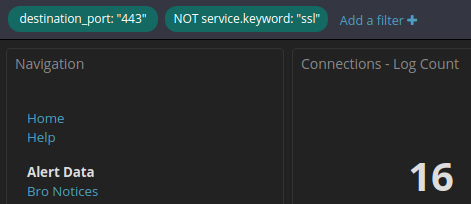
As soon as so-import-pcap completes, we can log into Squert and Kibana to review NIDS alerts and Bro logs. The first two screenshots are from Squert and are thus NIDS alerts only. We then pivot to Kibana where we see not only NIDS alerts but also Bro logs.
sudo so-import-pcap ~/Downloads/2019-06-17-password-protected-Word-doc-causes-Dridex-infection.pcap
As soon as so-import-pcap completes, we can log into Squert and Kibana to review NIDS alerts and Bro logs. The first two screenshots are from Squert and are thus NIDS alerts only. We then pivot to Kibana where we see not only NIDS alerts but also Bro logs.
| Squert Views Tab (NIDS Alerts) |
| Squert Summary Tab (NIDS Alerts) |
| Kibana Overview Dashboard showing NIDS Alerts and Bro logs |
| Bro Notices Dashboard showing Invalid SSL certificates |
| SSL Dashboard showing details of those SSL certs |
| If we filter the Connections Dashboard for dst port 443 and NOT ssl, we find some interesting connections |
| Here is the detail for those interesting connections |
| And if we pivot to full packet capture, we can see the full TCP stream for one of those connections |
Monday, June 17, 2019
Analyzing 2019-06-17-Rig-EK-sends-AZORult-and-follow-up-malware.pcap using so-import-pcap
Brad Duncan has a great writeup over on the SANS Internet Storm Center today. Let's download Brad's pcap and then analyze it using so-import-pcap!
sudo so-import-pcap ~/Downloads/2019-06-17-Rig-EK-sends-AZORult-and-follow-up-malware.pcap
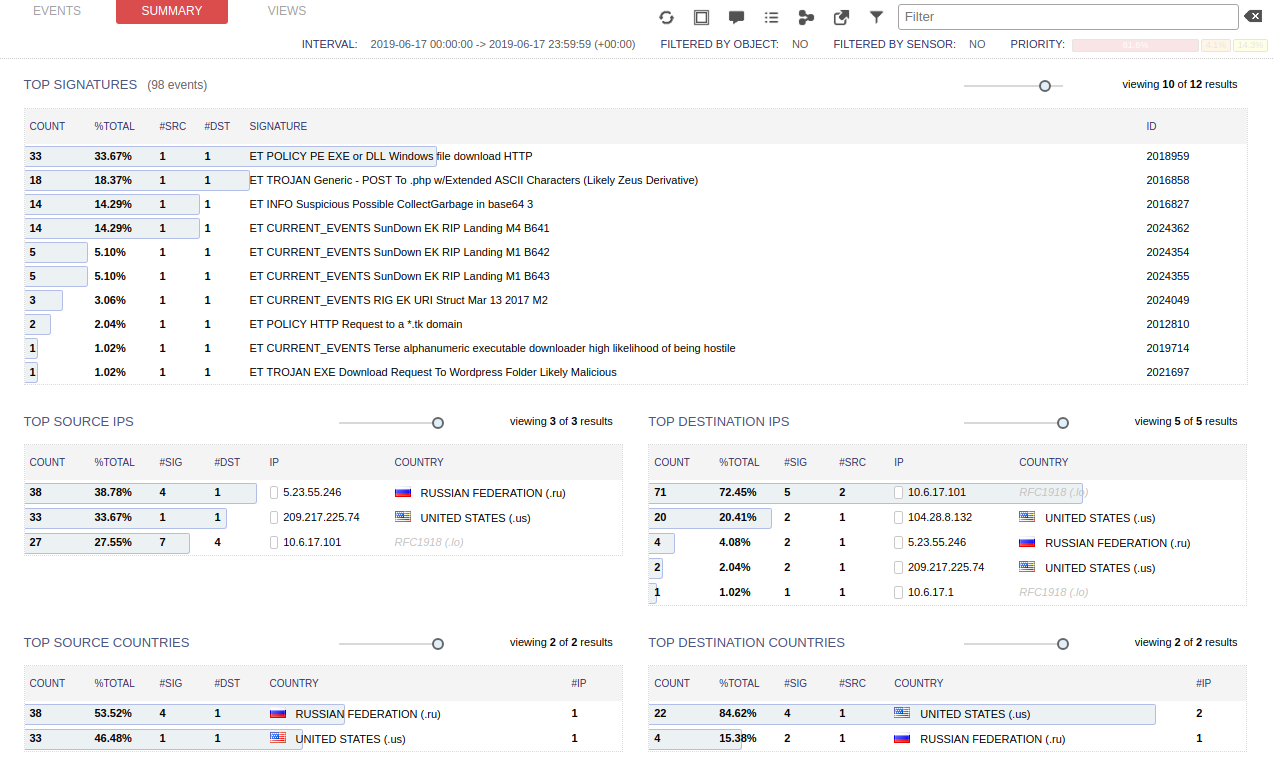
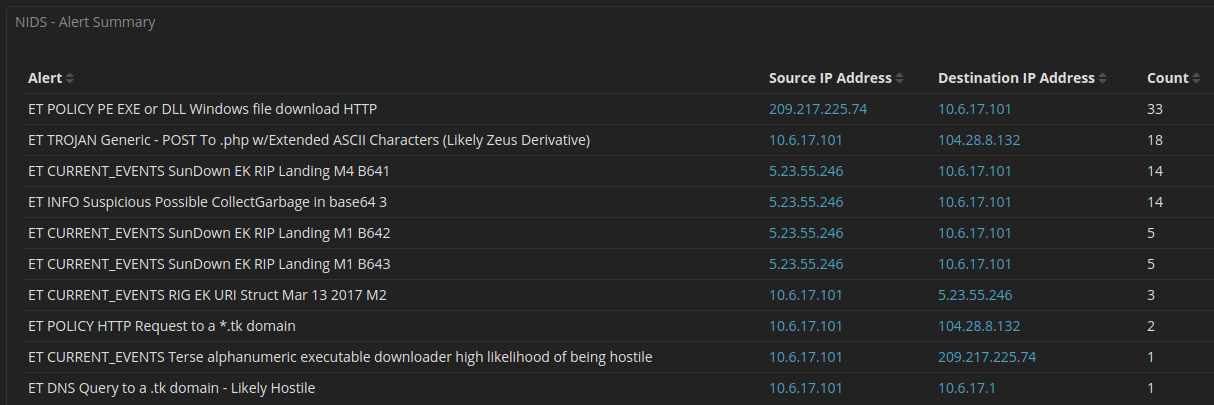
As soon as so-import-pcap completes, we can log into Squert and Kibana to review NIDS alerts and Bro logs. The first three screenshots are from Squert and are thus NIDS alerts only. We then pivot to Kibana where we see not only NIDS alerts but also Bro logs.
sudo so-import-pcap ~/Downloads/2019-06-17-Rig-EK-sends-AZORult-and-follow-up-malware.pcap
As soon as so-import-pcap completes, we can log into Squert and Kibana to review NIDS alerts and Bro logs. The first three screenshots are from Squert and are thus NIDS alerts only. We then pivot to Kibana where we see not only NIDS alerts but also Bro logs.
| Squert Views Tab (NIDS Alerts) |
| Squert Summary Tab (NIDS Alerts) |
| Squert NIDS Alerts |
| Kibana Overview Dashboard |
| Kibana NIDS Dashboard |
| Kibana Notices Dashboard |
| Kibana HTTP Dashboard |
| Pivot to full packet capture to see the full EXE |
Only 1 week left to submit for Security Onion Conference CFP!
Have an interesting talk? We want to hear from you!
For more information and to submit your talk, please see:
https://blog.securityonion.net/2019/04/security-onion-conference-2019-cfp.html
For more information and to submit your talk, please see:
https://blog.securityonion.net/2019/04/security-onion-conference-2019-cfp.html
![]() |
| Security Onion Conference 2018 |
Wednesday, June 12, 2019
Analyze pcaps in 3 simple steps using Security Onion's improved so-import-pcap!
In February 2018, we released an initial version of so-import-pcap to allow you to easily import pcap files into Security Onion while preserving original timestamps. Then in February 2019, we totally revamped so-import-pcap to make it much easier, faster, and have better error handling!
Our most recent ISO image includes the latest version of so-import-pcap and one of the new features is the ability to automatically run Setup for you. This means that you can now analyze pcap files in Security Onion in just 3 simple steps!
- install our most recent ISO image
- sudo so-import-pcap /path/to/pcap/file
- log into Squert and Kibana to review alerts and logs with original timestamps
Finally, this new so-import-pcap should now handle errors much more gracefully. For example, corrupt pcap files are now automatically fixed using pcapfix.
As a reminder, so-import-pcap is NOT intended to run on your existing production deployment. Instead, it is intended for standalone systems designated for so-import-pcap.
Screenshot Tour
| so-import-pcap warns before making any changes |
| so-import-pcap can now run Setup automatically for you |
| When so-import-pcap is complete, it will provide a hyperlink to view all data in Kibana |
| Kibana and Squert displaying logs and alerts while using just over 3GB RAM |
Monday, June 10, 2019
Network Security Monitoring Hardware for only $38?
Introduction
Over the last few years, many folks have asked if they could run Security Onion on a Raspberry Pi. The answer is no, for two main reasons:- The Raspberry Pi has an ARM processor and we do not compile Security Onion for ARM.
- The Raspberry Pi is simply not powerful enough to do the kinds of things you would want to do with Security Onion.
However, the Atomic Pi was recently announced and it's based on the Intel Atom processor. This avoids the ARM architecture issue and the specs are a little bit better than the Raspberry Pi, but are they good enough to run Security Onion?
Disclaimers
![]() |
| Thanks https://imgflip.com/memegenerator for reminding us that Jeff Goldblum does not approve of this project! |
This is intended to be a fun project only, so let's start with some disclaimers:
- Jeff Goldblum does NOT approve!
- The Atomic Pi simply wasn't designed to support things like Security Onion and so its hardware is very limited. Limited RAM, limited storage, limited expansion!
- The Atomic Pi is a limited production run, so once they're sold out, there won't be any more!
- You might be able to make the Atomic Pi work on a low bandwidth home network, but we do not officially support or recommend running Security Onion on the Atomic Pi for any serious production usage!
- If you try to deploy Security Onion on the Atomic Pi in production, it may result in dropped packets, missed attacks, and a burning sensation!
Procurement
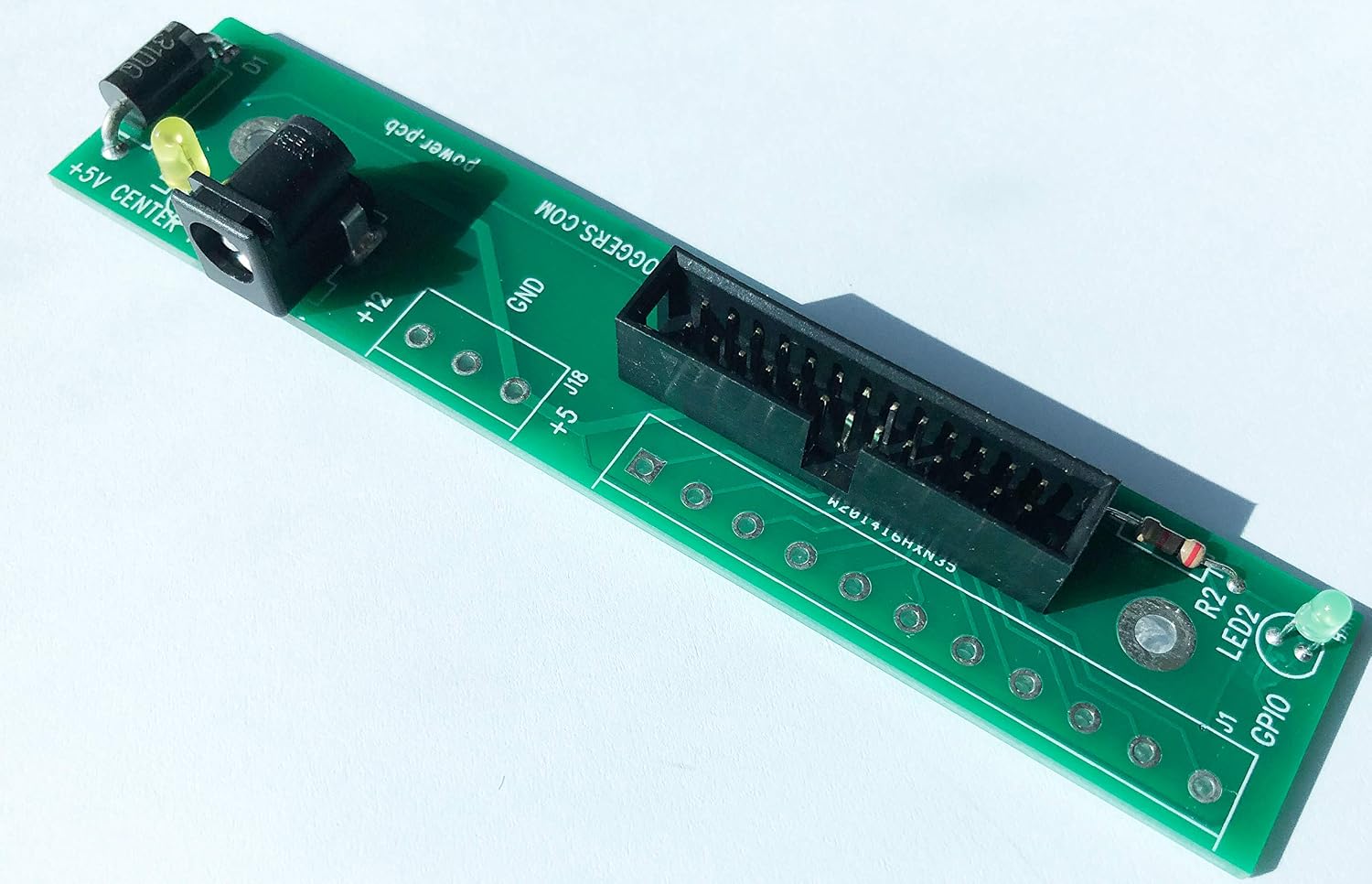
The Atomic Pi can be purchased from Digital Loggers Direct or from Amazon:![]() | |
|
Purchase Atomic Pi Breakout Board from Amazon
![]() |
| https://images-na.ssl-images-amazon.com/images/I/812Ih4VWvfL._SL1500_.jpg |
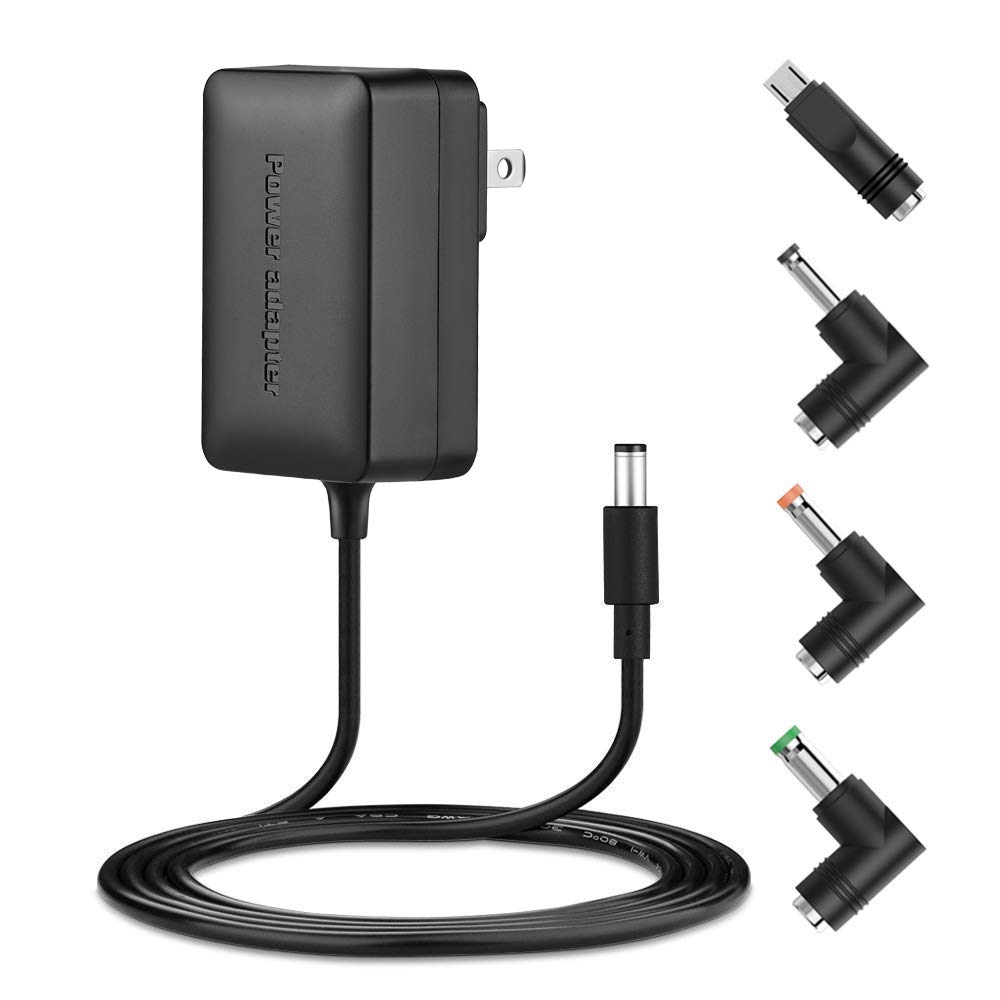
Purchase Power Supply from Amazon
![]() |
| https://images-na.ssl-images-amazon.com/images/I/51Qr04soWPL._SL1000_.jpg |
Installation
With hardware in hand, we connected the above parts and also added a USB keyboard and mouse via USB hub. We then booted the Atomic Pi to verify that it was functional. The Atomic Pi comes preloaded with Lubuntu 18.04, so we knew our Security Onion ISO image would load fairly easily. Even though our ISO image is based on Ubuntu 16.04, it includes the HWE stack, which is the kernel and drivers from Ubuntu 18.04. We prepared a USB drive with our Security Onion 16.04.6.1 ISO image and then followed our Installation Guide here:https://securityonion.net/docs/quick-iso-image.html
In a later section, we'll talk about disabling the desktop GUI to minimize RAM usage, so instead of using our ISO image another option would be to start off with Ubuntu 16.04 Server (no GUI):
https://securityonion.net/docs/installing-on-ubuntu.html
If we were to use Ubuntu 16.04 Server, we would need to manually select the HWE stack to ensure full hardware support of the Atomic Pi components.
Maximizing the Minimal RAM
One of the main constraints of the Atomic Pi is the limited RAM - only 2GB! This is not much especially when you consider our Hardware Requirements:https://securityonion.net/docs/hardware.html
So the first thing we need to do after installation is to enable RAM compression to avoid swapping to the eMMC storage as much as possible. To do this, we'll need to connect to the Internet using the Atomic Pi's wireless or wired interface and then install the zram-config package and reboot:
sudo apt update && sudo apt install zram-config && sudo rebootAfter rebooting, we can verify that there are zram entries in /proc/swaps:
cat /proc/swapsWe can also disable other unnecessary services like bluetooth:
https://securityonion.net/docs/performance.html#disable-unnecessary-services
Even with these tweaks, RAM is still very limited. So what can we do with so little RAM?
Use Case #1 - Wazuh HIDS Server
Let's start off with a simple use case. Suppose we just want to deploy a Wazuh server that could manage some Wazuh agents and allow us to view Wazuh HIDS alerts using the Squert web interface. We run Setup and choose the following options:- skip network configuration
- Production Mode
- New Deployment
- Custom
- Disable network sensor services
- Disable Salt
- Disable Elastic Stack
Then we run "sudo so-allow" to allow our analyst machine to connect to the web interface on the Atomic Pi.
| Squert showing Wazuh HIDS Alerts |
That's it! Pretty simple and straightforward if all we want is a Wazuh HIDS server and the Squert web interface.
Use Case #2 - HIDS and NIDS
HIDS is great, but what about NIDS? This is where things get more interesting, but also more complicated! For NIDS, we generally recommend two separate network interfaces, one for management and the other for sniffing. The Atomic Pi comes with one wireless interface and one wired interface, so we have a couple of options.Using built-in interfaces
If we want to limit ourselves to the network interfaces built into the Atomic Pi, then we'll need to configure the wireless interface for management and the wired interface for sniffing. Our Setup wizard configures wired network interfaces, but it intentionally doesn't support wireless interfaces. However, it's still possible to make this work. We can use Ubuntu's Network Manager to configure the wireless interface and then manually configure the wired network interface in /etc/network/interfaces using the guidance here:https://securityonion.net/docs/network-configuration.html
Using a USB Ethernet Adapter
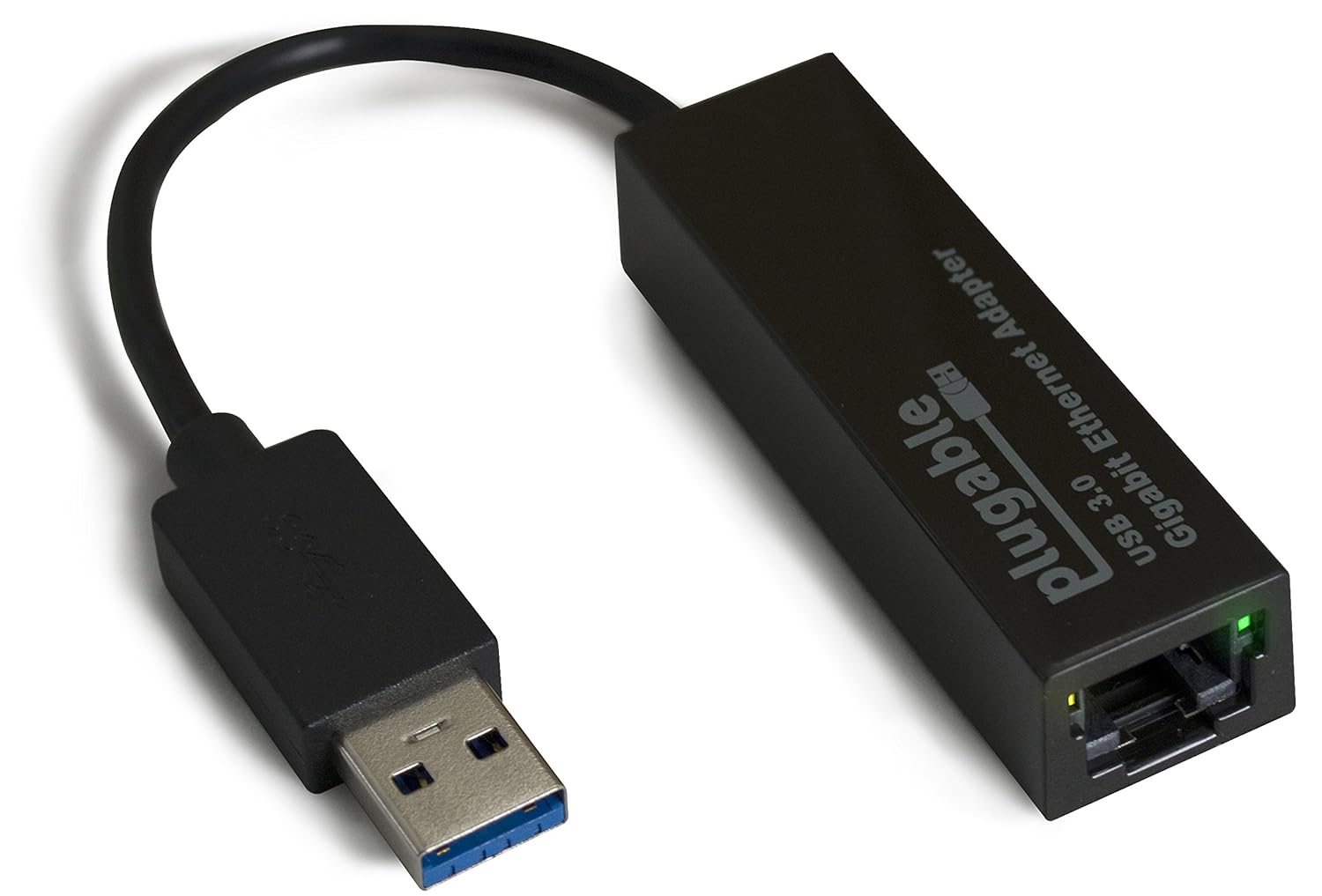
If we don't care about limiting ourselves to the network interfaces built into the Atomic Pi, then we can add an external USB Ethernet adapter. For example:https://www.amazon.com/Plugable-Ethernet-Gigabit-Network-Compatible/dp/B00AQM8586
![]() |
| https://images-na.ssl-images-amazon.com/images/I/81DE2obQJCL._SL1500_.jpg |
This plus the onboard wired interface gives us two wired interfaces so we can use our standard Setup wizard for network configuration rather than having to resort to manually editing /etc/network/interfaces as shown above.
It should be noted that this may require an additional step if we choose to sniff from the USB Ethernet adapter using PF_RING. PF_RING may not recognize the USB Ethernet adapter name by default and so it may need to be renamed. This should only be an issue if we choose Snort (and thus PF_RING). Security Onion now defaults to running Suricata and Bro using AF_PACKET, which should handle USB Ethernet adapters just fine.
Setup Options for Use Case #2
For Use Case #2, we'll choose options very similar to Use Case #1, but we'll choose to Enable Network Sensor Services:- skip network configuration
- Production Mode
- New Deployment
- Custom
- ENABLE network sensor services
- Enable NIDS
- Disable full packet capture
- Disable Salt
- Disable Elastic Stack
| NIDS and HIDS Alerts in Squert |
Use Case #3 - Adding a Forward Node to an Existing Deployment
Now that we've discussed how to do network sniffing on the Atomic Pi, we could also turn an Atomic Pi into a forward node to add to an existing Security Onion deployment. We would simply use the network config in Use Case #2 and then run Setup as follows:- skip network configuration
- Production Mode
- EXISTING Deployment
- Forward Node
- Custom
- Enable NIDS
- Enable Bro
- Disable full packet capture
Use Case #4 - NIDS, HIDS, Bro, and the Elastic Stack?
So far, we've avoided running the Elastic Stack directly on the Atomic Pi as we normally suggest at least 8GB RAM for such a configuration. Let's see if we have any more tricks up our sleeves for minimizing RAM usage and getting the Elastic Stack running on this Atomic Pi!Another disclaimer! We're about to do some crazy stuff just for this fun proof of concept! Don't try this in production!
We run Setup choosing similar options as Use Case #2, but this time we enable the Elastic Stack:
- skip network configuration
- Production Mode
- New Deployment
- Custom
- Enable network sensor services
- Enable NIDS
- Enable Bro
- Disable full packet capture
- Disable Salt
- Enable Elastic Stack
sudo so-stopWe need to change sguild's DEBUG setting:
sudo sed -i 's|set DEBUG.*$|set DEBUG 2|g' /etc/sguild/sguild.confNext, we manually configure Bro for standalone mode in /opt/bro/etc/node.cfg (replacing $INTERFACE with your actual sniffing interface)
[bro]
type=standalone
host=localhost
interface=$INTERFACE
We then add the following to /etc/nsm/securityonion.conf:
LOGSTASH_OUTPUT_INGEST="yes"
LOGSTASH_OPTIONS="--volume /nsm/bro/logs/current/:/nsm/bro/logs/current/:ro"
Then we set the following in BOTH /etc/elasticsearch/jvm.options AND /etc/logstash/jvm.options:
-Xms200m
-Xmx200m
Next, we limit Logstash workers in /etc/logstash/logstash.yml:
pipeline.workers: 1
Now we need to start Logstash to create the /etc/logstash/conf.d.ingest.output/ directory:
sudo so-logstash-startThen update 0007_input_import.conf:
sudo sed -i 's|/nsm/import/bro/\*\*|/nsm/bro/logs/current|g' /etc/logstash/conf.d.ingest.output/0007_input_import.confNext, we'll need to disable the desktop and reboot:
https://securityonion.net/docs/desktop.html
Once the Atomic Pi has rebooted, we log back in over SSH and verify that everything is running:
sudo so-statusConfigure Kibana:
sudo so-elastic-configure-kibanaFinally, we run "sudo so-allow" to allow our analyst machine to connect to the web interface on the Atomic Pi and view NIDS and Bro logs via Kibana.
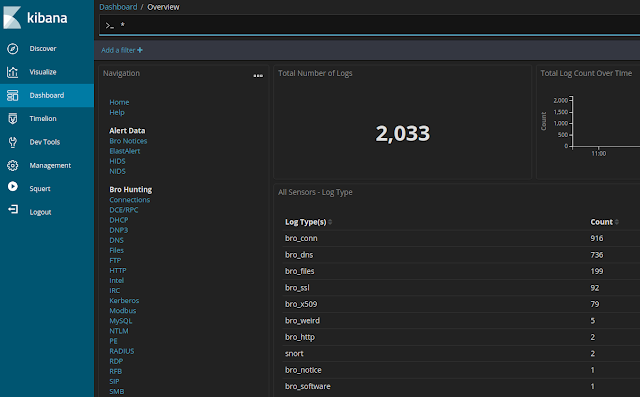
| NIDS and Bro logs now available in Kibana |
Conclusion
Playing with the Atomic Pi has been a fun project and, at only $38, it is an impressive little device! However, as you've seen from this blog post and its many disclaimers, we've had to do quite a bit to work around the inherent limitations of the hardware and so we can't really recommend or support it for production Security Onion usage.Security Onion is a versatile and scalable platform that can run on small form factor devices with limited hardware and can also scale up to the opposite end of the hardware spectrum to take advantage of extremely powerful server-class machines. Security Onion can also scale horizontally, growing from a standalone single-machine deployment to a full distributed deployment with tens or hundreds of machines as dictated by your enterprise visibility needs.
If you've enjoyed this blog post and would like to learn more about Security Onion, you may want to consider purchasing a printed copy of our Security Onion Documentation! It's available at an introductory price for a limited time only and includes a foreword by Richard Bejtlich and proceeds go to Rural Technology Fund!
If you're looking for Security Onion training, be sure to check out our official Security Onion training classes. We've got 4-day Basic and 4-day Advanced classes coming up in Columbia MD!
If your organization is interested in customized and tuned hardware appliances pre-loaded with Security Onion, please head over to https://securityonionsolutions.com to learn more about our Security Onion appliances and reach out to us using the contact information there.
Thanks!
Monday, June 3, 2019
Bro 2.6.2 now available for Security Onion!
Bro 2.6.2 is now available for Security Onion! The new package versions are as follows:
securityonion-bro - 2.6.2-1ubuntu1securityonion2
securityonion-bro-afpacket - 1.3.0-1ubuntu1securityonion11
securityonion-bro-scripts - 20121004-0ubuntu0securityonion71
These packages should resolve the following issue:
Bro 2.6.2 #1525
https://github.com/Security-Onion-Solutions/security-onion/issues/1525
Thanks
Thanks to the Bro/Zeek team for Bro 2.6.2!
Thanks to Wes Lambert for testing!
Updating
Please see the following page for full update instructions:
https://securityonion.net/docs/Upgrade
Conference
Please mark your calendar! Security Onion Conference 2019 will be on Friday, October 4, 2019 and registration will open July 18! CFP is open now and we want to hear from you!
https://blog.securityonion.net/2019/04/security-onion-conference-2019-cfp.html
Documentation
We've got a brand new documentation site! Please let us know if anything needs to be updated:
https://securityonion.net/docs
Also, we're now offering a printed copy of our official documentation with foreword by Richard Bejtlich and proceeds going to Rural Technology Fund:
https://securityonion.net/book
Training
We have 4-day Security Onion Training classes coming up in Columbia MD! If you can't make it to an onsite class, we have a new online training platform. For more information and other training options, please see:
https://securityonionsolutions.com
Appliances
We now offer hardware appliances! For more information, please see:
https://blog.securityonion.net/2018/10/introducing-security-onion-solutions.html
Support
Need support? Please see:
https://securityonion.net/docs/Support
Thanks!
securityonion-bro - 2.6.2-1ubuntu1securityonion2
securityonion-bro-afpacket - 1.3.0-1ubuntu1securityonion11
securityonion-bro-scripts - 20121004-0ubuntu0securityonion71
These packages should resolve the following issue:
Bro 2.6.2 #1525
https://github.com/Security-Onion-Solutions/security-onion/issues/1525
Thanks
Thanks to the Bro/Zeek team for Bro 2.6.2!
Thanks to Wes Lambert for testing!
Updating
Please see the following page for full update instructions:
https://securityonion.net/docs/Upgrade
Conference
Please mark your calendar! Security Onion Conference 2019 will be on Friday, October 4, 2019 and registration will open July 18! CFP is open now and we want to hear from you!
https://blog.securityonion.net/2019/04/security-onion-conference-2019-cfp.html
Documentation
We've got a brand new documentation site! Please let us know if anything needs to be updated:
https://securityonion.net/docs
Also, we're now offering a printed copy of our official documentation with foreword by Richard Bejtlich and proceeds going to Rural Technology Fund:
https://securityonion.net/book
Training
We have 4-day Security Onion Training classes coming up in Columbia MD! If you can't make it to an onsite class, we have a new online training platform. For more information and other training options, please see:
https://securityonionsolutions.com
Appliances
We now offer hardware appliances! For more information, please see:
https://blog.securityonion.net/2018/10/introducing-security-onion-solutions.html
Support
Need support? Please see:
https://securityonion.net/docs/Support
Thanks!
Thursday, May 30, 2019
Snort 2.9.13.0 and PulledPork 0.7.3 now available for Security Onion!
Snort 2.9.13.0 was recently released:
https://blog.snort.org/2019/04/snort-29130-has-been-released.html
We've packaged Snort 2.9.13.0 and the new version of PulledPork required for this new Snort version. The new package versions are as follows:
securityonion-snort - 2.9.13.0-1ubuntu1securityonion3
securityonion-pulledpork - 0.7.3-1ubuntu1securityonion3
These packages should resolve the following issues:
Snort 2.9.13.0 #1142
https://github.com/Security-Onion-Solutions/security-onion/issues/1142
PulledPork 0.7.3 #1143
https://github.com/Security-Onion-Solutions/security-onion/issues/1143
Thanks
Thanks to the Snort team for Snort 2.9.13.0!
Thanks to the PulledPork team for PulledPork 0.7.3!
Thanks to Wes Lambert for testing!
Updating
Please see the following page for full update instructions:
https://securityonion.net/docs/Upgrade
Conference
Please mark your calendar! Security Onion Conference 2019 will be on Friday, October 4, 2019 and registration will open July 18! CFP is open now and we want to hear from you!
https://blog.securityonion.net/2019/04/security-onion-conference-2019-cfp.html
Training
We have 4-day Security Onion Training classes coming up in Columbia MD! Use promotional code earlybird for 10% off the ADVANCED class for a limited time. If you can't make it to an onsite class, we have a new online training platform. For more information and other training options, please see:
https://securityonionsolutions.com
Appliances
We now offer hardware appliances! For more information, please see:
https://blog.securityonion.net/2018/10/introducing-security-onion-solutions.html
Documentation
We've got a brand new documentation site! Please let us know if anything needs to be updated:
https://securityonion.net/docs
Support
Need support? Please see:
https://securityonion.net/docs/Support
Thanks!
https://blog.snort.org/2019/04/snort-29130-has-been-released.html
We've packaged Snort 2.9.13.0 and the new version of PulledPork required for this new Snort version. The new package versions are as follows:
securityonion-snort - 2.9.13.0-1ubuntu1securityonion3
securityonion-pulledpork - 0.7.3-1ubuntu1securityonion3
These packages should resolve the following issues:
Snort 2.9.13.0 #1142
https://github.com/Security-Onion-Solutions/security-onion/issues/1142
PulledPork 0.7.3 #1143
https://github.com/Security-Onion-Solutions/security-onion/issues/1143
| Snort 2.9.13.0 |
| PulledPork 0.7.3 |
Thanks
Thanks to the Snort team for Snort 2.9.13.0!
Thanks to the PulledPork team for PulledPork 0.7.3!
Thanks to Wes Lambert for testing!
Updating
Please see the following page for full update instructions:
https://securityonion.net/docs/Upgrade
Conference
Please mark your calendar! Security Onion Conference 2019 will be on Friday, October 4, 2019 and registration will open July 18! CFP is open now and we want to hear from you!
https://blog.securityonion.net/2019/04/security-onion-conference-2019-cfp.html
Training
We have 4-day Security Onion Training classes coming up in Columbia MD! Use promotional code earlybird for 10% off the ADVANCED class for a limited time. If you can't make it to an onsite class, we have a new online training platform. For more information and other training options, please see:
https://securityonionsolutions.com
Appliances
We now offer hardware appliances! For more information, please see:
https://blog.securityonion.net/2018/10/introducing-security-onion-solutions.html
Documentation
We've got a brand new documentation site! Please let us know if anything needs to be updated:
https://securityonion.net/docs
Support
Need support? Please see:
https://securityonion.net/docs/Support
Thanks!
Tuesday, May 28, 2019
Security Onion Users Can Now Switch to Elastic Features
Many folks have asked if they could switch from the open source version of the Elastic Stack to the Features version licensed under the Elastic license. You can try it out starting today!
Instructions
Screenshots
Q&A
Is Elastic Features open source?
No, it is not open source. It is licensed under the Elastic license:
https://github.com/elastic/elasticsearch/blob/6.7/licenses/ELASTIC-LICENSE.txt
What does this mean for Security Onion licensing?
Security Onion continues to be free and open source and will continue to default to the open source version of the Elastic Stack. If you choose to switch to Elastic Features (not open source), you may do so using the instructions above.
If I switch to Elastic Features, is this a trial license?
If you switch to Elastic Features, you can remain on the BASIC license for free forever or you can choose to upgrade to a paid subscription. For more information about Elastic Features subscription levels, please see:
https://www.elastic.co/subscriptions
How does authentication work?
Authentication works the same way it does in our existing Elastic open source images. Security Onion provides Single Sign On (SSO) using the same username and password for Sguil, Squert, and Kibana.
What about the recent Elastic announcement about security features?
Elastic recently announced that security features are included for free in the Elastic Features license starting in version 6.8.0. Since Security Onion still uses Elastic 6.7.2, those security features are not free in that version. We will begin the process of working towards Elastic 6.8.0.
Instructions
- First, please review the Elastic Features license:
https://github.com/elastic/elasticsearch/blob/6.7/licenses/ELASTIC-LICENSE.txt - Next, you should make sure that all updates have been installed:
sudo soup - If soup prompts to reboot, please do so.
- Verify that everything is working properly before continuing.
- Edit /etc/nsm/elasticdownload.conf using your favorite text editor and change DOCKERHUB from "securityonionsolutions" to "securityonionsolutionselas":
DOCKERHUB="securityonionsolutionselas" - Run soup again to download the new Docker images for Elastic Features:
sudo soup - Once soup has downloaded the new Docker images, it should restart your Docker containers.
- Kibana should now have some new features on the left side.
Screenshots
| Soup downloading new Docker images |
| Kibana now includes new features on left side |
Q&A
Is Elastic Features open source?
No, it is not open source. It is licensed under the Elastic license:
https://github.com/elastic/elasticsearch/blob/6.7/licenses/ELASTIC-LICENSE.txt
What does this mean for Security Onion licensing?
Security Onion continues to be free and open source and will continue to default to the open source version of the Elastic Stack. If you choose to switch to Elastic Features (not open source), you may do so using the instructions above.
If I switch to Elastic Features, is this a trial license?
If you switch to Elastic Features, you can remain on the BASIC license for free forever or you can choose to upgrade to a paid subscription. For more information about Elastic Features subscription levels, please see:
https://www.elastic.co/subscriptions
How does authentication work?
Authentication works the same way it does in our existing Elastic open source images. Security Onion provides Single Sign On (SSO) using the same username and password for Sguil, Squert, and Kibana.
What about the recent Elastic announcement about security features?
Elastic recently announced that security features are included for free in the Elastic Features license starting in version 6.8.0. Since Security Onion still uses Elastic 6.7.2, those security features are not free in that version. We will begin the process of working towards Elastic 6.8.0.
Wednesday, May 22, 2019
Security Onion Documentation now available in Book Format!
Many folks have asked for a printed version of our official online documentation and we're excited to provide that! Whether you work on airgapped networks or simply want a portable reference that doesn't require an Internet connection or batteries, this is what you've been asking for.
Thanks to Richard Bejtlich for writing the inspiring foreword!
Proceeds go to the Rural Technology Fund!
This introductory price is good for a limited time only!
This book covers the following Security Onion topics:
- Getting Started
- Analyst Tools
- Network Visibility
- Host Visibility
- Elastic Stack
- Updating
- Customizing for your Environment
- Tuning
- Tricks and Tips
- Services
- Utilities
- Help
- Integrations
Q&A
What is the difference between this book and the online documentation?
This book is the online documentation formatted specifically for print. It also includes an inspiring foreword by Richard Bejtlich that is not available anywhere else! Finally, proceeds go to the Rural Technology Fund!
Who should get this book?
Security Onion users who work on airgapped networks or simply want a portable reference that doesn't require an Internet connection or batteries! Also anyone who wants to donate to a worthy cause like Rural Technology Fund!
How often will the book be updated?
Currently, we plan to release a new edition of the book every time we release a new version of our ISO image.
Where do we get it?
https://securityonion.net/book
Tuesday, May 21, 2019
Monday, May 20, 2019
securityonion-sostat - 20120722-0ubuntu0securityonion126 now available for Security Onion!
securityonion-sostat - 20120722-0ubuntu0securityonion126 is now available. This should resolve the following issue:
securityonion-sostat: re-apply debconf noninteractive setting so that soup can proceed unattended #1523
https://github.com/Security-Onion-Solutions/security-onion/issues/1523
Thanks
Thanks to Wes Lambert for testing!
Updating
Please see the following page for full update instructions:
https://securityonion.net/docs/Upgrade
Conference
Please mark your calendar! Security Onion Conference 2019 will be on Friday, October 4, 2019 and registration will open July 18! CFP is open now and we want to hear from you!
https://blog.securityonion.net/2019/04/security-onion-conference-2019-cfp.html
Training
We have 4-day Security Onion Training classes coming up in Costa Mesa CA and Columbia MD! Use promotional code earlybird for 10% off the Columbia MD classes for a limited time. If you can't make it to an onsite class, we have a new online training platform. For more information and other training options, please see:
https://securityonionsolutions.com
Appliances
We now offer hardware appliances! For more information, please see:
https://blog.securityonion.net/2018/10/introducing-security-onion-solutions.html
Documentation
We've got a brand new documentation site! Please let us know if anything needs to be updated:
https://securityonion.net/docs
Support
Need support? Please see:
https://securityonion.net/docs/Support
Thanks!
securityonion-sostat: re-apply debconf noninteractive setting so that soup can proceed unattended #1523
https://github.com/Security-Onion-Solutions/security-onion/issues/1523
Thanks
Thanks to Wes Lambert for testing!
Updating
Please see the following page for full update instructions:
https://securityonion.net/docs/Upgrade
Conference
Please mark your calendar! Security Onion Conference 2019 will be on Friday, October 4, 2019 and registration will open July 18! CFP is open now and we want to hear from you!
https://blog.securityonion.net/2019/04/security-onion-conference-2019-cfp.html
Training
We have 4-day Security Onion Training classes coming up in Costa Mesa CA and Columbia MD! Use promotional code earlybird for 10% off the Columbia MD classes for a limited time. If you can't make it to an onsite class, we have a new online training platform. For more information and other training options, please see:
https://securityonionsolutions.com
Appliances
We now offer hardware appliances! For more information, please see:
https://blog.securityonion.net/2018/10/introducing-security-onion-solutions.html
Documentation
We've got a brand new documentation site! Please let us know if anything needs to be updated:
https://securityonion.net/docs
Support
Need support? Please see:
https://securityonion.net/docs/Support
Thanks!
securityonion-iso - 20151016-1ubuntu1securityonion32 now available for Security Onion!
securityonion-iso - 20151016-1ubuntu1securityonion32 is now available. This should resolve the following issue:
so-iso-build: purge php7.0-fpm #1463
https://github.com/Security-Onion-Solutions/security-onion/issues/1463
Thanks
Thanks to the following for testing!
Updating
Please see the following page for full update instructions:
https://securityonion.net/docs/Upgrade
Conference
Please mark your calendar! Security Onion Conference 2019 will be on Friday, October 4, 2019 and registration will open July 18! CFP is open now and we want to hear from you!
https://blog.securityonion.net/2019/04/security-onion-conference-2019-cfp.html
Training
We have 4-day Security Onion Training classes coming up in Costa Mesa CA and Columbia MD! Use promotional code earlybird for 10% off the Columbia MD classes for a limited time. If you can't make it to an onsite class, we have a new online training platform. For more information and other training options, please see:
https://securityonionsolutions.com
Appliances
We now offer hardware appliances! For more information, please see:
https://blog.securityonion.net/2018/10/introducing-security-onion-solutions.html
Documentation
We've got a brand new documentation site! Please let us know if anything needs to be updated:
https://securityonion.net/docs
Support
Need support? Please see:
https://securityonion.net/docs/Support
Thanks!
so-iso-build: purge php7.0-fpm #1463
https://github.com/Security-Onion-Solutions/security-onion/issues/1463
Thanks
Thanks to the following for testing!
- Wes Lambert
- Dustin Lee
- Bryant Treacle
Updating
Please see the following page for full update instructions:
https://securityonion.net/docs/Upgrade
Conference
Please mark your calendar! Security Onion Conference 2019 will be on Friday, October 4, 2019 and registration will open July 18! CFP is open now and we want to hear from you!
https://blog.securityonion.net/2019/04/security-onion-conference-2019-cfp.html
Training
We have 4-day Security Onion Training classes coming up in Costa Mesa CA and Columbia MD! Use promotional code earlybird for 10% off the Columbia MD classes for a limited time. If you can't make it to an onsite class, we have a new online training platform. For more information and other training options, please see:
https://securityonionsolutions.com
Appliances
We now offer hardware appliances! For more information, please see:
https://blog.securityonion.net/2018/10/introducing-security-onion-solutions.html
Documentation
We've got a brand new documentation site! Please let us know if anything needs to be updated:
https://securityonion.net/docs
Support
Need support? Please see:
https://securityonion.net/docs/Support
Thanks!
pinguybuilder - 20180514-1ubuntu1securityonion18 now available for Security Onion!
pinguybuilder - 20180514-1ubuntu1securityonion18 is now available. This should resolve the following issue:
pinguybuilder: increment version to 16.04.6.1 #1433
https://github.com/Security-Onion-Solutions/security-onion/issues/1433
Thanks
Thanks to the following for testing!
Updating
Please see the following page for full update instructions:
https://securityonion.net/docs/Upgrade
Conference
Please mark your calendar! Security Onion Conference 2019 will be on Friday, October 4, 2019 and registration will open July 18! CFP is open now and we want to hear from you!
https://blog.securityonion.net/2019/04/security-onion-conference-2019-cfp.html
Training
We have 4-day Security Onion Training classes coming up in Costa Mesa CA and Columbia MD! Use promotional code earlybird for 10% off the Columbia MD classes for a limited time. If you can't make it to an onsite class, we have a new online training platform. For more information and other training options, please see:
https://securityonionsolutions.com
Appliances
We now offer hardware appliances! For more information, please see:
https://blog.securityonion.net/2018/10/introducing-security-onion-solutions.html
Documentation
We've got a brand new documentation site! Please let us know if anything needs to be updated:
https://securityonion.net/docs
Support
Need support? Please see:
https://securityonion.net/docs/Support
Thanks!
pinguybuilder: increment version to 16.04.6.1 #1433
https://github.com/Security-Onion-Solutions/security-onion/issues/1433
Thanks
Thanks to the following for testing!
- Wes Lambert
- Dustin Lee
- Bryant Treacle
Updating
Please see the following page for full update instructions:
https://securityonion.net/docs/Upgrade
Conference
Please mark your calendar! Security Onion Conference 2019 will be on Friday, October 4, 2019 and registration will open July 18! CFP is open now and we want to hear from you!
https://blog.securityonion.net/2019/04/security-onion-conference-2019-cfp.html
Training
We have 4-day Security Onion Training classes coming up in Costa Mesa CA and Columbia MD! Use promotional code earlybird for 10% off the Columbia MD classes for a limited time. If you can't make it to an onsite class, we have a new online training platform. For more information and other training options, please see:
https://securityonionsolutions.com
Appliances
We now offer hardware appliances! For more information, please see:
https://blog.securityonion.net/2018/10/introducing-security-onion-solutions.html
Documentation
We've got a brand new documentation site! Please let us know if anything needs to be updated:
https://securityonion.net/docs
Support
Need support? Please see:
https://securityonion.net/docs/Support
Thanks!
Subscribe to:
Posts (Atom)
Search This Blog
Featured Post
Registration Now Open for Augusta Cyber Week 2026!
Registration is now open for Augusta Cyber Week in beautiful Augusta GA from October 19, 2026 through October 24, 2026! This includes: 4-day...
Popular Posts
-
Security Onion 3.0.0 is now available and includes a new and improved interface, updated components, and many quality of life improvements! ...
-
Security Onion 2.4.180 is now available and includes several new features, updated components, and many quality of life improvements! For Se...
-
Security Onion 2.4.190 is now available and includes several new features, updated components, and many quality of life improvements! For S...
Blog Archive
- August 2026 (2)
- July 2026 (2)
- May 2026 (6)
- April 2026 (4)
- March 2026 (5)
- January 2026 (3)
- December 2025 (5)
- November 2025 (2)
- October 2025 (2)
- September 2025 (3)
- August 2025 (4)
- July 2025 (3)
- June 2025 (3)
- May 2025 (5)
- April 2025 (2)
- March 2025 (7)
- February 2025 (5)
- January 2025 (11)
- December 2024 (3)
- November 2024 (1)
- October 2024 (9)
- September 2024 (16)
- August 2024 (3)
- July 2024 (7)
- June 2024 (5)
- May 2024 (2)
- April 2024 (7)
- March 2024 (5)
- February 2024 (3)
- January 2024 (3)
- December 2023 (15)
- November 2023 (27)
- October 2023 (18)
- September 2023 (3)
- August 2023 (8)
- July 2023 (4)
- June 2023 (3)
- May 2023 (2)
- April 2023 (4)
- March 2023 (4)
- February 2023 (5)
- January 2023 (3)
- December 2022 (5)
- November 2022 (2)
- October 2022 (9)
- September 2022 (3)
- August 2022 (8)
- July 2022 (7)
- June 2022 (9)
- May 2022 (14)
- April 2022 (7)
- March 2022 (6)
- February 2022 (11)
- January 2022 (12)
- December 2021 (19)
- November 2021 (25)
- October 2021 (22)
- September 2021 (23)
- August 2021 (30)
- July 2021 (13)
- June 2021 (4)
- May 2021 (3)
- April 2021 (4)
- March 2021 (7)
- February 2021 (5)
- January 2021 (4)
- December 2020 (13)
- November 2020 (5)
- October 2020 (12)
- September 2020 (3)
- August 2020 (6)
- July 2020 (8)
- June 2020 (5)
- May 2020 (9)
- April 2020 (11)
- March 2020 (7)
- February 2020 (4)
- January 2020 (1)
- December 2019 (6)
- November 2019 (4)
- October 2019 (8)
- September 2019 (7)
- August 2019 (7)
- July 2019 (4)
- June 2019 (7)
- May 2019 (20)
- April 2019 (8)
- March 2019 (7)
- February 2019 (7)
- January 2019 (12)
- December 2018 (12)
- November 2018 (13)
- October 2018 (10)
- September 2018 (4)
- August 2018 (16)
- July 2018 (11)
- June 2018 (13)
- May 2018 (4)
- April 2018 (11)
- March 2018 (9)
- February 2018 (10)
- January 2018 (9)
- December 2017 (7)
- November 2017 (7)
- October 2017 (9)
- September 2017 (4)
- August 2017 (7)
- July 2017 (5)
- June 2017 (8)
- May 2017 (4)
- April 2017 (2)
- March 2017 (1)
- February 2017 (3)
- January 2017 (15)
- December 2016 (9)
- November 2016 (3)
- October 2016 (5)
- September 2016 (13)
- August 2016 (12)
- July 2016 (10)
- June 2016 (7)
- May 2016 (7)
- April 2016 (7)
- March 2016 (10)
- February 2016 (13)
- January 2016 (10)
- December 2015 (1)
- November 2015 (1)
- October 2015 (3)
- September 2015 (5)
- August 2015 (7)
- July 2015 (7)
- June 2015 (12)
- May 2015 (6)
- April 2015 (6)
- March 2015 (6)
- February 2015 (10)
- January 2015 (11)
- December 2014 (5)
- November 2014 (3)
- October 2014 (6)
- September 2014 (20)
- August 2014 (7)
- July 2014 (10)
- June 2014 (10)
- May 2014 (3)
- April 2014 (9)
- March 2014 (6)
- February 2014 (9)
- January 2014 (8)
- December 2013 (5)
- November 2013 (2)
- October 2013 (7)
- September 2013 (5)
- August 2013 (7)
- July 2013 (9)
- June 2013 (7)
- May 2013 (11)
- April 2013 (3)
- March 2013 (3)
- February 2013 (3)
- January 2013 (3)
- December 2012 (3)
- November 2012 (1)
- October 2012 (1)
- September 2012 (1)
- August 2012 (2)
- May 2012 (4)
- April 2012 (6)
- March 2012 (8)
- February 2012 (4)
- January 2012 (13)
- December 2011 (9)
- November 2011 (8)
- October 2011 (8)
- September 2011 (8)
- July 2011 (4)
- June 2011 (5)
- May 2011 (2)
- April 2011 (1)
- February 2011 (1)
- January 2011 (11)
- November 2010 (4)
- October 2010 (8)
- August 2010 (1)
- July 2010 (2)
- June 2010 (1)
- May 2010 (1)
- April 2010 (2)
- February 2010 (3)
- January 2010 (1)
- September 2009 (1)
- August 2009 (3)
- July 2009 (4)
- June 2009 (3)
- May 2009 (1)
- April 2009 (8)
- February 2009 (1)
- January 2009 (9)
- November 2008 (2)
- October 2008 (4)
- September 2008 (3)