Showing posts with label wazuh. Show all posts

Thursday, December 15, 2022

Potential Security Issue in Windows Wazuh agent 3.13

This is a notification of a potential security issue in the Wazuh Windows agent. If you do not use Wazuh, then you can disregard this notification.

Summary

Version 3.13 of the Windows Wazuh agent installs with incorrect permissions on ossec.conf which could allow users to escalate privileges. However, most users configure that Wazuh agent using the Wazuh Agent Manager utility which then sets the permissions correctly. If you don't use the Wazuh Agent Manager utility for configuration, then you may need to manually fix the permissions on ossec.conf. For more information, please see https://github.com/Security-Onion-Solutions/securityonion/discussions/9390. Thanks to jakko10 for notifying us of this issue.

Discussion

First, it's important to note that Wazuh is an optional component of Security Onion and does not have to be enabled. Furthermore, the issue exists in the Windows agent itself and not the Wazuh server that runs on the Security Onion node. Finally, most users configure the Wazuh agent using the Wazuh Agent Manager which sets the permissions correctly.

If you are using Wazuh and have deployed the agent to Windows machines without using the Wazuh Agent Manager, then you may want to manually change the permissions on the ossec.conf file.

Unrelated to this issue, we plan to remove Wazuh in Security Onion 2.4. Therefore, you may want to take this opportunity to switch to a different endpoint agent like Winlogbeat:
https://docs.securityonion.net/en/2.3/beats.html 

Questions

If you have any questions, please start a new discussion at https://securityonion.net/discuss.

Tuesday, November 23, 2021

Security Onion 2.3.90 WAZUH Hotfix Now Available!

We recently released Security Onion 2.3.90:
https://blog.securityonion.net/2021/11/security-onion-2390-now-available.html

Today, we are releasing a WAZUH hotfix:
https://docs.securityonion.net/en/2.3/release-notes.html#hotfix-wazuh

If you haven't updated recently, then you should review the 2.3.90 blog post linked above so that you are aware of all recent changes.

Holiday Closure

Security Onion Solutions offices will be closed 11/25/2021 and 11/26/2021 for Thanksgiving in the US. You may want to wait until the following week before upgrading your production deployments just in case you run into any issues.

Internet-Connected Deployments

If your Security Onion deployment has Internet access, simply run "sudo soup" as described here:
https://docs.securityonion.net/en/2.3/soup.html

Airgap Deployments

If you have an airgap deployment, download the new ISO image from the usual location:

https://securityonion.net/download

Then follow the steps here:

https://docs.securityonion.net/en/2.3/soup.html#airgap

Questions or Problems

If you have questions or problems, please see our community support forum guidelines:

https://docs.securityonion.net/en/2.3/community-support.html

You can then find the community support forum at:

https://securityonion.net/discuss

Monday, August 26, 2019

Elastic 6.8.2, Wazuh 3.9.5, and updated packages for Setup, CapMe, and sostat are now available for Security Onion!

The following updates are now available for Security Onion!
Elastic 6.8.2 Docker images
Wazuh 3.9.5 (packaged as ossec-hids-server - 3.9.5.1-ubuntu1securityonion1)
securityonion-capme - 20121213-0ubuntu0securityonion78
securityonion-elastic - 20190510-1ubuntu1securityonion65
securityonion-setup - 20120912-0ubuntu0securityonion312
securityonion-sostat - 20120722-0ubuntu0securityonion129

These updates resolve a whopping 85 issues!  You can see the full list of resolved issues at the end of this blog post, but here is a quick summary of the new features in this release.

Setup can now run interactively via CLI!  Setup started out as a GUI built using Zenity.  Many years ago, we added the ability to automate Setup using sosetup.conf and this helped folks who didn't want to run Setup via GUI.  When Mike Reeves began building Hybrid Hunter last year, he started a new Setup process from scratch using whiptail to allow interactive prompts via CLI.  We've now added whiptail support to our existing 16.04 Setup!

Interactive Setup via CLI

Running sosetup-minimal and choosing Evaluation Mode can run in only 4GB RAM!

sosetup-minimal Evaluation Mode


LOGSTASH_MINIMAL config moves parsing from Logstash to Elasticsearch ingest node (NIDS alerts and Bro logs in JSON format) allowing Logstash to start faster and consume less resources!

LOGSTASH_MINIMAL config

so-import-pcap has been completely overhauled!

Lots of bug fixes and performance improvements!

If you would like to switch from open source Elastic to Elastic Features, then you can run the new so-elastic-features and it will walk you through that process!

so-elastic-features


If you would like to enable native Elastic authentication, you can run the new so-elastic-auth!  This will automatically run so-elastic-features as shown above and then enable Elastic authentication which includes Role Based Access Control (RBAC)!

so-elastic-auth
Kibana auth
so-elastic-auth enumerates your existing Sguil/Squert user accounts and automatically generates corresponding Elastic accounts with minimal privileges

Thanks

Thanks to the Elastic team for Elastic 6.8.2!
Thanks to the Wazuh team for Wazuh 3.9.5!
Thanks to the following for testing and QA!
  • Wes Lambert
  • Josh Brower
  • Dustin Lee

Updating
Please see the following page for full update instructions:
https://securityonion.net/docs/Upgrade

Conference
Registration is now open for Security Onion Conference 2019 on Friday, October 4, 2019!
https://socaugusta2019.eventbrite.com/

Training
Security Onion Solutions is the only official authorized training provider for Security Onion and we have 4-day Security Onion Training classes coming up in Columbia MD and Augusta GA!  If you can't make it to an onsite class, we have a new online training platform.  For more information and other training options, please see:
https://securityonionsolutions.com

Appliances
We now offer hardware appliances!  For more information, please see:
https://blog.securityonion.net/2018/10/introducing-security-onion-solutions.html

Support
Need support?  Please see:
https://securityonion.net/docs/Support

Documentation Updates

https://securityonion.readthedocs.io/en/latest/use-cases.html#minimal-evaluation
https://securityonion.readthedocs.io/en/latest/elastic-features.html
https://securityonion.readthedocs.io/en/latest/elastic-auth.html
https://securityonion.readthedocs.io/en/latest/accounts.html
https://securityonion.readthedocs.io/en/latest/passwords.html
https://securityonion.readthedocs.io/en/latest/adding-accounts.html
https://securityonion.readthedocs.io/en/latest/listing-accounts.html
https://securityonion.readthedocs.io/en/latest/disabling-accounts.html
https://securityonion.readthedocs.io/en/latest/so-elasticsearch-query.html
https://securityonion.readthedocs.io/en/latest/logstash.html#logstash-minimal
https://securityonion.readthedocs.io/en/latest/quick-iso-image.html
https://securityonion.readthedocs.io/en/latest/installing-on-ubuntu.html
https://securityonion.readthedocs.io/en/latest/production-deployment.html
https://securityonion.readthedocs.io/en/latest/cheat-sheet.html

Issues Resolved

Setup: interactive setup via command line

securityonion-elastic: change Beats user_data field to dynamic mapping

ElastAlert dashboard filter

Wazuh 3.9.5

securityonion-elastic: update Logstash config to support Wazuh 3.9 agent

securityonion-elastic: simplify Firewall Action/Reason viz to just Action

Logstash crashes due to logstash-filter-tld

securityonion-elastic: so-logstash-start should map /var/log/nsm/securityonion/

securityonion-elastic: Bro Logstash config - change body_len to body_length

securityonion-elastic: Add evaluation for multiple IPs in file_ip or destination_ip in Bro files.log

securityonion-elastic: add image_timestamp to autoruns pattern

securityonion-elastic: improve selection of closed indices in so-curator-closed-delete-delete

so-import-pcap: improve Logstash initialization check

so-import-pcap: improve handling of single pcap without full path

securityonion-elastic: Update OSSEC Dashboard

securityonion-elastic: DHCP dashboard should show hostname field

securityonion-elastic: copy so-ossec-verb scripts to so-wazuh-verb

securityonion-elastic: add note to Help dashboard that Wazuh has replaced OSSEC

securityonion-elastic: decrease logstash pipeline.workers depending on config

securityonion-elastic: improve Kibana check before importing dashboards and config

so-import-pcap: if pcap already exists in pcap store, then use mergecap to avoid overwriting

so-import-pcap: create lock file to prevent multiple instances from trying to configure the system at the same time

securityonion-setup: default PCAP_OPTIONS in sosetup-forward.conf to no options

securityonion-elastic: add so-redis-count

securityonion-elastic: improve status scripts

so-import-pcap: split configuration out into separate script

so-import-pcap: create lock file to prevent multiple instances from writing to pcap store at same time

so-import-pcap: create lock file to prevent multiple instances from writing IDS alerts at same time

securityonion-elastic: so-elasticsearch-start should map /etc/elasticsearch

securityonion-elastic: add login and logout to apache reverse proxy

securityonion-elastic: so-elasticsearch-start needs to set ownership on /etc/elasticsearch/

securityonion-elastic: change ownership and perms of kibana.yml

securityonion-elastic: support elastic auth in so-component-verb scripts

sostat: support elastic auth

securityonion-elastic: create so-elastic-auth

securityonion-elastic: create so-elastic-features

securityonion-elastic: copy so-bro-verb scripts to so-zeek-verb

securityonion-elastic: so-test-configure-bro no longer needs to configure for smb

securityonion-setup: support elastic auth

CapMe: support Elastic auth

securityonion-elastic: create so-elasticsearch-query

securityonion-setup: if re-running setup, delete any existing elastic auth config

securityonion-elastic: update so-user-* to support elastic auth

Elastic 6.8.2

Setup: sosetup-network should check for hostname of securityonion and recommend changing

securityonion-elastic: create new LOGSTASH_MINIMAL config

securityonion-setup: create new sosetup-minimal script

securityonion-elastic: create so-rule-update as a wrapper to rule-update

securityonion-elastic: don't overwrite conf.d.redis.output files

securityonion-elastic: support elastic auth in ElastAlert

securityonion-elastic: fix typo in 6501_ossec_sysmon.conf

securityonion-elastic: support elastic auth in curator

securityonion-elastic: upgrades need to preserve auth settings in elasticsearch.yml and kibana.yml

Wazuh: create agent-template.conf

securityonion-elastic: update logstash jvm.options

securityonion-elastic: update so-elasticsearch-node-list and so-elasticsearch-node-remove

securityonion-elastic: elasticsearch ingest node parsing should create bro_conn total_bytes

securityonion-elastic: elasticsearch ingest geoip should output all fields

securityonion-elastic: update elasticsearch ingest parser for bro_ntlm

securityonion-elastic: update elasticsearch ingest parser for bro_ssh

securityonion-elastic: elasticsearch ingest node parsing should populate connection_state_description

so-import-pcap: improve geoip for NIDS alerts

so-import-pcap: parse NIDS rule category

so-import-pcap: set NIDS severity field

securityonion-elastic: move common ingest node config into common file

securityonion-elastic: ingest node parser for ossec/wazuh

securityonion-elastic: resize DHCP hostname viz to avoid scrollbars

securityonion-elastic: LOGSTASH_MINIMAL should support standard syslog

securityonion-elastic: update Help dashboard

securityonion-elastic: LOGSTASH_MINIMAL should parse NIDS logs via ingest

so-import-pcap: fix sguild_nids parsing for ICMP alerts

so-import-pcap: sguild_nids should translate protocol field

securityonion-elastic: common_nids should set rule_type

securityonion-elastic: common_nids should set signature_info

so-import-pcap: sguild_nids dissect should drop on failure

securityonion-elastic: snort ingest drop on failure

so-import-pcap: sguild_nids should drop null values in source_ip, destination_ip, and protocol

securityonion-elastic: change DHCP dashboard button from Refresh to Update

securityonion-elastic: adjust DHCP Logs panel to avoid scrollbars

securityonion-elastic: create bro_common_ssl to parse cert fields for bro ssl and x509 logs

securityonion-elastic: add length fields to bro_http ingest

securityonion-elastic: add query_length field to bro_dns ingest

securityonion-elastic: improve LOGSTASH_MINIMAL config file check in so-logstash-start

so-import-pcap-configure: improve heap adjustment

securityonion-setup: improve heap adjustment in sosetup-minimal

Thursday, July 25, 2019

securityonion-rule-update - 20151201-1ubuntu1securityonion19 now available for Security Onion!

securityonion-rule-update - 20151201-1ubuntu1securityonion19 is now available for Security Onion!  This package should resolve the following issues:

rule-update ossec backup local rules issue #1572
https://github.com/Security-Onion-Solutions/security-onion/issues/1572

rule-update: if non-master and salt is enabled, then just run state.highstate #1574
https://github.com/Security-Onion-Solutions/security-onion/issues/1574

rule-update: Add white_list.rules and black_list.rules to worker sync #1577
https://github.com/Security-Onion-Solutions/security-onion/issues/1577

Thanks
Thanks to Matt Svensson for submitting the following Pull Request:
https://github.com/Security-Onion-Solutions/securityonion-rule-update/pull/9

Thanks to Wes Lambert for testing!

Updating
Please see the following page for full update instructions:
https://securityonion.net/docs/Upgrade

Conference
Registration is now open for Security Onion Conference 2019 on Friday, October 4, 2019!
https://socaugusta2019.eventbrite.com/

Documentation
We've got a brand new documentation site!  Please let us know if anything needs to be updated:
https://securityonion.net/docs

Also, we're now offering a printed copy of our official documentation with foreword by Richard Bejtlich and proceeds going to Rural Technology Fund!
https://securityonion.net/book

Training
Security Onion Solutions is the only official authorized training provider for Security Onion and we have 4-day Security Onion Training classes coming up in Columbia MD and Augusta GA!  If you can't make it to an onsite class, we have a new online training platform.  For more information and other training options, please see:
https://securityonionsolutions.com

Appliances
We now offer hardware appliances!  For more information, please see:
https://blog.securityonion.net/2018/10/introducing-security-onion-solutions.html

Support
Need support?  Please see:
https://securityonion.net/docs/Support

Thanks!

Tuesday, July 2, 2019

securityonion-sostat - 20120722-0ubuntu0securityonion128 now available for Security Onion!

securityonion-sostat - 20120722-0ubuntu0securityonion128 is now available for Security Onion!  This package should resolve the following issues:

soup: if snort or suricata are updated, remind user to run rule-update #1536
https://github.com/Security-Onion-Solutions/security-onion/issues/1536

soup: if Wazuh is updated, remind user to review ossec.conf and update Wazuh agents #1544
https://github.com/Security-Onion-Solutions/security-onion/issues/1544

Thanks
Thanks to Wes Lambert for testing!

Updating
Please see the following page for full update instructions:
https://securityonion.net/docs/Upgrade

Conference
Please mark your calendar! Security Onion Conference 2019 will be on Friday, October 4, 2019 and registration will open July 18!
https://securityonion.net/conference

Documentation
We've got a brand new documentation site!  Please let us know if anything needs to be updated:
https://securityonion.net/docs

Also, we're now offering a printed copy of our official documentation with foreword by Richard Bejtlich and proceeds going to Rural Technology Fund:
https://securityonion.net/book

Training
We have 4-day Security Onion Training classes coming up in Columbia MD and Augusta GA!  If you can't make it to an onsite class, we have a new online training platform.  For more information and other training options, please see:
https://securityonionsolutions.com

Appliances
We now offer hardware appliances!  For more information, please see:
https://blog.securityonion.net/2018/10/introducing-security-onion-solutions.html

Support
Need support?  Please see:
https://securityonion.net/docs/Support

Thanks!

Monday, May 20, 2019

Security Onion 16.04.6.1 now available featuring Elastic 6.7.2, CyberChef 8.31.3, Suricata 4.1.4, Wazuh 3.8.2, and more!

Security Onion 16.04.6.1 is now available!

Security Onion 16.04.6.1

Major Changes Since Last ISO Image
  • Elastic 6.7.2
  • CyberChef 8.31.3
  • Suricata 4.1.4
  • Wazuh 3.8.2
  • now includes a static copy of our new Documentation
  • now includes our Cheat Sheet PDF
  • so-import-pcap handles many more use cases and can now run Setup for you if necessary
  • new PCAP samples in /opt/samples/mta/
  • Setup now configures Bro and Suricata for AF_PACKET by default
  • fixed lots of bugs!

Thanks
Thanks to the following for testing this ISO image!

  • Wes Lambert
  • Dustin Lee
  • Bryant Treacle

Issues Resolved
For a list of all issues resolved in this release, please see:
https://github.com/Security-Onion-Solutions/security-onion/projects/6

Release Notes
For more information about this release, please see:
https://securityonion.net/docs/release-notes.html

Installation Guide
We've updated the Installation guide to reflect the download locations for the new ISO image:
https://securityonion.net/docs/installation.html

Existing Deployments
If you have existing 16.04 installations, there is no need to download the new ISO image.  You can simply continue using our standard update process to install updated packages as they are made available:
https://securityonion.net/docs/Upgrade

If you have existing installations of Security Onion 14.04, you can upgrade from 14.04 to 16.04:
https://securityonion.net/docs/upgrading-from-14.04-to-16.04.html

Conference
Please mark your calendar! Security Onion Conference 2019 will be on Friday, October 4, 2019 and registration will open July 18! CFP is open now and we want to hear from you!
https://blog.securityonion.net/2019/04/security-onion-conference-2019-cfp.html

Training
We have 4-day Security Onion Training classes coming up in Costa Mesa CA and Columbia MD!  Use promotional code earlybird for 10% off the Columbia MD classes for a limited time.  If you can't make it to an onsite class, we have a new online training platform.  For more information and other training options, please see:
https://securityonionsolutions.com

Appliances
We now offer hardware appliances!  For more information, please see:
https://blog.securityonion.net/2018/10/introducing-security-onion-solutions.html

Documentation
We've got a brand new documentation site!  Please let us know if anything needs to be updated:
https://securityonion.net/docs

Support
Need support?  Please see:
https://securityonion.net/docs/Support

Screenshot Tour

ISO Boot Menu 
Once the Live Desktop appears, double-click the Install icon and follow the prompts

Once you've completed the installer and rebooted, login using the username and password you created in the installer

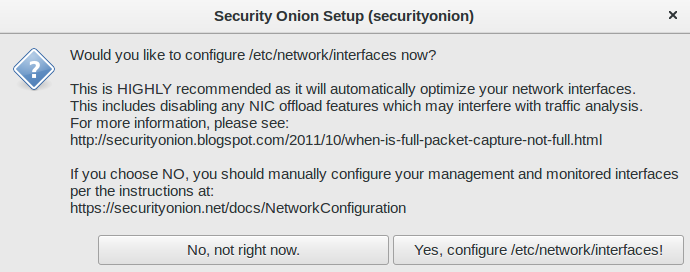
After logging in, you are prompted to run Setup

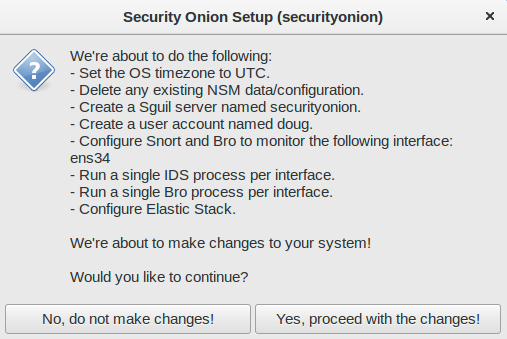
Setup Wizard

Configure network interfaces, reboot, then log back in

You are then prompted to run Setup again to continue to the second phase of Setup

Skip network configuration to go to service configuration

Evaluation Mode vs Production Mode

Monitoring Interface Selection

Create Username

Create Password

Confirm Password

Confirm all options

Setup Complete

Desktop no longer prompts to run Setup


The README shortcut includes links to the cheat sheet and online and offline documentation

CyberChef 8.31.3

Single Sign On (SSO for Squert, CapMe, and Kibana)

Review IDS alerts using Squert

Retrieve full packet capture with CapMe

Kibana Overview

If you want to change from dark dashboards to light, you can run so-elastic-configure-kibana-dashboards-light

Light dashboards

If you want to switch back to dark dashboards, you can run so-elastic-configure-kibana-dashboards-dark

Back to dark dashboards

Help

Bro Notices

ElastAlert

HIDS Alerts from Wazuh (OSSEC)

NIDS Alerts from Snort or Suricata

Bro Connections

Bro DCE/RPC

Bro DHCP

Bro DNP3

Bro DNS

Bro Files

Bro FTP

Bro HTTP

Bro Intel

Bro IRC

Bro Kerberos

Bro Modbus

Bro MySQL

Bro NTLM

Bro PE

Bro RADIUS

Bro RDP

Bro RFB

Bro SIP

Bro SMB

Bro SMTP

Bro SNMP

Bro Software

Bro SSH

Bro SSL

Bro Syslog

Bro Tunnels

Bro Weird

Bro X.509

Autoruns

Beats

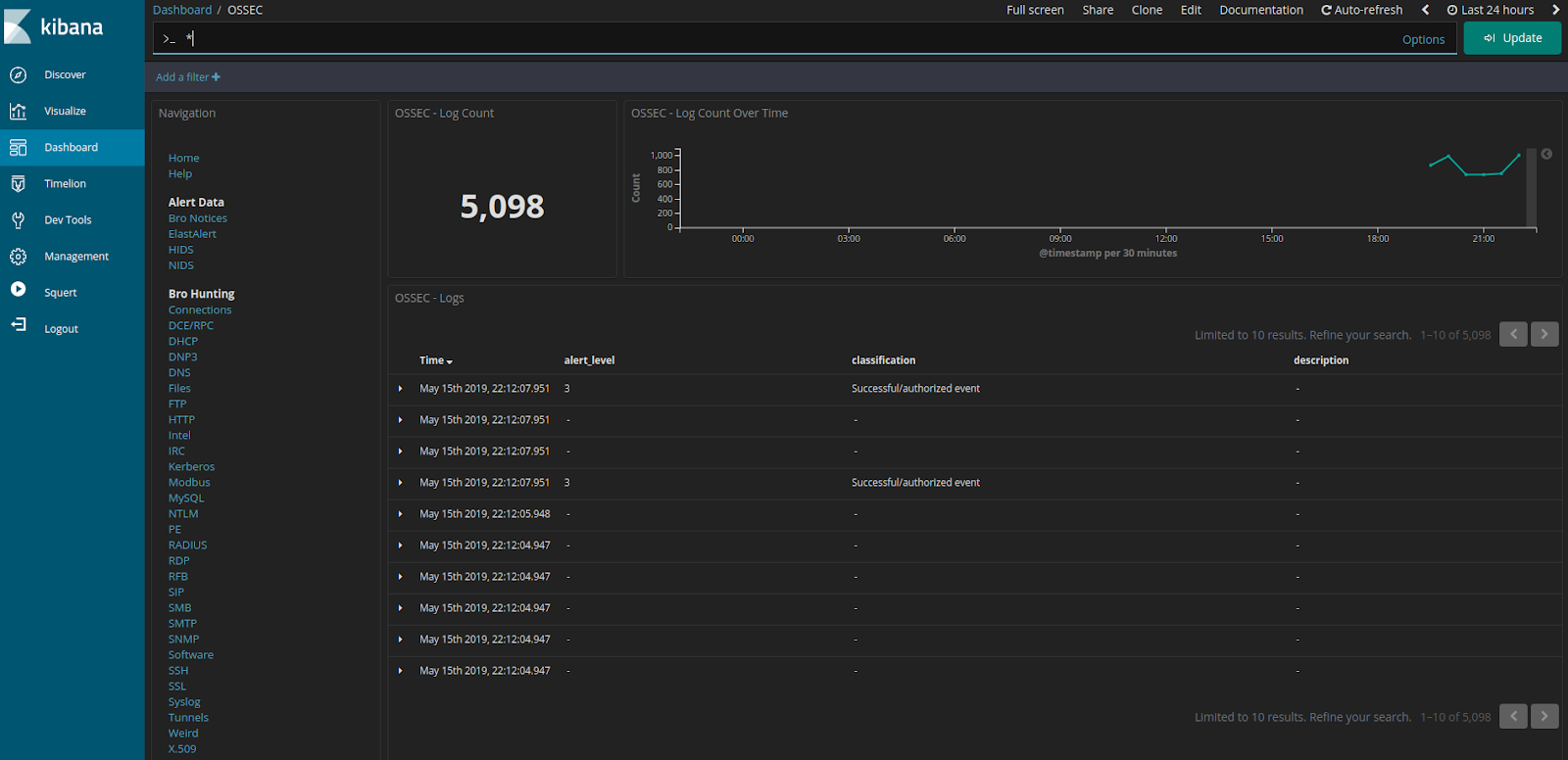
OSSEC (Wazuh) Logs

Sysmon

Domain Stats

Firewall

Frequency Analysis

Syslog

Search This Blog

Featured Post

Registration Now Open for Augusta Cyber Week 2026!

Registration is now open for Augusta Cyber Week in beautiful Augusta GA from October 19, 2026 through October 24, 2026! This includes: 4-day...

Popular Posts

Blog Archive