Monday, May 20, 2019

Security Onion 16.04.6.1 now available featuring Elastic 6.7.2, CyberChef 8.31.3, Suricata 4.1.4, Wazuh 3.8.2, and more!

Security Onion 16.04.6.1 is now available!

Security Onion 16.04.6.1

Major Changes Since Last ISO Image
  • Elastic 6.7.2
  • CyberChef 8.31.3
  • Suricata 4.1.4
  • Wazuh 3.8.2
  • now includes a static copy of our new Documentation
  • now includes our Cheat Sheet PDF
  • so-import-pcap handles many more use cases and can now run Setup for you if necessary
  • new PCAP samples in /opt/samples/mta/
  • Setup now configures Bro and Suricata for AF_PACKET by default
  • fixed lots of bugs!

Thanks
Thanks to the following for testing this ISO image!

  • Wes Lambert
  • Dustin Lee
  • Bryant Treacle

Issues Resolved
For a list of all issues resolved in this release, please see:
https://github.com/Security-Onion-Solutions/security-onion/projects/6

Release Notes
For more information about this release, please see:
https://securityonion.net/docs/release-notes.html

Installation Guide
We've updated the Installation guide to reflect the download locations for the new ISO image:
https://securityonion.net/docs/installation.html

Existing Deployments
If you have existing 16.04 installations, there is no need to download the new ISO image.  You can simply continue using our standard update process to install updated packages as they are made available:
https://securityonion.net/docs/Upgrade

If you have existing installations of Security Onion 14.04, you can upgrade from 14.04 to 16.04:
https://securityonion.net/docs/upgrading-from-14.04-to-16.04.html

Conference
Please mark your calendar! Security Onion Conference 2019 will be on Friday, October 4, 2019 and registration will open July 18! CFP is open now and we want to hear from you!
https://blog.securityonion.net/2019/04/security-onion-conference-2019-cfp.html

Training
We have 4-day Security Onion Training classes coming up in Costa Mesa CA and Columbia MD!  Use promotional code earlybird for 10% off the Columbia MD classes for a limited time.  If you can't make it to an onsite class, we have a new online training platform.  For more information and other training options, please see:
https://securityonionsolutions.com

Appliances
We now offer hardware appliances!  For more information, please see:
https://blog.securityonion.net/2018/10/introducing-security-onion-solutions.html

Documentation
We've got a brand new documentation site!  Please let us know if anything needs to be updated:
https://securityonion.net/docs

Support
Need support?  Please see:
https://securityonion.net/docs/Support

Screenshot Tour

ISO Boot Menu 
Once the Live Desktop appears, double-click the Install icon and follow the prompts

Once you've completed the installer and rebooted, login using the username and password you created in the installer

After logging in, you are prompted to run Setup

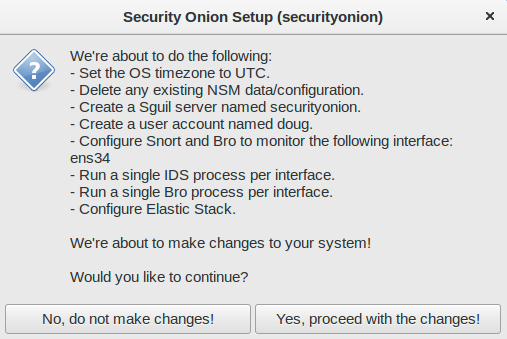
Setup Wizard

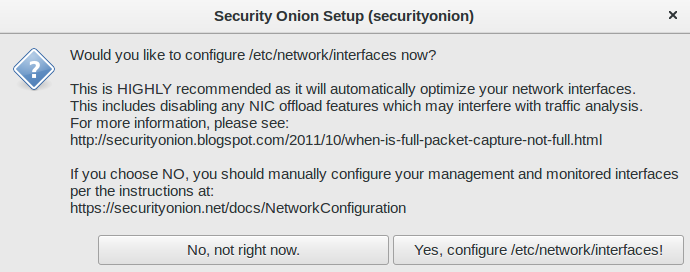
Configure network interfaces, reboot, then log back in

You are then prompted to run Setup again to continue to the second phase of Setup

Skip network configuration to go to service configuration

Evaluation Mode vs Production Mode

Monitoring Interface Selection

Create Username

Create Password

Confirm Password

Confirm all options

Setup Complete

Desktop no longer prompts to run Setup


The README shortcut includes links to the cheat sheet and online and offline documentation

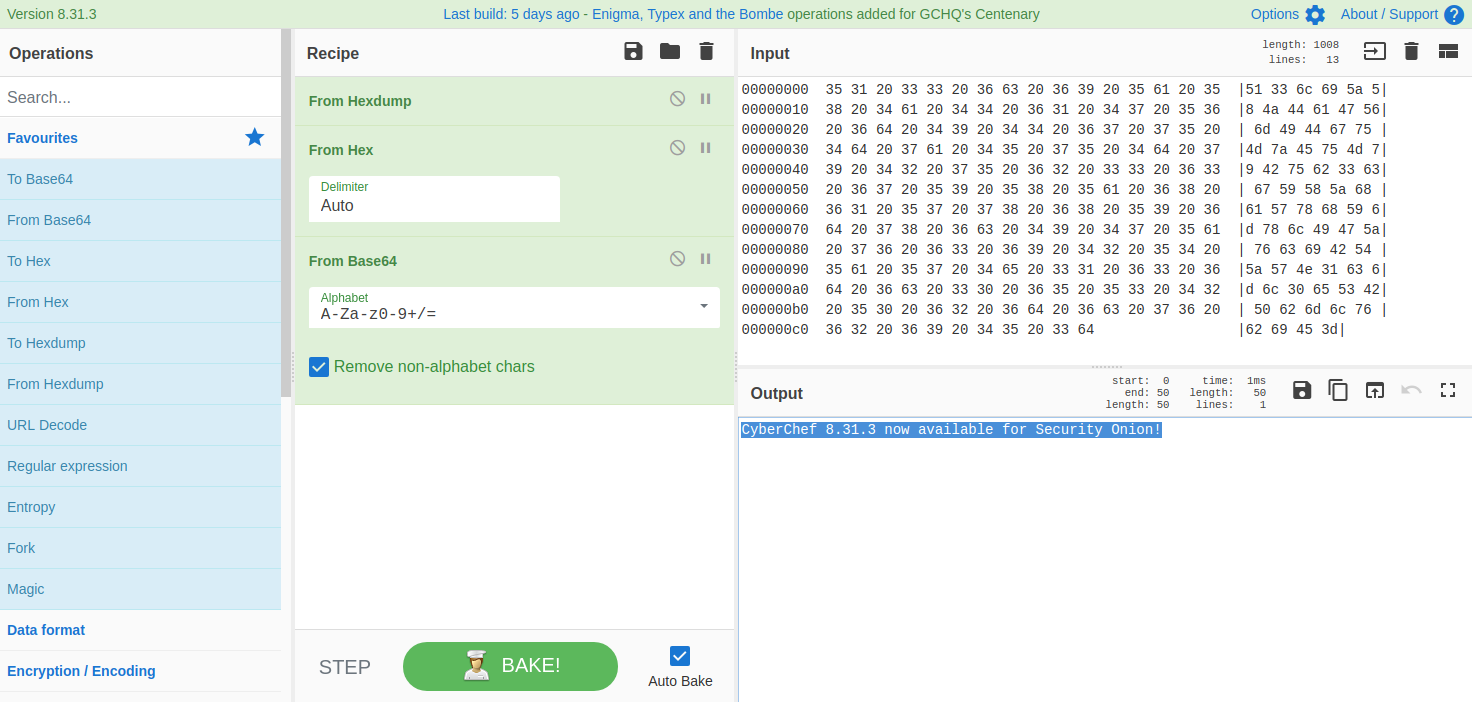
CyberChef 8.31.3

Single Sign On (SSO for Squert, CapMe, and Kibana)

Review IDS alerts using Squert

Retrieve full packet capture with CapMe

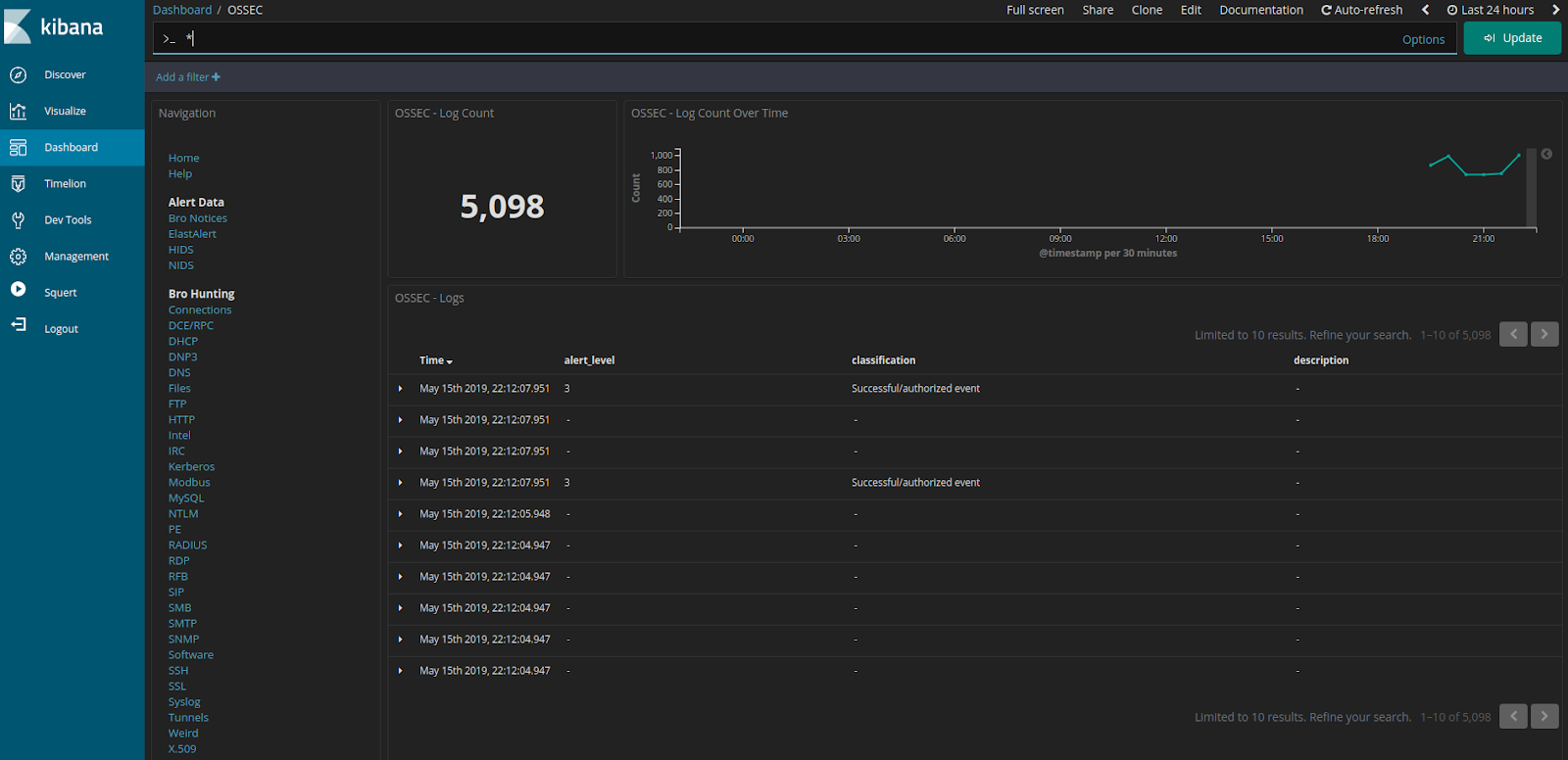
Kibana Overview

If you want to change from dark dashboards to light, you can run so-elastic-configure-kibana-dashboards-light

Light dashboards

If you want to switch back to dark dashboards, you can run so-elastic-configure-kibana-dashboards-dark

Back to dark dashboards

Help

Bro Notices

ElastAlert

HIDS Alerts from Wazuh (OSSEC)

NIDS Alerts from Snort or Suricata

Bro Connections

Bro DCE/RPC

Bro DHCP

Bro DNP3

Bro DNS

Bro Files

Bro FTP

Bro HTTP

Bro Intel

Bro IRC

Bro Kerberos

Bro Modbus

Bro MySQL

Bro NTLM

Bro PE

Bro RADIUS

Bro RDP

Bro RFB

Bro SIP

Bro SMB

Bro SMTP

Bro SNMP

Bro Software

Bro SSH

Bro SSL

Bro Syslog

Bro Tunnels

Bro Weird

Bro X.509

Autoruns

Beats

OSSEC (Wazuh) Logs

Sysmon

Domain Stats

Firewall

Frequency Analysis

Syslog

Wednesday, May 15, 2019

securityonion-web-page - 20141015-0ubuntu0securityonion101 now available for Security Onion!

securityonion-web-page - 20141015-0ubuntu0securityonion101 is now available.  This should resolve the following issues:

securityonion-web-page: add Security Onion documentation #1446
https://github.com/Security-Onion-Solutions/security-onion/issues/1446

securityonion-web-page: add Security Onion cheat sheet PDF #571
https://github.com/Security-Onion-Solutions/security-onion/issues/571

securityonion-web-page: CyberChef 8.31.3 #1491
https://github.com/Security-Onion-Solutions/security-onion/issues/1491

securityonion-web-page: only restart apache if it was already running #1520
https://github.com/Security-Onion-Solutions/security-onion/issues/1520

Screenshot
CyberChef 8.31.3

Thanks
Thanks to the CyberChef team for CyberChef 8.31.3!
Thanks to Wes Lambert for testing!

Updating
Please see the following page for full update instructions:
https://securityonion.net/docs/Upgrade

Conference
Please mark your calendar! Security Onion Conference 2019 will be on Friday, October 4, 2019 and registration will open July 18! CFP is open now and we want to hear from you!
https://blog.securityonion.net/2019/04/security-onion-conference-2019-cfp.html

Training
We have 4-day Security Onion Training classes coming up in Costa Mesa CA and Columbia MD!  Use promotional code earlybird for 10% off the Columbia MD classes for a limited time.  If you can't make it to an onsite class, we have a new online training platform.  For more information and other training options, please see:
https://securityonionsolutions.com

Appliances
We now offer hardware appliances!  For more information, please see:
https://blog.securityonion.net/2018/10/introducing-security-onion-solutions.html

Documentation
We've got a brand new documentation site!  Please let us know if anything needs to be updated:
https://securityonion.net/docs

Support
Need support?  Please see:
https://securityonion.net/docs/Support

Thanks!

securityonion-samples-mta - 20190514-1ubuntu1securityonion1 now available for Security Onion!

securityonion-samples-mta - 20190514-1ubuntu1securityonion1 is now available.  This is simply a rebuild of the previous package with no additional changes:
https://blog.securityonion.net/2019/05/securityonion-samples-mta-20150103.html

Please note that these samples contain network traffic from real malware and so they may get flagged by content inspection devices.  If your Security Onion box(es) go through a firewall, proxy, or other network security device that does content inspection, you may need to add an exception for ppa.launchpad.net.

Thanks
Thanks to Brad Duncan for the PCAPs he posts at https://www.malware-traffic-analysis.net/!
Thanks to Davide Pistore and Wes Lambert for testing!

Updating
Please see the following page for full update instructions:
https://securityonion.net/docs/Upgrade

Conference
Please mark your calendar! Security Onion Conference 2019 will be on Friday, October 4, 2019 and registration will open July 18! CFP is open now and we want to hear from you!
https://blog.securityonion.net/2019/04/security-onion-conference-2019-cfp.html

Training
We have 4-day Security Onion Training classes coming up in Costa Mesa CA and Columbia MD!  Use promotional code earlybird for 10% off the Columbia MD classes for a limited time.  If you can't make it to an onsite class, we have a new online training platform.  For more information and other training options, please see:
https://securityonionsolutions.com

Appliances
We now offer hardware appliances!  For more information, please see:
https://blog.securityonion.net/2018/10/introducing-security-onion-solutions.html

Documentation
We've got a brand new documentation site!  Please let us know if anything needs to be updated:
https://securityonion.net/docs

Support
Need support?  Please see:
https://securityonion.net/docs/Support

Thanks!

Monday, May 13, 2019

Call For Testing: Security Onion 16.04.6.1 ISO image!

We just built a new ISO image including Elastic 6.7.2 that we released this morning and all other updates!  If you have some time to help us test, please head on over to our security-onion-testing group (joining the group if you haven't already) and follow the instructions in the following topic:
https://groups.google.com/d/topic/security-onion-testing/fEIUM0YJY78/discussion

Thanks!

Elastic 6.7.2 now available for Security Onion!

The following are now available for Security Onion:
Docker images for Elastic 6.7.2
securityonion-elastic - 20190510-1ubuntu1securityonion3

Elastic 6.7.2

Issues Resolved

Elastic 6.7.2 #1426
https://github.com/Security-Onion-Solutions/security-onion/issues/1426

securityonion-elastic: enable Java Execution Engine in Logstash #1436
https://github.com/Security-Onion-Solutions/security-onion/issues/1436

securityonion-elastic: update "Syslog - Source IP Address" visualization on Syslog dashboard #1498
https://github.com/Security-Onion-Solutions/security-onion/issues/1498

securityonion-elastic: add bro_conn service data table #1496
https://github.com/Security-Onion-Solutions/security-onion/issues/1496

securityonion-elastic: rename bro x509 id to fuid #1499
https://github.com/Security-Onion-Solutions/security-onion/issues/1499

securityonion-elastic: rename bro pe id to fuid #1493
https://github.com/Security-Onion-Solutions/security-onion/issues/1493

securityonion-elastic: update so-elastalert-create-whiptail to use new parameters in so-elastalert-test #1487
https://github.com/Security-Onion-Solutions/security-onion/issues/1487

securityonion-elastic: add more options to so-elastalert-test #1486
https://github.com/Security-Onion-Solutions/security-onion/issues/1486

securityonion-elastic: so-elastalert-test errors if no input provided #1470
https://github.com/Security-Onion-Solutions/security-onion/issues/1470

securityonion-elastic: correct separator in 1122_preprocess_bro_socks.conf #1485
https://github.com/Security-Onion-Solutions/security-onion/issues/1485

securityonion-elastic: update Logstash config to support Wazuh 3.8 agent #1469
https://github.com/Security-Onion-Solutions/security-onion/issues/1469

securityonion-elastic: avoid writing firewall logs to logstash-syslog index #1481
https://github.com/Security-Onion-Solutions/security-onion/issues/1481

securityonion-elastic: remove Wazuh's alerts.json from syslog-ng config #1467
https://github.com/Security-Onion-Solutions/security-onion/issues/1467

securityonion-elastic: update PFSense Logstash config for IPv6 options #1461
https://github.com/Security-Onion-Solutions/security-onion/issues/1461

securityonion-elastic: add so-elastic-document-stats #1459
https://github.com/Security-Onion-Solutions/security-onion/issues/1459

securityonion-elastic: minor fixes to bro logstash filters #1460
https://github.com/Security-Onion-Solutions/security-onion/issues/1460

securityonion-elastic: change wiki to docs #1452
https://github.com/Security-Onion-Solutions/security-onion/issues/1452

securityonion-elastic: if Standalone with 8GB RAM, set ES heap to 1GB #1425
https://github.com/Security-Onion-Solutions/security-onion/issues/1425

securityonion-elastic: move parsing from logstash to elasticsearch ingest for so-import-pcap #1497
https://github.com/Security-Onion-Solutions/security-onion/issues/1497

securityonion-elastic: so-import-pcap should run snort and suricata with checksums disabled #1478
https://github.com/Security-Onion-Solutions/security-onion/issues/1478

securityonion-elastic: minor fixes to so-import-pcap #1458
https://github.com/Security-Onion-Solutions/security-onion/issues/1458

securityonion-elastic: so-import-pcap should create a sguil sensor named HOSTNAME-import #1472
https://github.com/Security-Onion-Solutions/security-onion/issues/1472

so-import-pcap: run Setup if necessary #1480
https://github.com/Security-Onion-Solutions/security-onion/issues/1480

so-import-pcap: avoid merging errors #1430
https://github.com/Security-Onion-Solutions/security-onion/issues/1430

so-import-pcap - improve single pcap use case #1239
https://github.com/Security-Onion-Solutions/security-onion/issues/1239

securityonion-elastic: add translations route to Apache proxy config #1495
https://github.com/Security-Onion-Solutions/security-onion/issues/1495

securityonion-elastic: add built_assets route to Apache proxy config #1494
https://github.com/Security-Onion-Solutions/security-onion/issues/1494

securityonion-elastic: add dlls route to Apache proxy config #1435
https://github.com/Security-Onion-Solutions/security-onion/issues/1435

securityonion-elastic: add socket.io route to Apache proxy config #1437
https://github.com/Security-Onion-Solutions/security-onion/issues/1437

securityonion-elastic: add s route to Apache proxy config #1438
https://github.com/Security-Onion-Solutions/security-onion/issues/1438

securityonion-elastic: ensure update/refresh button is consistent across all Kibana dashboards #1429
https://github.com/Security-Onion-Solutions/security-onion/issues/1429

Kibana: HIDS Alerts Dashboard - Replace syslog-host_from with agent.name #1442
https://github.com/Security-Onion-Solutions/security-onion/issues/1442

securityonion-elastic: DHCP dashboard has different darkTheme behavior than others #1516
https://github.com/Security-Onion-Solutions/security-onion/issues/1516

securityonion-elastic: modify fields for Bro socks log #1517
https://github.com/Security-Onion-Solutions/security-onion/issues/1517

securityonion-elastic: fix so-elasticsearch-template-create #1518
https://github.com/Security-Onion-Solutions/security-onion/issues/1518

Thanks
Thanks to the Elastic team for Elastic 6.7.2!
Thanks to Wes Lambert and Dustin Lee for testing!

Updating
Please see the following page for full update instructions:
https://securityonion.net/docs/Upgrade

Conference
Please mark your calendar! Security Onion Conference 2019 will be on Friday, October 4, 2019 and registration will open July 18! CFP is open now and we want to hear from you!
https://blog.securityonion.net/2019/04/security-onion-conference-2019-cfp.html

Training
We have 4-day Security Onion Training classes coming up in Costa Mesa CA and Columbia MD!  Use promotional code earlybird for 10% off the Columbia MD classes for a limited time.  If you can't make it to an onsite class, we have a new online training platform.  For more information and other training options, please see:
https://securityonionsolutions.com

Appliances
We now offer hardware appliances!  For more information, please see:
https://blog.securityonion.net/2018/10/introducing-security-onion-solutions.html

Documentation
We've got a brand new documentation site!  Please let us know if anything needs to be updated:
https://securityonion.net/docs

Support
Need support?  Please see:
https://securityonion.net/docs/Support

Thanks!

Wednesday, May 8, 2019

Security Onion Hybrid Hunter 1.0.8 Tech Preview Available for Testing!

We recently announced Security Onion Hybrid Hunter:
https://blog.securityonion.net/2018/11/security-onion-hybrid-hunter-101-tech.html

We're excited to announce that Hybrid Hunter 1.0.8 is now available for testing!
https://github.com/Security-Onion-Solutions/securityonion-saltstack/blob/master/README.md

Major highlights of this release:

  • Suricata 4.1.4
  • Eval and Master installs now ask which components you would like to install
  • Fleet (osquery) now has it's own additional setup script (please see the docs)
  • Fleet setup script now generates auto install packages for Windows, CentOS, and Ubuntu
  • When Fleet setup is completed, all SO nodes will auto install the appropriate auto install package
  • We now have a progress bar during install!
  • The setup script will now tell you if it was successful

Thanks to Josh Brower for his additional work on the osquery integration!

Screenshots

Installation

Main Web Page with link to OSquery

Osquery Page with prebuilt binaries

Fleet showing endpoints

osquery dashboard in Kibana

4-day Security Onion Advanced Training class in Columbia MD with 10% discount!

In addition to the 4-day Basic training class we announced yesterday, we just scheduled a 4-day Security Onion Advanced training class in Columbia MD as well!  Use promotional code earlybird to get 10% off through 5/31/2019 at 11:59 PM ET!  For more information and to register, please see:
https://securityonionsolutions.com/onsitetraining

If you can't make it to either of these onsite classes, we have a new online training platform!
https://onlinetraining.securityonionsolutions.com/

For more information and other training options, please see:
https://securityonionsolutions.com

Tuesday, May 7, 2019

securityonion-samples-mta - 20150103-0ubuntu0securityonion4 now available for Security Onion!

securityonion-samples-mta - 20150103-0ubuntu0securityonion4 is now available and resolves the following issue:

securityonion-samples-mta: Add/Remove PCAPs #1476
https://github.com/Security-Onion-Solutions/security-onion/issues/1476

Thanks
Thanks to Brad Duncan for the PCAPs he posts at https://www.malware-traffic-analysis.net/!
Thanks to Phil Plantamura and Wes Lambert for testing!

Updating
Please see the following page for full update instructions:
https://securityonion.net/docs/Upgrade

Conference
Please mark your calendar! Security Onion Conference 2019 will be on Friday, October 4, 2019 and registration will open July 18! CFP is open now and we want to hear from you!
https://blog.securityonion.net/2019/04/security-onion-conference-2019-cfp.html

Training
We have 4-day Security Onion Basic Training classes coming up in Costa Mesa CA and Columbia MD!  Use promotional code earlybird for 10% off the Columbia MD class through 5/21 at 11:59 PM ET.  If you can't make it to an onsite class, we have a new online training platform.  For more information and other training options, please see:
https://securityonionsolutions.com

Appliances
We now offer hardware appliances!  For more information, please see:
https://blog.securityonion.net/2018/10/introducing-security-onion-solutions.html

Documentation
We've got a brand new documentation site!  Please let us know if anything needs to be updated:
https://securityonion.net/docs

Support
Need support?  Please see:
https://securityonion.net/docs/Support

Thanks!

4-day Security Onion Basic Training class in Columbia MD with 10% discount!

We just scheduled a 4-day Security Onion Basic training class in Columbia MD!  Use promotional code earlybird to get 10% off through 5/21/2019 at 11:59 PM ET!  For more information and to register, please see:
https://securityonionsolutions.com/onsitetraining

If you can't make it to either of these onsite classes, we have a new online training platform!
https://onlinetraining.securityonionsolutions.com/

For more information and other training options, please see:
https://securityonionsolutions.com

Monday, May 6, 2019

securityonion-capme - 20121213-0ubuntu0securityonion77 now available for Security Onion!

securityonion-capme - 20121213-0ubuntu0securityonion77 is now available and resolves the following issue:

securityonion-capme: add cmdproto to callback.php #1515
https://github.com/Security-Onion-Solutions/security-onion/issues/1515

Thanks
Thanks to Wes Lambert for testing!

Updating
Please see the following page for full update instructions:
https://securityonion.net/docs/Upgrade

Conference
Please mark your calendar! Security Onion Conference 2019 will be on Friday, October 4, 2019 and registration will open July 18! CFP is open now and we want to hear from you!
https://blog.securityonion.net/2019/04/security-onion-conference-2019-cfp.html

Training
We have a 4-day Security Onion Basic Training class coming up in Costa Mesa CA!  If you can't make it to an onsite class, we have a new online training platform.  For more information and other training options, please see:
https://securityonionsolutions.com

Appliances
We now offer hardware appliances!  For more information, please see:
https://blog.securityonion.net/2018/10/introducing-security-onion-solutions.html

Documentation
We've got a brand new documentation site!  Please let us know if anything needs to be updated:
https://securityonion.net/docs

Support
Need support?  Please see:
https://securityonion.net/docs/Support

Thanks!

Call For Testing: Elastic 6.7.2

Elastic 6.7.2 was released recently and we've got Docker images and a new securityonion-elastic package ready for testing!  There are lots of changes here, so we need your help in testing to see what we missed.  Please follow the instructions on our security-onion-testing thread and post your test results there!  Thanks!

https://groups.google.com/d/topic/security-onion-testing/FDJ66pUgH8E/discussion

Thursday, May 2, 2019

securityonion-nsmnow-admin-scripts - 20120724-0ubuntu0securityonion204 now available for Security Onion!

securityonion-nsmnow-admin-scripts - 20120724-0ubuntu0securityonion204 is now available and should resolve the following issue:

NSM: add --no-hwtimestamp to netsniff command line #1514
https://github.com/Security-Onion-Solutions/security-onion/issues/1514

Thanks
Thanks to Wes Lambert for testing!

Updating
Please see the following page for full update instructions:
https://securityonion.net/docs/Upgrade

Conference
Please mark your calendar! Security Onion Conference 2019 will be on Friday, October 4, 2019 and registration will open July 18! CFP is open now and we want to hear from you!
https://blog.securityonion.net/2019/04/security-onion-conference-2019-cfp.html

Training
We have a 4-day Security Onion Basic Training class coming up in Costa Mesa CA!  If you can't make it to an onsite class, we have a new online training platform.  For more information and other training options, please see:
https://securityonionsolutions.com

Appliances
We now offer hardware appliances!  For more information, please see:
https://blog.securityonion.net/2018/10/introducing-security-onion-solutions.html

Documentation
We've got a brand new documentation site!  Please let us know if anything needs to be updated:
https://securityonion.net/docs

Support
Need support?  Please see:
https://securityonion.net/docs/Support

Thanks!

Suricata 4.1.4 now available for Security Onion!

Suricata 4.1.4 was released recently:
https://suricata-ids.org/2019/04/30/suricata-4-1-4-released/

We've packaged Suricata 4.1.4 and the following package is now available:
securityonion-suricata - 4.1.4-1ubuntu1securityonion1

This package should resolve the following issue:

Suricata 4.1.4 #1512
https://github.com/Security-Onion-Solutions/security-onion/issues/1512

Thanks
Thanks to the Suricata team for Suricata 4.1.4!
Thanks to Wes Lambert for testing!

Updating
Please see the following page for full update instructions:
https://securityonion.net/docs/Upgrade

Conference
Please mark your calendar! Security Onion Conference 2019 will be on Friday, October 4, 2019 and registration will open July 18! CFP is open now and we want to hear from you!
https://blog.securityonion.net/2019/04/security-onion-conference-2019-cfp.html

Training
We have a 4-day Security Onion Basic Training class coming up in Costa Mesa CA!  If you can't make it to an onsite class, we have a new online training platform.  For more information and other training options, please see:
https://securityonionsolutions.com

Appliances
We now offer hardware appliances!  For more information, please see:
https://blog.securityonion.net/2018/10/introducing-security-onion-solutions.html

Documentation
We've got a brand new documentation site!  Please let us know if anything needs to be updated:
https://securityonion.net/docs

Support
Need support?  Please see:
https://securityonion.net/docs/Support

Thanks!

Tuesday, April 30, 2019

securityonion-capme - 20121213-0ubuntu0securityonion76 now available for Security Onion!

securityonion-capme - 20121213-0ubuntu0securityonion76 is now available and resolves the following issue:

securityonion-capme: update callback.php #1509
https://github.com/Security-Onion-Solutions/security-onion/issues/1509

Thanks
Thanks to Wes Lambert for testing!

Updating
Please see the following page for full update instructions:
https://securityonion.net/docs/Upgrade

Conference
Please mark your calendar! Security Onion Conference 2019 will be on Friday, October 4, 2019 and registration will open July 18! CFP is open now and we want to hear from you!
https://blog.securityonion.net/2019/04/security-onion-conference-2019-cfp.html

Training
We have a 4-day Security Onion Basic Training class coming up in Costa Mesa CA!  If you can't make it to an onsite class, we have a new online training platform.  For more information and other training options, please see:
https://securityonionsolutions.com

Appliances
We now offer hardware appliances!  For more information, please see:
https://blog.securityonion.net/2018/10/introducing-security-onion-solutions.html

Documentation
We've got a brand new documentation site!  Please let us know if anything needs to be updated:
https://securityonion.net/docs

Support
Need support?  Please see:
https://securityonion.net/docs/Support

Thanks!

securityonion-setup - 20120912-0ubuntu0securityonion296 now available for Security Onion!

securityonion-setup - 20120912-0ubuntu0securityonion296 is now available and should resolve the following issues:

so-allow: add OSSEC/Wazuh registration service option #1506
https://github.com/Security-Onion-Solutions/security-onion/issues/1506

Setup: /etc/network/interfaces ethtool rx setting should be commented out by default #1508
https://github.com/Security-Onion-Solutions/security-onion/issues/1508

Discussion
Richard Bejtlich recently blogged about an issue with Virtualbox and /etc/network/interfaces:
https://taosecurity.blogspot.com/2019/04/troubleshooting-nsm-virtualization.html

We were able to duplicate the issue and determine that it had to do with the ethtool -G rx setting.  Traditionally, our Setup script has used ethtool -g to determine the maximum rx setting and then ethtool -G to enforce that maximum rx setting.  It seems as if VirtualBox 6.0.4 may have an issue whereby its virtual network interfaces report a maximum rx setting of 4096 but are unable to reliably be set to that value.  Therefore, the safest option for widest compatibility is to keep the rx setting at its default value.  Additionally, some folks are recommending lower rx values for better performance:
https://github.com/pevma/SEPTun/blob/master/SEPTun.rst

Our new Setup script continues to write the ethtool -G rx setting into /etc/network/interfaces but it is now commented out by default.  If you need to modify this, you can certainly do so.

For more information, please see the Network Configuration page on our Documentation site:
https://securityonion.readthedocs.io/en/latest/network-configuration.html

Thanks
Thanks to Richard Bejtlich for reporting the /etc/network/interfaces issue!
Thanks to Dustin Lee for duplicating the /etc/network/interfaces issue!
Thanks to Wes Lambert for testing!

Updating
Please see the following page for full update instructions:
https://securityonion.net/docs/Upgrade

Conference
Please mark your calendar! Security Onion Conference 2019 will be on Friday, October 4, 2019 and registration will open July 18! CFP is open now and we want to hear from you!
https://blog.securityonion.net/2019/04/security-onion-conference-2019-cfp.html

Training
We have a 4-day Security Onion Basic Training class coming up in Costa Mesa CA!  If you can't make it to an onsite class, we have a new online training platform.  For more information and other training options, please see:
https://securityonionsolutions.com

Appliances
We now offer hardware appliances!  For more information, please see:
https://blog.securityonion.net/2018/10/introducing-security-onion-solutions.html

Documentation
We've got a brand new documentation site!  Please let us know if anything needs to be updated:
https://securityonion.net/docs

Support
Need support?  Please see:
https://securityonion.net/docs/Support

Thanks!
Monday, April 29, 2019

Security Onion Conference 2019 CFP

This year's Security Onion Conference will be held in Augusta, GA on Friday, October 4, 2019 (please mark your calendar!). Registration will open July 18.

CFP

Want to speak at Security Onion Conference? We want to hear from you!

How are you...
...using Security Onion to find evil?
...handling lots of traffic using Security Onion?
...consuming host telemetry with Security Onion?
...integrating Security Onion with other technologies?
...automating common tasks with your own scripts?
...using Security Onion in a unique way?

Each talk should be 30 minutes with an additional 10 minutes for questions.

Submit your talk here!
https://securityonion.net/cfp

Schedule

April 29 - CFP open
June 24 - CFP closes
July 18 - Speakers selected and notified
July 18 - Registration opens
September 30 - October 3 - Security Onion 4-day training in Augusta
October 4 - Security Onion Conference
October 5 - BSidesAugusta

Security Onion Docker Images NOT Affected by Recent Docker Hub Data Exposure

In Security Onion 16.04, our Elastic components are delivered via Docker images stored on Docker Hub.  Docker recently announced unauthorized access to a single Docker Hub database:
https://success.docker.com/article/docker-hub-user-notification

From the article:
Q: How do I know if I was impacted by this unauthorized access?
If you directly received an email from Docker about this incident, you may have been impacted. If you have received a password reset link, your password hash was potentially exposed. We have invalidated it and sent you a password reset link as a precaution. If you are using autobuilds and your GitHub or Bitbucket repositories have been unlinked from Docker Hub, you will need to relink those repositories for autobuilds to work correctly.
Security Onion does NOT use autobuilds and did NOT receive an email from Docker, so we don't have any reason to believe that our Docker accounts or images were impacted.  However, to err on the side of caution, we have verified our Docker images and reset our passwords.  Finally, please note that our images are digitally signed using Docker Content Trust:
https://docs.docker.com/engine/security/trust/content_trust/

tcpflow - 1.4.5+repack1-1ubuntu1securityonion2 now available for Security Onion!

tcpflow - 1.4.5+repack1-1ubuntu1securityonion2 is now available and should resolve the following issue:

update tcpflow #1507
https://github.com/Security-Onion-Solutions/security-onion/issues/1507

Thanks
Thanks to Wes Lambert for testing!

Updating
Please see the following page for full update instructions:
https://securityonion.net/docs/Upgrade

Training
We have a 4-day Security Onion Basic Training class coming up in Costa Mesa CA!  If you can't make it to an onsite class, we have a new online training platform.  For more information and other training options, please see:
https://securityonionsolutions.com

Appliances
We now offer hardware appliances!  For more information, please see:
https://blog.securityonion.net/2018/10/introducing-security-onion-solutions.html

Documentation
We've got a brand new documentation site!  Please let us know if anything needs to be updated:
https://securityonion.net/docs

Support
Need support?  Please see:
https://securityonion.net/docs/Support

Thanks!

Wednesday, April 24, 2019

securityonion-nsmnow-admin-scripts - 20120724-0ubuntu0securityonion203 now available for Security Onion!

securityonion-nsmnow-admin-scripts - 20120724-0ubuntu0securityonion203 is now available and should resolve the following issue:

NSM: nsm_server_user-add should check to see if user account exists and prompt user #1505
https://github.com/Security-Onion-Solutions/security-onion/issues/1505

Thanks
Thanks to Wes Lambert for testing!

Updating
Please see the following page for full update instructions:
https://securityonion.net/docs/Upgrade

Training
We have a 4-day Security Onion Basic Training class coming up in Costa Mesa CA!  If you can't make it to an onsite class, we have a new online training platform.  For more information and other training options, please see:
https://securityonionsolutions.com

Appliances
We now offer hardware appliances!  For more information, please see:
https://blog.securityonion.net/2018/10/introducing-security-onion-solutions.html

Documentation
We've got a brand new documentation site!  Please let us know if anything needs to be updated:
https://securityonion.net/docs

Support
Need support?  Please see:
https://securityonion.net/docs/Support

Thanks!

Wednesday, April 3, 2019

Security Onion Hybrid Hunter 1.0.7 Tech Preview Available for Testing!

We recently announced Security Onion Hybrid Hunter:
https://blog.securityonion.net/2018/11/security-onion-hybrid-hunter-101-tech.html

We're excited to announce that Hybrid Hunter 1.0.7 is now available for testing!
https://github.com/Security-Onion-Solutions/securityonion-saltstack/blob/master/README.md

Major highlights of this release:

  • Suricata 4.1.3
  • Influxdb 1.7.5
  • Telegraf 1.10.1
  • Grafana 6.0.2
  • Setup now requires interface selection #26
  • Reduced the RAM usage for ES in Eval mode #25
  • Eval Mode setup is now choose your own adventure style
  • Fresh dockers for all the things to bring everything to 1.0.7
  • New utility docker called SOctopus
  • New html landing page now in dark mode
  • Added support for TheHive
Screenshots
From Kibana, you can pivot from a log entry to TheHive

Log now available in TheHive

Search This Blog

Featured Post

Registration Now Open for Augusta Cyber Week 2026!

Registration is now open for Augusta Cyber Week in beautiful Augusta GA from October 19, 2026 through October 24, 2026! This includes: 4-day...

Popular Posts

Blog Archive