Showing posts with label setup. Show all posts

Monday, April 13, 2020

securityonion-setup - 20120912-0ubuntu0securityonion328 now available for Security Onion!

securityonion-setup - 20120912-0ubuntu0securityonion328 is now available for Security Onion and should resolve the following issue:

securityonion-setup: change /nsm/bro to /nsm/zeek in a few user facing messages #1753
https://github.com/Security-Onion-Solutions/security-onion/issues/1753

Thanks
Thanks to Wes Lambert for testing and QA!

Updating
Please see the following page for full update instructions:
https://securityonion.net/docs/Upgrade

Support
Need support?  Please see:
https://securityonion.net/docs/Support

Documentation
You can find our documentation here:
https://securityonion.net/docs

Also, we're now offering a printed copy of our official documentation with foreword by Richard Bejtlich and proceeds going to Rural Technology Fund:
https://securityonion.net/book

Training
Security Onion Solutions is the only official authorized training provider for Security Onion.  For more information about our training classes, please see:
https://securityonionsolutions.com

Appliances
We now offer hardware appliances!  For more information, please see:
https://securityonionsolutions.com

Thanks!

Wednesday, February 5, 2020

Zeek 3.0.1, Elastic 6.8.6, and CyberChef 9.12.0 now available for Security Onion!

The following updates are now available for Security Onion!

Elastic 6.8.6 Docker images
securityonion-bro - 3.0.1-1ubuntu1securityonion10 (Zeek 3.0.1)
securityonion-bro-afpacket - 1.3.0-1ubuntu1securityonion17
securityonion-bro-scripts - 20121004-0ubuntu0securityonion100
securityonion-elastic - 20190510-1ubuntu1securityonion83
securityonion-nsmnow-admin-scripts - 20120724-0ubuntu0securityonion225
securityonion-onionsalt - 20140917-0ubuntu0securityonion28
securityonion-samples-bro - 20170824-1ubuntu1securityonion4
securityonion-setup - 20120912-0ubuntu0securityonion325
securityonion-sostat - 20120722-0ubuntu0securityonion141
securityonion-tcpudpflow - 001-0ubuntu0securityonion10
securityonion-web-page - 20141015-0ubuntu0securityonion105

These updates should resolve the following issues:

Zeek 3.0.1 #1645
https://github.com/Security-Onion-Solutions/security-onion/issues/1645

Elastic 6.8.6 #1684
https://github.com/Security-Onion-Solutions/security-onion/issues/1684

CyberChef 9.12.0 #1689
https://github.com/Security-Onion-Solutions/security-onion/issues/1689

securityonion-bro-scripts: migrate from Bro to Zeek #1683
https://github.com/Security-Onion-Solutions/security-onion/issues/1683

securityonion-bro-scripts: remove conn-add-country #1630
https://github.com/Security-Onion-Solutions/security-onion/issues/1630

securityonion-bro-scripts: improve postinst to avoid errors when reinstalling #1711
https://github.com/Security-Onion-Solutions/security-onion/issues/1711

securityonion-bro-scripts: add cve-2020-0601 script #1709
https://github.com/Security-Onion-Solutions/security-onion/issues/1709

securityonion-samples-bro: add cve-2020-0601 pcaps #1710
https://github.com/Security-Onion-Solutions/security-onion/issues/1710

securityonion-elastic: update parsers for Zeek 3 #1680
https://github.com/Security-Onion-Solutions/security-onion/issues/1680

securityonion-elastic: improve logstash parser for pfsense filterlog #1696
https://github.com/Security-Onion-Solutions/security-onion/issues/1696

securityonion-elastic: update dashboards for Zeek migration #1685
https://github.com/Security-Onion-Solutions/security-onion/issues/1685

securityonion-elastic: Update Kibana dashboard for firewall logs #1697
https://github.com/Security-Onion-Solutions/security-onion/issues/1697

securityonion-elastic: add elasticsearch ingest parser for pfsense filterlog #1698
https://github.com/Security-Onion-Solutions/security-onion/issues/1698

securityonion-elastic: elasticsearch ingest pipelines need to support "ips" fields #1666
https://github.com/Security-Onion-Solutions/security-onion/issues/1666

securityonion-elastic: update dns domain info for elasticsearch ingest #1667
https://github.com/Security-Onion-Solutions/security-onion/issues/1667

securityonion-elastic: improve support for custom ingest parsers #1671
https://github.com/Security-Onion-Solutions/security-onion/issues/1671

securityonion-elastic: Docker daemon.json conflict #1674
https://github.com/Security-Onion-Solutions/security-onion/issues/1674

securityonion-elastic: improve postinst update check #1699
https://github.com/Security-Onion-Solutions/security-onion/issues/1699

securityonion-elastic: migrate script.* settings from elasticsearch.yml.bak to elasticsearch.yml #1676
https://github.com/Security-Onion-Solutions/security-onion/issues/1676

securityonion-elastic: container status scripts should check system uptime before declaring fail #1686
https://github.com/Security-Onion-Solutions/security-onion/issues/1686

securityonion-elastic: Bro HTTP Logs "user" field not mapped in Elasticsearch template #1672
https://github.com/Security-Onion-Solutions/security-onion/issues/1672

securityonion-elastic: so-elastic-start times out waiting for elasticsearch #1695
https://github.com/Security-Onion-Solutions/security-onion/issues/1695

Elastalert - Update new_term.yaml #1706
https://github.com/Security-Onion-Solutions/security-onion/issues/1706

securityonion-onionsalt: replicate /etc/elasticsearch/custom #1693
https://github.com/Security-Onion-Solutions/security-onion/issues/1693

securityonion-sostat: migrate from Bro to Zeek #1692
https://github.com/Security-Onion-Solutions/security-onion/issues/1692

NSM: change Bro references to Zeek #1682
https://github.com/Security-Onion-Solutions/security-onion/issues/1682

NSM: increase timeout in /etc/systemd/system/securityonion.service #1708
https://github.com/Security-Onion-Solutions/security-onion/issues/1708

NSM: broctl and zeekctl need to check if parameters were passed #1713
https://github.com/Security-Onion-Solutions/security-onion/issues/1713

Docs: Change bro to zeek #1690
https://github.com/Security-Onion-Solutions/security-onion/issues/1690

Setup: change #inter#face to #interface #1675
https://github.com/Security-Onion-Solutions/security-onion/issues/1675

Setup: change Bro references to Zeek #1681
https://github.com/Security-Onion-Solutions/security-onion/issues/1681

securityonion-tcpudpflow: update for Zeek #1700
https://github.com/Security-Onion-Solutions/security-onion/issues/1700

securityonion-web-page: change bro to zeek #1687
https://github.com/Security-Onion-Solutions/security-onion/issues/1687

securityonion-web-page: update docs and cheat sheet for 16.04.6.4 #1688
https://github.com/Security-Onion-Solutions/security-onion/issues/1688

Test Zeek 3.0.1, Elastic 6.8.6, and related updates #1691
https://github.com/Security-Onion-Solutions/security-onion/issues/1691

Thanks
Thanks to the Zeek team for Zeek 3.0.1!
Thanks to the Elastic team for Elastic 6.8.6!
Thanks to the CyberChef team for CyberChef 9.12.0!
Thanks to the following for testing and QA!
Bryant Treacle
Wes Lambert
Josh Brower
Chris Cuevas

Updating
Please see the following page for full update instructions:
https://securityonion.net/docs/Upgrade

Since we are transitioning from Bro to Zeek, Bro will automatically stop before the packages are upgraded.  Once soup completes, double-check your Bro/Zeek configuration and then restart Zeek:
sudo so-zeek-restart

Support
Need support?  Please see:
https://securityonion.net/docs/Support

Documentation
You can find our documentation here:
https://securityonion.net/docs

Also, we're now offering a printed copy of our official documentation with foreword by Richard Bejtlich and proceeds going to Rural Technology Fund:
https://securityonion.net/book

Training
Security Onion Solutions is the only official authorized training provider for Security Onion and we have 4-day Basic and 4-day Advanced onsite training classes.  We also offer online classes as well.  For more information, please see:
https://securityonionsolutions.com

Appliances
We now offer hardware appliances!  For more information, please see:
https://securityonionsolutions.com

Thanks!

Tuesday, November 26, 2019

securityonion-setup - 20120912-0ubuntu0securityonion316 now available for Security Onion!

securityonion-setup - 20120912-0ubuntu0securityonion316 is now available for Security Onion!

This update should resolve the following issues:

Setup: remind user to keep LOG_SIZE_LIMIT under 90% #1659
https://github.com/Security-Onion-Solutions/security-onion/issues/1659

securityonion-setup: include SOSTATADDRESS in so-email.conf #1665
https://github.com/Security-Onion-Solutions/security-onion/issues/1665

Thanks
Thanks to Wes Lambert for his work on improving and testing this package!

Updating
Please see the following page for full update instructions:
https://securityonion.net/docs/Upgrade

Documentation
We've got a new documentation site!  Please let us know if anything needs to be updated:
https://securityonion.net/docs

Also, we're now offering a printed copy of our official documentation with foreword by Richard Bejtlich and proceeds going to Rural Technology Fund:
https://securityonion.net/book

Training
Security Onion Solutions is the only official authorized training provider for Security Onion and we have 4-day Basic and 4-day Advanced onsite training classes.  We also offer online classes as well.  For more information, please see:
https://securityonionsolutions.com

Appliances
We now offer hardware appliances!  For more information, please see:
https://blog.securityonion.net/2018/10/introducing-security-onion-solutions.html

Support
Need support?  Please see:
https://securityonion.net/docs/Support

Thanks!

Thursday, September 5, 2019

securityonion-setup - 20120912-0ubuntu0securityonion314 now available for Security Onion!

securityonion-setup - 20120912-0ubuntu0securityonion314 is now available for Security Onion!  This should resolve the following issue:

Setup: improve removal of Elastic auth files #1632
https://github.com/Security-Onion-Solutions/security-onion/issues/1632

Thanks
Thanks to Wes Lambert for testing!

Updating
Please see the following page for full update instructions:
https://securityonion.net/docs/Upgrade

Documentation
We've got a brand new documentation site!  Please let us know if anything needs to be updated:
https://securityonion.net/docs

Also, we're now offering a printed copy of our official documentation with foreword by Richard Bejtlich and proceeds going to Rural Technology Fund:
https://securityonion.net/book

Conference
Only a few weeks left to register for Security Onion Conference 2019 on Friday, October 4, 2019!
https://socaugusta2019.eventbrite.com/

Training
Security Onion Solutions is the only official authorized training provider for Security Onion and we have 4-day Security Onion Training classes coming up in Columbia MD and Augusta GA!  If you can't make it to an onsite class, we have a new online training platform.  For more information and other training options, please see:
https://securityonionsolutions.com

Appliances
We now offer hardware appliances!  For more information, please see:
https://blog.securityonion.net/2018/10/introducing-security-onion-solutions.html

Support
Need support?  Please see:
https://securityonion.net/docs/Support

Thanks!

Monday, August 26, 2019

Elastic 6.8.2, Wazuh 3.9.5, and updated packages for Setup, CapMe, and sostat are now available for Security Onion!

The following updates are now available for Security Onion!
Elastic 6.8.2 Docker images
Wazuh 3.9.5 (packaged as ossec-hids-server - 3.9.5.1-ubuntu1securityonion1)
securityonion-capme - 20121213-0ubuntu0securityonion78
securityonion-elastic - 20190510-1ubuntu1securityonion65
securityonion-setup - 20120912-0ubuntu0securityonion312
securityonion-sostat - 20120722-0ubuntu0securityonion129

These updates resolve a whopping 85 issues!  You can see the full list of resolved issues at the end of this blog post, but here is a quick summary of the new features in this release.

Setup can now run interactively via CLI!  Setup started out as a GUI built using Zenity.  Many years ago, we added the ability to automate Setup using sosetup.conf and this helped folks who didn't want to run Setup via GUI.  When Mike Reeves began building Hybrid Hunter last year, he started a new Setup process from scratch using whiptail to allow interactive prompts via CLI.  We've now added whiptail support to our existing 16.04 Setup!

Interactive Setup via CLI

Running sosetup-minimal and choosing Evaluation Mode can run in only 4GB RAM!

sosetup-minimal Evaluation Mode


LOGSTASH_MINIMAL config moves parsing from Logstash to Elasticsearch ingest node (NIDS alerts and Bro logs in JSON format) allowing Logstash to start faster and consume less resources!

LOGSTASH_MINIMAL config

so-import-pcap has been completely overhauled!

Lots of bug fixes and performance improvements!

If you would like to switch from open source Elastic to Elastic Features, then you can run the new so-elastic-features and it will walk you through that process!

so-elastic-features


If you would like to enable native Elastic authentication, you can run the new so-elastic-auth!  This will automatically run so-elastic-features as shown above and then enable Elastic authentication which includes Role Based Access Control (RBAC)!

so-elastic-auth
Kibana auth
so-elastic-auth enumerates your existing Sguil/Squert user accounts and automatically generates corresponding Elastic accounts with minimal privileges

Thanks

Thanks to the Elastic team for Elastic 6.8.2!
Thanks to the Wazuh team for Wazuh 3.9.5!
Thanks to the following for testing and QA!
  • Wes Lambert
  • Josh Brower
  • Dustin Lee

Updating
Please see the following page for full update instructions:
https://securityonion.net/docs/Upgrade

Conference
Registration is now open for Security Onion Conference 2019 on Friday, October 4, 2019!
https://socaugusta2019.eventbrite.com/

Training
Security Onion Solutions is the only official authorized training provider for Security Onion and we have 4-day Security Onion Training classes coming up in Columbia MD and Augusta GA!  If you can't make it to an onsite class, we have a new online training platform.  For more information and other training options, please see:
https://securityonionsolutions.com

Appliances
We now offer hardware appliances!  For more information, please see:
https://blog.securityonion.net/2018/10/introducing-security-onion-solutions.html

Support
Need support?  Please see:
https://securityonion.net/docs/Support

Documentation Updates

https://securityonion.readthedocs.io/en/latest/use-cases.html#minimal-evaluation
https://securityonion.readthedocs.io/en/latest/elastic-features.html
https://securityonion.readthedocs.io/en/latest/elastic-auth.html
https://securityonion.readthedocs.io/en/latest/accounts.html
https://securityonion.readthedocs.io/en/latest/passwords.html
https://securityonion.readthedocs.io/en/latest/adding-accounts.html
https://securityonion.readthedocs.io/en/latest/listing-accounts.html
https://securityonion.readthedocs.io/en/latest/disabling-accounts.html
https://securityonion.readthedocs.io/en/latest/so-elasticsearch-query.html
https://securityonion.readthedocs.io/en/latest/logstash.html#logstash-minimal
https://securityonion.readthedocs.io/en/latest/quick-iso-image.html
https://securityonion.readthedocs.io/en/latest/installing-on-ubuntu.html
https://securityonion.readthedocs.io/en/latest/production-deployment.html
https://securityonion.readthedocs.io/en/latest/cheat-sheet.html

Issues Resolved

Setup: interactive setup via command line

securityonion-elastic: change Beats user_data field to dynamic mapping

ElastAlert dashboard filter

Wazuh 3.9.5

securityonion-elastic: update Logstash config to support Wazuh 3.9 agent

securityonion-elastic: simplify Firewall Action/Reason viz to just Action

Logstash crashes due to logstash-filter-tld

securityonion-elastic: so-logstash-start should map /var/log/nsm/securityonion/

securityonion-elastic: Bro Logstash config - change body_len to body_length

securityonion-elastic: Add evaluation for multiple IPs in file_ip or destination_ip in Bro files.log

securityonion-elastic: add image_timestamp to autoruns pattern

securityonion-elastic: improve selection of closed indices in so-curator-closed-delete-delete

so-import-pcap: improve Logstash initialization check

so-import-pcap: improve handling of single pcap without full path

securityonion-elastic: Update OSSEC Dashboard

securityonion-elastic: DHCP dashboard should show hostname field

securityonion-elastic: copy so-ossec-verb scripts to so-wazuh-verb

securityonion-elastic: add note to Help dashboard that Wazuh has replaced OSSEC

securityonion-elastic: decrease logstash pipeline.workers depending on config

securityonion-elastic: improve Kibana check before importing dashboards and config

so-import-pcap: if pcap already exists in pcap store, then use mergecap to avoid overwriting

so-import-pcap: create lock file to prevent multiple instances from trying to configure the system at the same time

securityonion-setup: default PCAP_OPTIONS in sosetup-forward.conf to no options

securityonion-elastic: add so-redis-count

securityonion-elastic: improve status scripts

so-import-pcap: split configuration out into separate script

so-import-pcap: create lock file to prevent multiple instances from writing to pcap store at same time

so-import-pcap: create lock file to prevent multiple instances from writing IDS alerts at same time

securityonion-elastic: so-elasticsearch-start should map /etc/elasticsearch

securityonion-elastic: add login and logout to apache reverse proxy

securityonion-elastic: so-elasticsearch-start needs to set ownership on /etc/elasticsearch/

securityonion-elastic: change ownership and perms of kibana.yml

securityonion-elastic: support elastic auth in so-component-verb scripts

sostat: support elastic auth

securityonion-elastic: create so-elastic-auth

securityonion-elastic: create so-elastic-features

securityonion-elastic: copy so-bro-verb scripts to so-zeek-verb

securityonion-elastic: so-test-configure-bro no longer needs to configure for smb

securityonion-setup: support elastic auth

CapMe: support Elastic auth

securityonion-elastic: create so-elasticsearch-query

securityonion-setup: if re-running setup, delete any existing elastic auth config

securityonion-elastic: update so-user-* to support elastic auth

Elastic 6.8.2

Setup: sosetup-network should check for hostname of securityonion and recommend changing

securityonion-elastic: create new LOGSTASH_MINIMAL config

securityonion-setup: create new sosetup-minimal script

securityonion-elastic: create so-rule-update as a wrapper to rule-update

securityonion-elastic: don't overwrite conf.d.redis.output files

securityonion-elastic: support elastic auth in ElastAlert

securityonion-elastic: fix typo in 6501_ossec_sysmon.conf

securityonion-elastic: support elastic auth in curator

securityonion-elastic: upgrades need to preserve auth settings in elasticsearch.yml and kibana.yml

Wazuh: create agent-template.conf

securityonion-elastic: update logstash jvm.options

securityonion-elastic: update so-elasticsearch-node-list and so-elasticsearch-node-remove

securityonion-elastic: elasticsearch ingest node parsing should create bro_conn total_bytes

securityonion-elastic: elasticsearch ingest geoip should output all fields

securityonion-elastic: update elasticsearch ingest parser for bro_ntlm

securityonion-elastic: update elasticsearch ingest parser for bro_ssh

securityonion-elastic: elasticsearch ingest node parsing should populate connection_state_description

so-import-pcap: improve geoip for NIDS alerts

so-import-pcap: parse NIDS rule category

so-import-pcap: set NIDS severity field

securityonion-elastic: move common ingest node config into common file

securityonion-elastic: ingest node parser for ossec/wazuh

securityonion-elastic: resize DHCP hostname viz to avoid scrollbars

securityonion-elastic: LOGSTASH_MINIMAL should support standard syslog

securityonion-elastic: update Help dashboard

securityonion-elastic: LOGSTASH_MINIMAL should parse NIDS logs via ingest

so-import-pcap: fix sguild_nids parsing for ICMP alerts

so-import-pcap: sguild_nids should translate protocol field

securityonion-elastic: common_nids should set rule_type

securityonion-elastic: common_nids should set signature_info

so-import-pcap: sguild_nids dissect should drop on failure

securityonion-elastic: snort ingest drop on failure

so-import-pcap: sguild_nids should drop null values in source_ip, destination_ip, and protocol

securityonion-elastic: change DHCP dashboard button from Refresh to Update

securityonion-elastic: adjust DHCP Logs panel to avoid scrollbars

securityonion-elastic: create bro_common_ssl to parse cert fields for bro ssl and x509 logs

securityonion-elastic: add length fields to bro_http ingest

securityonion-elastic: add query_length field to bro_dns ingest

securityonion-elastic: improve LOGSTASH_MINIMAL config file check in so-logstash-start

so-import-pcap-configure: improve heap adjustment

securityonion-setup: improve heap adjustment in sosetup-minimal

Tuesday, April 30, 2019

securityonion-setup - 20120912-0ubuntu0securityonion296 now available for Security Onion!

securityonion-setup - 20120912-0ubuntu0securityonion296 is now available and should resolve the following issues:

so-allow: add OSSEC/Wazuh registration service option #1506
https://github.com/Security-Onion-Solutions/security-onion/issues/1506

Setup: /etc/network/interfaces ethtool rx setting should be commented out by default #1508
https://github.com/Security-Onion-Solutions/security-onion/issues/1508

Discussion
Richard Bejtlich recently blogged about an issue with Virtualbox and /etc/network/interfaces:
https://taosecurity.blogspot.com/2019/04/troubleshooting-nsm-virtualization.html

We were able to duplicate the issue and determine that it had to do with the ethtool -G rx setting.  Traditionally, our Setup script has used ethtool -g to determine the maximum rx setting and then ethtool -G to enforce that maximum rx setting.  It seems as if VirtualBox 6.0.4 may have an issue whereby its virtual network interfaces report a maximum rx setting of 4096 but are unable to reliably be set to that value.  Therefore, the safest option for widest compatibility is to keep the rx setting at its default value.  Additionally, some folks are recommending lower rx values for better performance:
https://github.com/pevma/SEPTun/blob/master/SEPTun.rst

Our new Setup script continues to write the ethtool -G rx setting into /etc/network/interfaces but it is now commented out by default.  If you need to modify this, you can certainly do so.

For more information, please see the Network Configuration page on our Documentation site:
https://securityonion.readthedocs.io/en/latest/network-configuration.html

Thanks
Thanks to Richard Bejtlich for reporting the /etc/network/interfaces issue!
Thanks to Dustin Lee for duplicating the /etc/network/interfaces issue!
Thanks to Wes Lambert for testing!

Updating
Please see the following page for full update instructions:
https://securityonion.net/docs/Upgrade

Conference
Please mark your calendar! Security Onion Conference 2019 will be on Friday, October 4, 2019 and registration will open July 18! CFP is open now and we want to hear from you!
https://blog.securityonion.net/2019/04/security-onion-conference-2019-cfp.html

Training
We have a 4-day Security Onion Basic Training class coming up in Costa Mesa CA!  If you can't make it to an onsite class, we have a new online training platform.  For more information and other training options, please see:
https://securityonionsolutions.com

Appliances
We now offer hardware appliances!  For more information, please see:
https://blog.securityonion.net/2018/10/introducing-security-onion-solutions.html

Documentation
We've got a brand new documentation site!  Please let us know if anything needs to be updated:
https://securityonion.net/docs

Support
Need support?  Please see:
https://securityonion.net/docs/Support

Thanks!

Monday, March 25, 2019

securityonion-setup - 20120912-0ubuntu0securityonion294 now available for Security Onion!

securityonion-setup - 20120912-0ubuntu0securityonion294 is now available and should resolve the following issue:

Setup: sudo fails during sosetup if NOPASSWD:ALL not enabled #1490
https://github.com/Security-Onion-Solutions/security-onion/issues/1490

Thanks
Thanks to Wes Lambert for testing!

Updating
Please see the following page for full update instructions:
https://securityonion.net/docs/Upgrade

Training
We have 4-day Security Onion Basic Training classes coming up in Columbia, MD and Costa Mesa CA!  Use promotional code marchmadness for 10% off either of these classes through the end of March!  If you can't make it to an onsite class, we have a new online training platform.  For more information and other training options, please see:
https://securityonionsolutions.com

Appliances
We now offer hardware appliances!  For more information, please see:
https://blog.securityonion.net/2018/10/introducing-security-onion-solutions.html

Documentation
We've got a brand new documentation site!  Please let us know if anything needs to be updated:
https://securityonion.net/docs

Support
Need support?  Please see:
https://securityonion.net/docs/Support

Thanks!

Tuesday, February 26, 2019

securityonion-setup - 20120912-0ubuntu0securityonion293 now available for Security Onion!

The following packages are now available:
securityonion-setup - 20120912-0ubuntu0securityonion293

This should resolve the following issues:

Setup: postinst script should add MySQL LimitNOFILE setting if necessary #1443
https://github.com/Security-Onion-Solutions/security-onion/issues/1443

Setup: create desktop shortcut for CyberChef #1449
https://github.com/Security-Onion-Solutions/security-onion/issues/1449

securityonion-setup: change wiki links to docs #1450
https://github.com/Security-Onion-Solutions/security-onion/issues/1450

Setup: change Elastic Setup to Setup #1453
https://github.com/Security-Onion-Solutions/security-onion/issues/1453

Setup: disable Bro syslog.log by default in Production Mode #1457
https://github.com/Security-Onion-Solutions/security-onion/issues/1457

Thanks
Thanks to Wes Lambert for testing!

Updating
Please see the following page for full update instructions:
https://securityonion.net/docs/Upgrade

Training
We have a 4-day Security Onion training class coming up in Columbia MD!  If you can't make it to this onsite class, we have a new online training platform!  For more information and other training options, please see:
https://securityonionsolutions.com

Appliances
We now offer hardware appliances!  For more information, please see:
https://blog.securityonion.net/2018/10/introducing-security-onion-solutions.html

Documentation
We've got a brand new documentation site!  Please let us know if anything needs to be updated.
https://securityonion.net/docs

Support
Need support?  Please see:
https://securityonion.net/docs/Support

Thanks!

Monday, February 11, 2019

New Setup and NSM packages now available for Security Onion!

The following packages are now available:
securityonion-nsmnow-admin-scripts - 20120724-0ubuntu0securityonion199
securityonion-setup - 20120912-0ubuntu0securityonion285

This should resolve the following issues:

Setup: update setup conf files #1417
https://github.com/Security-Onion-Solutions/security-onion/issues/1417

Setup: Fix bug where the regex in sed disables incorrect interfaces #1427
https://github.com/Security-Onion-Solutions/security-onion/issues/1427

Setup: add logger node to Bro node.cfg #1420
https://github.com/Security-Onion-Solutions/security-onion/issues/1420

Setup: configure Bro cluster mode for AF_PACKET #1421
https://github.com/Security-Onion-Solutions/security-onion/issues/1421

Setup: configure Suricata for AF_PACKET #1432
https://github.com/Security-Onion-Solutions/security-onion/issues/1432

NSM: Improve the method of updating thread count in suricata.yaml #1230
https://github.com/Security-Onion-Solutions/security-onion/issues/1230

NSM: support running Suricata using AF_PACKET #1431
https://github.com/Security-Onion-Solutions/security-onion/issues/1431

As an overview, these updates will cause new installations to configure Bro and Suricata to collect network traffic via AF_PACKET (instead of PF_RING as we've done for the last few years).  Installations already configured for PF_RING will continue to use PF_RING.  Please see the links above for background information and config changes.

Thanks
Thanks to Wes Lambert for testing!

Updating
Please see the following page for full update instructions:
https://securityonion.net/wiki/Upgrade

Training
We have 4-day Security Onion training classes coming up in San Antonio TX, Atlanta GA, and Columbia MD!  If you can't make it to one of these onsite classes, we have a new online training platform!  For more information and other training options, please see:
https://securityonionsolutions.com

Appliances
We now offer hardware appliances!  For more information, please see:
https://blog.securityonion.net/2018/10/introducing-security-onion-solutions.html

Documentation
We've started moving our documentation to https://securityonion.net/docs!  Please let us know if anything needs to be updated.

Support
Need support?  Please see:
https://securityonion.net/wiki/Support

Thanks!

Thursday, December 27, 2018

securityonion-setup - 20120912-0ubuntu0securityonion281 now available for Security Onion!

securityonion-setup - 20120912-0ubuntu0securityonion281 is now available and should resolve the following issues:

Setup: Prevent ES ports from being allocated for snort_agent #1397
https://github.com/Security-Onion-Solutions/security-onion/issues/1397

Setup: update sosetup-storage.conf to align with new storage node config #1395
https://github.com/Security-Onion-Solutions/security-onion/issues/1395

Thanks
Thanks to Kevin Branch for the pull request!
Thanks to Wes Lambert for testing this package!

Updating
Please see the following page for full update instructions:
https://securityonion.net/wiki/Upgrade

Training
We have 4-day Security Onion training classes coming up in San Antonio, Texas and Atlanta, Georgia!  If you can't make it to either of these onsite classes, we have a new online training platform!  For more information and other training options, please see:
https://securityonionsolutions.com

Appliances
We now offer hardware appliances!  For more information, please see:
https://blog.securityonion.net/2018/10/introducing-security-onion-solutions.html

Support
Need support?  Please see:
https://securityonion.net/wiki/Support

Thanks!

Monday, December 10, 2018

Updated securityonion-iso, securityonion-logo, and securityonion-setup packages now available for Security Onion 16.04!

The following packages are now available:
securityonion-iso - 20151016-1ubuntu1securityonion28
securityonion-logo - 20120722-0ubuntu0securityonion3
securityonion-setup - 20120912-0ubuntu0securityonion280

These updated packages should resolve the following issues:

Setup: after configuring network, remind user to run Setup after reboot #1368
https://github.com/Security-Onion-Solutions/security-onion/issues/1368

Setup: remove old OSSEC code #1377
https://github.com/Security-Onion-Solutions/security-onion/issues/1377

Setup: Storage Node should enable ossec_agent #1378
https://github.com/Security-Onion-Solutions/security-onion/issues/1378

Setup: copy wallpaper into place to prompt user #1382
https://github.com/Security-Onion-Solutions/security-onion/issues/1382

securityonion-logo: prompt user to run Setup #1379
https://github.com/Security-Onion-Solutions/security-onion/issues/1379

so-iso-boot: if user hasn't run Setup yet, copy wallpaper into place to prompt them #1383
https://github.com/Security-Onion-Solutions/security-onion/issues/1383

Screenshots
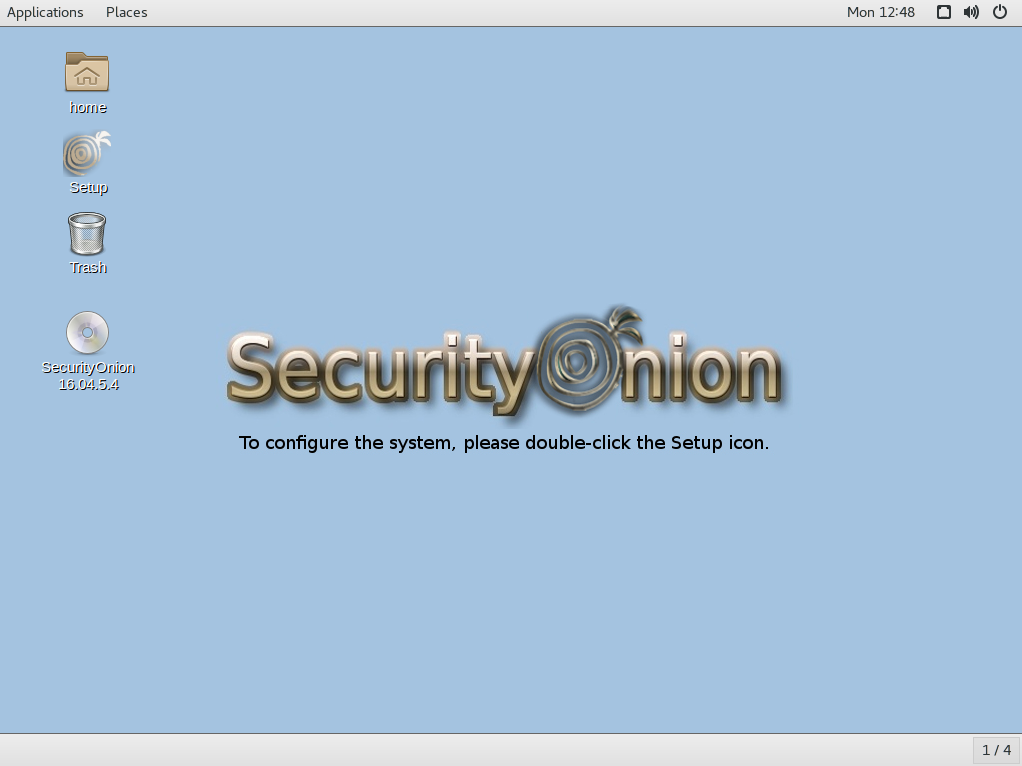
After installing the ISO image, the desktop guides the user to running Setup

After Setup configures network interfaces and reboots, the desktop guides the user to run Setup again to continue to the second phase of Setup

Once the second phase of Setup completes, the desktop displays the normal wallpaper with no prompts


Thanks
Thanks to Digininja for suggesting the Setup prompts!
Thanks to Wes Lambert for testing these packages!

Updating
Please see the following page for full update instructions:
https://securityonion.net/wiki/Upgrade

Training
We have 4-day Security Onion training classes coming up in San Antonio, Texas and Atlanta, Georgia!  If you can't make it to either of these onsite classes, we have a new online training platform!  For more information and other training options, please see:
https://securityonionsolutions.com

Appliances
We now offer hardware appliances!  For more information, please see:
https://blog.securityonion.net/2018/10/introducing-security-onion-solutions.html

Support
Need support?  Please see:
https://securityonion.net/wiki/Support

Thanks!

Thursday, November 1, 2018

securityonion-setup - 20120912-0ubuntu0securityonion278 now available for Security Onion 16.04!

The following package is now available:
securityonion-setup - 20120912-0ubuntu0securityonion278

This should resolve the following issues:

Setup: ensure Apache SSO config is enabled #1355
https://github.com/Security-Onion-Solutions/security-onion/issues/1355

Thanks
Thanks to Wes Lambert for testing this new package!

Updating
Please see the following page for full update instructions:
https://securityonion.net/wiki/Upgrade

Training
We have a 4-day Security Onion training class coming up in San Antonio, Texas!  If you can't make it to this onsite class, we have a new online training platform!  For more information and other training options, please see:
https://securityonionsolutions.com

Appliances
We now offer hardware appliances!  For more information, please see:
https://blog.securityonion.net/2018/10/introducing-security-onion-solutions.html

Support
Need support?  Please see:
https://securityonion.net/wiki/Support

Thanks!

Monday, September 10, 2018

securityonion-setup - 20120912-0ubuntu0securityonion276 now available for Security Onion 16.04!

The following package is now available:
securityonion-setup - 20120912-0ubuntu0securityonion276

This should resolve the following issues:

so-allow: fix verbiage for ES REST Endpoint #1325
https://github.com/Security-Onion-Solutions/security-onion/issues/1325

securityonion-setup: increase MySQL open files limit #1322
https://github.com/Security-Onion-Solutions/security-onion/issues/1322

Screenshots

MySQL open_files_limit

so-allow

Thanks
Thanks to Wes Lambert for updating so-allow and testing this new package!

Updating
Please see the following page for full update instructions:
https://securityonion.net/wiki/Upgrade

Conference
Registration is now open for our annual Security Onion Conference in Augusta GA!
http://socaugusta2018.eventbrite.com/

Training
We have 4-day Security Onion training classes coming up in Maryland and Georgia!  If you can't make it to any of these onsite classes, we have a new online training platform!  For more information and other training options, please see:
https://securityonionsolutions.com

Support
Need support?  Please see:
https://securityonion.net/wiki/Support

Thanks!

Wednesday, August 29, 2018

securityonion-setup - 20120912-0ubuntu0securityonion275 now available for Security Onion 16.04!

The following package is now available:
securityonion-setup - 20120912-0ubuntu0securityonion275

This should resolve the following issues:

securityonion-setup: allow ES exposure through so-allow #1307
https://github.com/Security-Onion-Solutions/security-onion/issues/1307

securityonion-setup: so-email advanced mode to set FROM email addresses #1308
https://github.com/Security-Onion-Solutions/security-onion/issues/1308

Screenshots

so-email now has an Advanced Setup option for specifying FROM addresses

so-allow now includes Elasticsearch options

Thanks
Thanks to Jon Zeolla and Wes Lambert for the Pull Requests!
Thanks to Wes Lambert for testing this new package!

Updating
Please see the following page for full update instructions:
https://securityonion.net/wiki/Upgrade

Conference
Registration is now open for our annual Security Onion Conference in Augusta GA!
http://socaugusta2018.eventbrite.com/

Training
We have 4-day Security Onion training classes coming up in Maryland and Georgia!  If you can't make it to any of these onsite classes, we have a new online training platform!  For more information and other training options, please see:
https://securityonionsolutions.com

Support
Need support?  Please see:
https://securityonion.net/wiki/Support

Thanks!

Thursday, July 5, 2018

securityonion-setup - 20120912-0ubuntu0securityonion273 now available for Security Onion 16.04!

securityonion-setup - 20120912-0ubuntu0securityonion273 is now available for Security Onion 16.04 and should resolve the following issues:

sosetup -w not writing answer file correctly in some cases #1270
https://github.com/Security-Onion-Solutions/security-onion/issues/1270

sosetup: move elasticsearch and logstash jvm.options out of the way and write new ones #1272
https://github.com/Security-Onion-Solutions/security-onion/issues/1272

Thanks
Thanks to Steve Baker for testing this new package!

Updating
Please see the following page for full update instructions:
https://securityonion.net/wiki/Upgrade

Training
We have 4-day Security Onion training classes coming up in Maryland and Georgia!  For more information and other training options, please see:
https://securityonionsolutions.com

Support
Need support?  Please see:
https://securityonion.net/wiki/Support

Thanks!

Wednesday, June 13, 2018

securityonion-setup - 20120912-0ubuntu0securityonion270 now available for Security Onion 16.04!

securityonion-setup - 20120912-0ubuntu0securityonion270 is now available for Security Onion 16.04 and should resolve the following issues:

Setup: remove ELSA references from so-email #1257
https://github.com/Security-Onion-Solutions/security-onion/issues/1257

Thanks
Thanks to Wes Lambert for testing this new package!

Updating
Please see the following page for full update instructions:
https://securityonion.net/wiki/Upgrade

Training
We have 4-day Security Onion training classes coming up in Maryland and Georgia!  For more information and other training options, please see:
https://securityonionsolutions.com

Support
Need support?  Please see:
https://securityonion.net/wiki/Support

Thanks!

Monday, April 9, 2018

securityonion-setup - 20120912-0ubuntu0securityonion251 now available for Security Onion!

The following package is now available:

securityonion-setup - 20120912-0ubuntu0securityonion251

This new package should resolve the following issue:

Issue 1216: Setup - default to Elastic
https://github.com/Security-Onion-Solutions/security-onion/issues/1216

Release Notes
Setup now defaults to Elastic instead of ELSA.  ELSA will reach End Of Life on October 9, 2018.  If for some reason you still need to run the old ELSA version of Setup, you can manually run:
sudo sosetup-elsa
Thanks
Thanks to Wes Lambert for testing this package!

Updating
Please see the following page for full update instructions:
https://securityonion.net/wiki/Upgrade

Training
We offer both onsite and online training!  For more information, please see:
https://securityonionsolutions.com

Support
Need support?  Please see:
https://securityonion.net/wiki/Support

Thanks!

Tuesday, December 12, 2017

securityonion-setup - 20120912-0ubuntu0securityonion249 now available for Security Onion!

The following package is now available:
securityonion-setup - 20120912-0ubuntu0securityonion249

This package should resolve the following issues:

Issue 1180: so-allow: if elastic is enabled, run so-allow-elastic
https://github.com/Security-Onion-Solutions/security-onion/issues/1180

Thanks
Thanks to Wes Lambert for testing this package!

Updating
Please see the following page for full update instructions:
https://securityonion.net/wiki/Upgrade

Want to show your support for Security Onion?
Security Onion t-shirts are available in our CafePress store!
http://www.cafepress.com/securityonion/11820053

Training
Security Onion Solutions offers onsite and online training!  For more information, please see:
https://securityonionsolutions.com

Support
Need support?  Please see:
https://securityonion.net/wiki/Support

Thanks!

Thursday, November 30, 2017

Elastic Stack Beta 2 Release and Security Onion 14.04.5.5 ISO Image!

UPDATED 2018/04/09! We've released a newer version!
https://blog.securityonion.net/2018/04/security-onion-elastic-stack-general.html

We're excited to announce that our Elastic stack integration has now reached Beta 2 Release!  This Beta 2 release includes a new 14.04.5.5 ISO image that contains these Beta 2 components and all the latest Ubuntu and Security Onion updates as of November 26, 2017!

Previous Releases
To see our progress over the last few months, please see the previous announcements:
http://blog.securityonion.net/2017/03/towards-elk-on-security-onion.html
http://blog.securityonion.net/2017/06/towards-elastic-on-security-onion.html
http://blog.securityonion.net/2017/07/towards-elastic-on-security-onion.html
http://blog.securityonion.net/2017/09/elastic-stack-alpha-release-and.html
http://blog.securityonion.net/2017/11/elastic-stack-beta-release-and-security.html

Highlights of this Beta 2 Release

  • Upgraded from Elastic 5.6.3 to 5.6.4
  • Kibana metric visualization scrollbar issue resolved
  • CapMe now supports pivoting from BRO_PE and BRO_X509 logs
  • many improvements to so-crossclustercheck
  • Setup now automatically disables FreqServer and DomainStats if running in Production Mode
  • The securityonion-elastic package now has a postinst script that runs so-elastic-configure if Elastic has already been enabled
  • Lots of cleanup and fixes

Kibana Overview Dashboard

Issues Resolved
Issue 1132: Elastic Stack Beta 2
https://github.com/Security-Onion-Solutions/security-onion/issues/1132

Issue 1158: 14.04.5.5 ISO image
https://github.com/Security-Onion-Solutions/security-onion/issues/1158

Known Issues
For known issues, please see our RC1 list:
https://github.com/Security-Onion-Solutions/security-onion/issues/1172

Thanks
This new ISO image has been tested by Wes Lambert and Rob Bardo.  Thanks, guys!

New Installations
We've updated the Verify_ISO page for the new ISO image:
https://github.com/Security-Onion-Solutions/security-onion/blob/master/Verify_ISO.md

Please remember to verify the signature of the downloaded ISO image using the instructions on that page.

Please note! This ISO image includes the EXPERIMENTAL Elastic stack!

The Elastic components are included in the ISO image and Setup gives you an option of Stable Setup (ELSA) or Experimental Setup (Elastic). If you do not want to try the new Elastic stack, you can choose Stable Setup.  If you choose Experimental Setup, the usual disclaimers and warnings apply!

  • Experimental Setup is BLEEDING EDGE and TOTALLY UNSUPPORTED!
  • If this breaks your system, you get to keep both pieces!
  • This is a work in progress and is in constant flux.
  • This is intended to build a quick prototype proof of concept so you can see what our ultimate Elastic configuration might look like.  This configuration will change drastically over time leading up to the final release.
  • Do NOT run this on a system that you care about!
  • Do NOT run this on a system that has data that you care about!
  • This should only be run on a TEST box with TEST data!
  • Experimental Setup may result in nausea, vomiting, or a burning sensation.


For more about this Elastic Beta 2 release, please see https://securityonion.net/wiki/elastic and the Screenshot tour at the bottom of this blog post.

Please note the following minimum hardware requirements for the Elastic stack:

  • 2 CPU cores
  • 8GB RAM


If you would prefer an ISO image with no Elastic components at all, you have a few options:

  • Install the older Security Onion 14.04.5.2 ISO image and then run "sudo soup"

    OR


Existing Deployments
If you have existing ELSA installations based on a previous 14.04 ISO image, there is no need to download this new ISO image.  You can simply continue using our standard update process to install updated packages as they are made available:
https://github.com/Security-Onion-Solutions/security-onion/wiki/Upgrade

If you have existing Elastic installations (Technology Previews, Alpha, or Beta), we don't officially support upgrading to newer releases.  You can try running "sudo soup" but if that fails, you can perform a fresh installation using this Beta 2 ISO image.

Release Notes
For more information about this release, please see:
https://github.com/Security-Onion-Solutions/security-onion/wiki/Security-Onion-14.04-Release-Notes

Want to show your support for Security Onion?
Security Onion t-shirts are available in our CafePress store!
http://www.cafepress.com/securityonion/11820053

Training
We offer onsite and online training!  For more information, please see:
https://securityonionsolutions.com

Support
Need support?  Please see:
https://securityonion.net/wiki/Support

Screenshot Tour

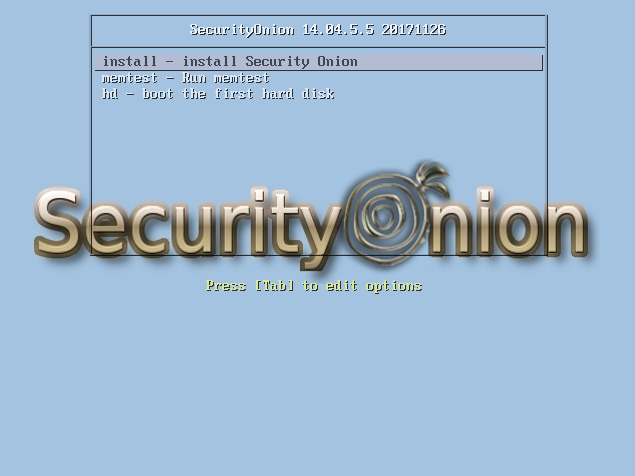
Security Onion 14.04.5.5 20171126 

Welcome to Setup

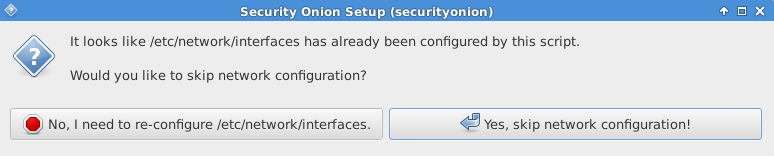
Network Configuration

Stable Setup vs Experimental Setup

Experimental Setup - Warnings and Disclaimers

Evaluation Mode vs Production Mode

Monitor (Sniffing) Interface

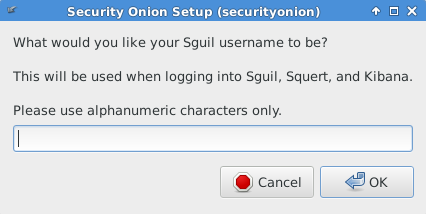
Creating Username

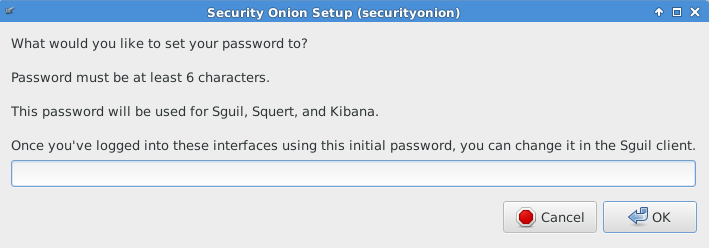
Setting Password

Confirming Password

Confirming Options

Setup Complete

Single Sign On (SSO) for Squert, CapMe, and Kibana

Squert

CapMe

Kibana Overview Dashboard

Help

Bro Notices

ElastAlert

OSSEC HIDS Alerts

NIDS Alerts - Snort or Suricata

Bro - Connections

Bro - DCE/RPC

Bro - DHCP

Bro - DNP3

Bro - DNS

Bro - Files

Bro - FTP

Bro - HTTP

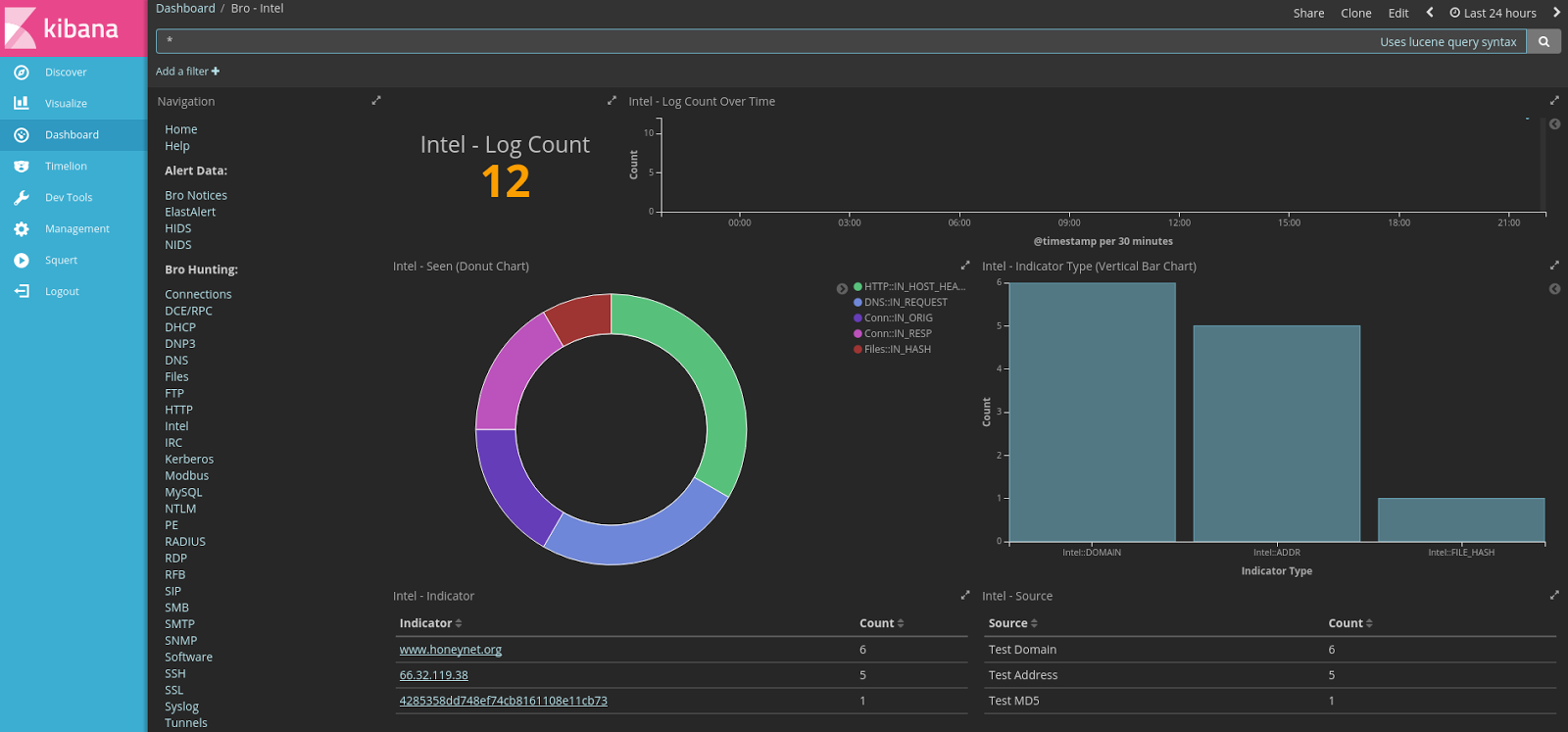
Bro - Intel

Bro - IRC

Bro - Kerberos

Bro - Modbus

Bro - MySQL

Bro - NTLM

Bro - PE

Bro - RADIUS

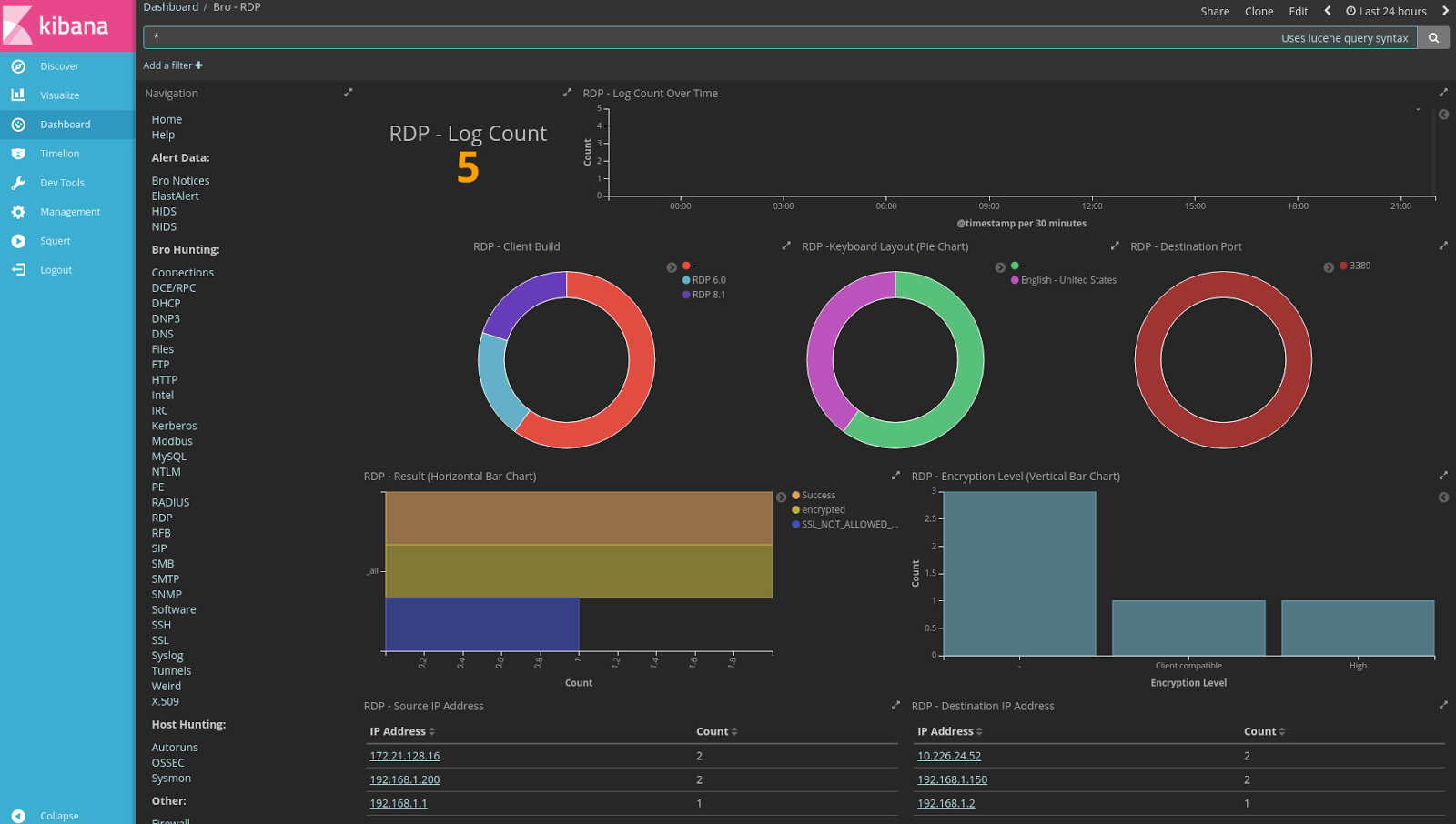
Bro - RDP

Bro - RFB

Bro - SIP

Bro - SMB

Bro - SMTP

Bro - SNMP

Bro - Software

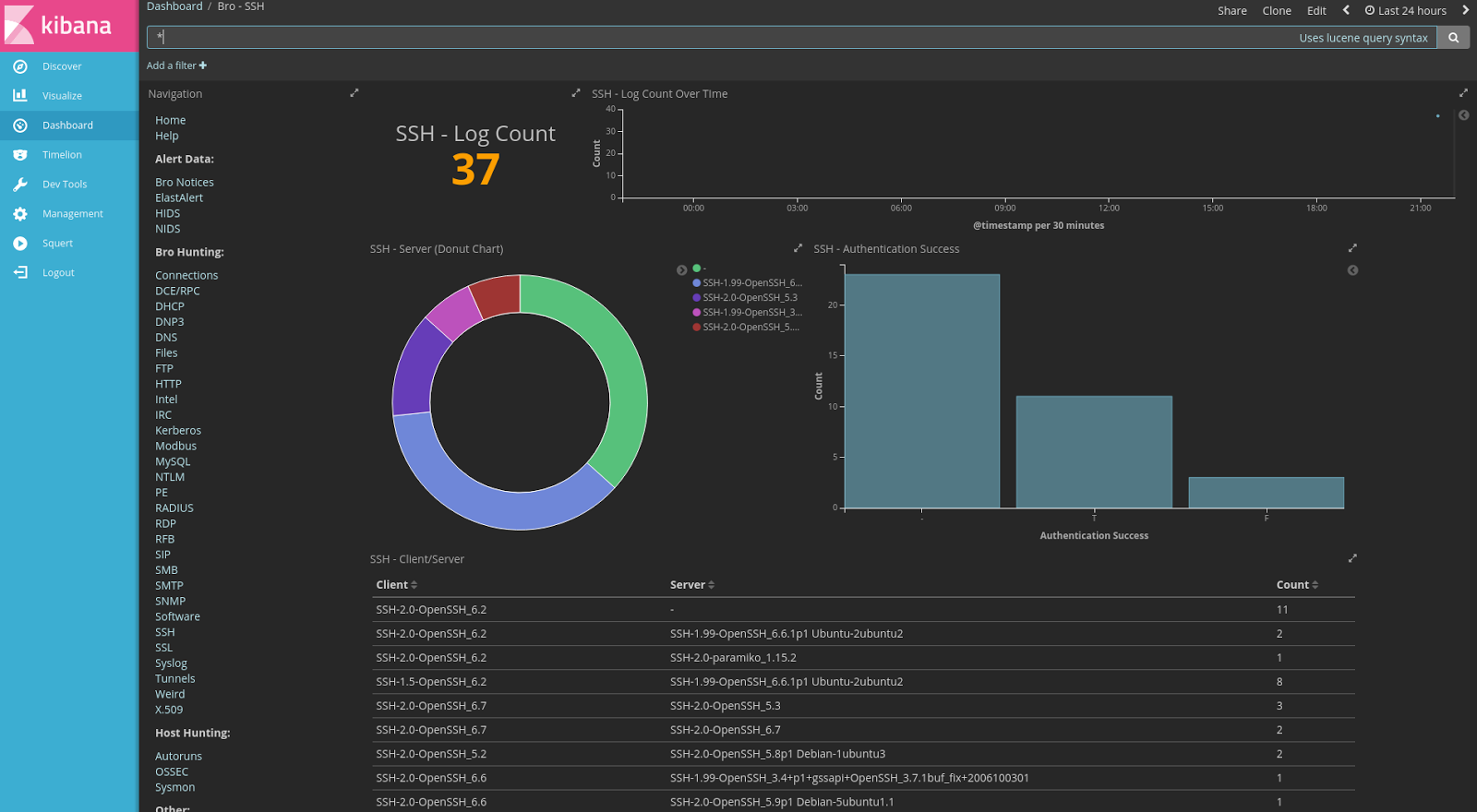
Bro - SSH

Bro - SSL

Bro - Syslog

Bro - Tunnels

Bro - Weird

Bro - X.509

Autoruns

OSSEC

Sysmon

Firewall

Stats

Syslog

Search This Blog

Featured Post

Registration Now Open for Augusta Cyber Week 2026!

Registration is now open for Augusta Cyber Week in beautiful Augusta GA from October 19, 2026 through October 24, 2026! This includes: 4-day...

Popular Posts

Blog Archive