Monday, May 4, 2020

Security Onion Hybrid Hunter 1.2.2 now available!

We recently released Security Onion Hybrid Hunter 1.2.1 Beta 1:
https://blog.securityonion.net/2020/04/security-onion-hybrid-hunter-121-beta-1.html

Today we are releasing Hybrid Hunter 1.2.2, which is still considered part of the Beta 1 cycle, but resolves a few issues:

  • Updated Saltstack to 2019.2.4 to address CVE-2020-11651
  • Updated Suricata to 4.1.8 to address some possible security issues
  • Fixed an issue that was preventing Strelka from functioning properly
  • ISO installs should now use the built in docker containers instead of re-downloading them

To read more and download Hybrid Hunter, please see:
https://github.com/Security-Onion-Solutions/securityonion-saltstack/wiki/ISO
https://github.com/Security-Onion-Solutions/securityonion-saltstack/blob/master/README.md

If you have any questions about Hybrid Hunter, please post a message on our reddit community and prefix the title with [Hybrid Hunter]!
https://www.reddit.com/r/securityonion/

SaltStack CVE-2020-11651 and CVE-2020-11652

Two vulnerabilities in SaltStack were recently announced:

https://cve.mitre.org/cgi-bin/cvename.cgi?name=CVE-2020-11651

https://cve.mitre.org/cgi-bin/cvename.cgi?name=CVE-2020-11652

In the current Security Onion 16.04 platform, we use the standard SaltStack packages from the standard Ubuntu repositories.  Ubuntu is currently tracking these as follows:

https://people.canonical.com/~ubuntu-security/cve/2020/CVE-2020-11651.html

https://people.canonical.com/~ubuntu-security/cve/2020/CVE-2020-11652.html

We would expect that as soon as Ubuntu updates its packages, then a standard "soup" update would completely remove the vulnerabilities.

UPDATE 2020/08/14 - Ubuntu has released updated packages:

In the meantime, please keep in mind that Security Onion locks down the host-based firewall to only allow connections to the salt ports from known good salt minions.  If you feel the need for additional compensating controls, you may wish to add firewall restrictions to your network firewalls as well.

Thursday, April 30, 2020

Snort 2.9.16.0 now available for Security Onion!

The following packages are now available for Security Onion:

securityonion-daq - 2.0.7-1ubuntu1securityonion2
securityonion-snort - 2.9.16.0-1ubuntu1securityonion1

These packages resolve the following issue:

Snort 2.9.16.0 #1755
https://github.com/Security-Onion-Solutions/security-onion/issues/1755

Thanks
Thanks to Cisco for Snort 2.9.16.0!
Thanks to Wes Lambert for testing!

Updating
Please see the following page for full update instructions:
https://securityonion.net/docs/Upgrade

Support
Need support?  Please see:
https://securityonion.net/docs/Support

Documentation
We've got a new documentation site!  Please let us know if anything needs to be updated:
https://securityonion.net/docs

Also, we're now offering a printed copy of our official documentation with foreword by Richard Bejtlich and proceeds going to Rural Technology Fund:
https://securityonion.net/book

Training
Security Onion Solutions is the only official authorized training provider for Security Onion and we have 4-day Basic and 4-day Advanced onsite training classes.  We also offer online classes as well.  For more information, please see:
https://securityonionsolutions.com

Appliances
We now offer hardware appliances!  For more information, please see:
https://securityonionsolutions.com

Thanks!

Wednesday, April 29, 2020

Suricata 4.1.8 now available for Security Onion!

securityonion-suricata - 4.1.8-1ubuntu1securityonion1 is now available for Security Onion and should resolve the following issue:

Suricata 4.1.8 #1760
https://github.com/Security-Onion-Solutions/security-onion/issues/1760

Thanks
Thanks to the Suricata team for Suricata 4.1.8!
Thanks to Wes Lambert for testing!

Updating
Please see the following page for full update instructions:
https://securityonion.net/docs/Upgrade

Support
Need support?  Please see:
https://securityonion.net/docs/Support

Documentation
You can find our documentation here:
https://securityonion.net/docs

Also, we're now offering a printed copy of our official documentation with foreword by Richard Bejtlich and proceeds going to Rural Technology Fund:
https://securityonion.net/book

Training
Security Onion Solutions is the only official authorized training provider for Security Onion.  For more information about our training classes, please see:
https://securityonionsolutions.com

Appliances
We now offer hardware appliances!  For more information, please see:
https://securityonionsolutions.com

Thanks!

Sunday, April 26, 2020

Tuesday, April 21, 2020

Elastic 6.8.8 now available for Security Onion!

UPDATE 2020-04-22 7:00 Looks like there is an issue with domainstats in this release.  So if you're running domainstats, please do not update until we have resolved this issue.

UPDATE 2020-04-22 8:27 We've pushed a new domainstats image which should resolve this issue.

The following updates are now available for Security Onion!

  • Elastic 6.8.8 Docker images
  • securityonion-elastic - 20190510-1ubuntu1securityonion93

These updates should resolve the following issues:

Elastic 6.8.8 #1746
https://github.com/Security-Onion-Solutions/security-onion/issues/1746

LOGSTASH_MINIMAL doesn't include Beat config #1751
https://github.com/Security-Onion-Solutions/security-onion/issues/1751

securityonion-elastic: improve elasticsearch ingest parsing for sysmon logs via Wazuh #1754
https://github.com/Security-Onion-Solutions/security-onion/issues/1754

securityonion-elastic: bro_files file_ip should be copied to source_ip #1742
https://github.com/Security-Onion-Solutions/security-onion/issues/1742

securityonion-elastic: remove [data][sysmon][targetfilename] from winlogbeat sysmon parsing #1752
https://github.com/Security-Onion-Solutions/security-onion/issues/1752

securityonion-elastic: so-elastic-reset does not remove closed indices #1759
https://github.com/Security-Onion-Solutions/security-onion/issues/1759

securityonion-elastic: so-elastic-reset needs to disable elastalert and then re-enable afterward #1735
https://github.com/Security-Onion-Solutions/security-onion/issues/1735

so-import-pcap-configure: running alone results in error #1740
https://github.com/Security-Onion-Solutions/security-onion/issues/1740

Unanchored regexes in 8001_postprocess_common_ip_augmentation.conf wrongly skip geoip #1244
https://github.com/Security-Onion-Solutions/security-onion/issues/1244

Thanks
Thanks to the Elastic team for Elastic 6.8.8!
Thanks to Wes Lambert and John Bernal for testing and QA!

Updating
Please see the following page for full update instructions:
https://securityonion.net/docs/Upgrade

Support
Need support?  Please see:
https://securityonion.net/docs/Support

Documentation
You can find our documentation here:
https://securityonion.net/docs

Also, we're now offering a printed copy of our official documentation with foreword by Richard Bejtlich and proceeds going to Rural Technology Fund:
https://securityonion.net/book

Training
Security Onion Solutions is the only official authorized training provider for Security Onion.  For more information about our training classes, please see:
https://securityonionsolutions.com

Appliances
We now offer hardware appliances!  For more information, please see:
https://securityonionsolutions.com

Thanks!

Friday, April 17, 2020

Security Onion Hybrid Hunter 1.2.1 - Beta 1 Available for Testing!

In 2018, Security Onion Solutions started working on the next major version of Security Onion, code-named Hybrid Hunter:
https://blog.securityonion.net/2018/11/security-onion-hybrid-hunter-101-tech.html

Today we are proud to release Security Onion codenamed “Hybrid Hunter” 1.2.1 aka Beta 1. Hybrid Hunter 1.2.1 officially supports Ubuntu 18.04 and CentOS 7, which means it no longer supports Ubuntu 16.04.  Our ISO image will continue to be based on CentOS 7 for the foreseeable future. There are plans to support CentOS 8 once podman reaches full compatibility with docker.

This release moves us to Elastic 7 and begins to embrace Elastic Common Schema (ECS). This change includes overhauled dashboards and a new prefix of "so-" for Elasticsearch indices. Among other advantages, migrating to ECS means that other products using ECS should more easily inter-operate with Hybrid Hunter. Over the next few releases, we plan to embrace ECS more fully. Stay tuned!

Finally, we are very excited to announce the introduction of the Security Onion Console! Over the next few releases, we will continue to improve and add more functionality to the Security Onion Console. Check it out and let us know what you think!

To read more and download Hybrid Hunter, please see:
https://github.com/Security-Onion-Solutions/securityonion-saltstack/wiki/ISO
https://github.com/Security-Onion-Solutions/securityonion-saltstack/blob/master/README.md

If you have any questions about Hybrid Hunter, please post a message on our reddit community and prefix the title with [Hybrid Hunter]!
https://www.reddit.com/r/securityonion/


Major Highlights in this Release

  • Full support for Ubuntu 18.04. Ubuntu 16.04 is no longer supported for Hybrid Hunter.
  • Elastic 7.6.1 with ECS support
  • New set of Kibana dashboards that align with ECS
  • Introduction of the Security Onion Console. Once logged in you are directly taken to the SOC.
  • New authentication using Kratos
  • Community ID support for Zeek, osquery, and Suricata. You can now tie host events to connection logs!
  • During install you must specify how you would like to access the SOC UI. This is for strict cookie security.
  • Ability to list and delete web users from the SOC UI
  • The soremote account is now used to add nodes to the grid vs using socore.
  • Eval mode no longer uses Logstash for parsing (Filebeat -> ES Ingest)
  • Ingest node parsing for osquery-shipped logs (osquery, Windows event logs, Sysmon)
  • Fleet standalone mode with improved Web UI & API access control
  • Improved Fleet integration support
  • Playbook now has full Windows Sigma community ruleset builtin
  • Automatic Sigma community rule updates
  • Playbook stability enhancements
  • Zeek health check. Zeek will now auto restart if a worker crashes
  • zeekctl is now managed by salt
  • Grafana dashboard improvements and cleanup
  • Moved logstash configs to pillars
  • Salt logs moved to /opt/so/log/salt
  • Strelka integrated for file-oriented detection/analysis at scale

Thanks

Lots of love went into this release!

Special thanks to all our folks working so hard to make this release happen!

Josh Brower
Jason Ertel
Wes Lambert
Josh Patterson
Mike Reeves
William Wernert


Screenshots

Security Onion Console - User Administration

Security Onion Console - User Details

Security Onion Console - Deleting User

Security Onion Console - Downloads


Thursday, April 16, 2020

Zeek 3.0.5 now available for Security Onion!

The following updates are now available for Security Onion!

securityonion-bro - 3.0.5-1ubuntu1securityonion1 (Zeek 3.0.5)
securityonion-bro-afpacket - 1.3.0-1ubuntu1securityonion22
securityonion-bro-scripts - 20121004-0ubuntu0securityonion105

These updates should resolve the following issues:

Zeek 3.0.5 #1757
https://github.com/Security-Onion-Solutions/security-onion/issues/1757

Thanks
Thanks to the Zeek team for Zeek 3.0.5!
Thanks to Wes Lambert for testing and QA!

Updating
Please see the following page for full update instructions:
https://securityonion.net/docs/Upgrade

Support
Need support?  Please see:
https://securityonion.net/docs/Support

Documentation
You can find our documentation here:
https://securityonion.net/docs

Also, we're now offering a printed copy of our official documentation with foreword by Richard Bejtlich and proceeds going to Rural Technology Fund:
https://securityonion.net/book

Training
Security Onion Solutions is the only official authorized training provider for Security Onion.  For more information about our training classes, please see:
https://securityonionsolutions.com

Appliances
We now offer hardware appliances!  For more information, please see:
https://securityonionsolutions.com

Thanks!

Tuesday, April 14, 2020

securityonion-sostat - 20120722-0ubuntu0securityonion144 now available for Security Onion!

securityonion-sostat - 20120722-0ubuntu0securityonion144 is now available for Security Onion and should resolve the following issue:

sostat: don't show pf_ring output if af_packet in use #1623
https://github.com/Security-Onion-Solutions/security-onion/issues/1623

Thanks
Thanks to Wes Lambert for testing and QA!

Updating
Please see the following page for full update instructions:
https://securityonion.net/docs/Upgrade

Support
Need support?  Please see:
https://securityonion.net/docs/Support

Documentation
You can find our documentation here:
https://securityonion.net/docs

Also, we're now offering a printed copy of our official documentation with foreword by Richard Bejtlich and proceeds going to Rural Technology Fund:
https://securityonion.net/book

Training
Security Onion Solutions is the only official authorized training provider for Security Onion.  For more information about our training classes, please see:
https://securityonionsolutions.com

Appliances
We now offer hardware appliances!  For more information, please see:
https://securityonionsolutions.com

Thanks!

Monday, April 13, 2020

securityonion-setup - 20120912-0ubuntu0securityonion328 now available for Security Onion!

securityonion-setup - 20120912-0ubuntu0securityonion328 is now available for Security Onion and should resolve the following issue:

securityonion-setup: change /nsm/bro to /nsm/zeek in a few user facing messages #1753
https://github.com/Security-Onion-Solutions/security-onion/issues/1753

Thanks
Thanks to Wes Lambert for testing and QA!

Updating
Please see the following page for full update instructions:
https://securityonion.net/docs/Upgrade

Support
Need support?  Please see:
https://securityonion.net/docs/Support

Documentation
You can find our documentation here:
https://securityonion.net/docs

Also, we're now offering a printed copy of our official documentation with foreword by Richard Bejtlich and proceeds going to Rural Technology Fund:
https://securityonion.net/book

Training
Security Onion Solutions is the only official authorized training provider for Security Onion.  For more information about our training classes, please see:
https://securityonionsolutions.com

Appliances
We now offer hardware appliances!  For more information, please see:
https://securityonionsolutions.com

Thanks!

Looking Back Over 1 Million Security Onion ISO Downloads

Our Security Onion ISO image has been downloaded over 1 million times!  Thanks to our entire community for your support!  If you haven't already downloaded your copy, head on over to https://securityonion.net/download!

When I started Security Onion way back in 2008, I never would have imagined that we would hit 1 million downloads.  Let's take a walk down memory lane and see how we got here.

9/3/2008 First Security Onion blog post
https://blog.securityonion.net/2008/09/security-onion.html

10/22/2008 Started working on the first Security Onion ISO based on Ubuntu 8.04
https://blog.securityonion.net/2008/10/security-onion-livecd.html

6/4/2009 first Security Onion release based on Xubuntu 9.04
https://blog.securityonion.net/2009/06/security-onion-livecd-is-now-available.html

6/16/2009 added Bro
https://blog.securityonion.net/2009/06/security-onion-livecd-20090613.html

8/16/2009 started building Security Onion community - mailing list, issue tracker, wiki
https://blog.securityonion.net/2009/08/security-onion-on-google-code.html

10/12/2010 new version of Security Onion based on Xubuntu 10.04 and including Suricata
https://blog.securityonion.net/2010/10/security-onion-live-20101010-edition.html

1/5/2011 new release includes Squert web interface, new Setup script, and OSSEC HIDS
https://blog.securityonion.net/2011/01/security-onion-20110101.html
https://blog.securityonion.net/2011/01/security-onion-20110101-setup-script.html
https://blog.securityonion.net/2011/01/security-onion-20110101-ossec-and-sguil.html

1/6/2011 Richard Bejtlich suggests in-place upgrade:
https://blog.securityonion.net/2011/01/security-onion-20110101.html?showComment=1294317204238#c2797095959331531686
https://blog.securityonion.net/2011/01/security-onion-upgrade-script.html

4/7/2011 distributed deployments
https://blog.securityonion.net/2011/04/security-onion-20110321-distributed.html

10/19/2011 disabling NIC offloading
https://blog.securityonion.net/2011/10/when-is-full-packet-capture-not-full.html

12/31/2012 Security Onion 12.04 included all components built as Ubuntu packages
https://blog.securityonion.net/2012/12/security-onion-1204-is-now-available.html

6/10/2013 Security Onion 12.04.1
https://blog.securityonion.net/2013/06/security-onion-12041-iso-image-now.html

7/25/2013 Security Onion 12.04.2
https://blog.securityonion.net/2013/07/security-onion-12042-iso-image-now.html

9/12/2013 Mike Reeves developed OnionSalt for managing distributed deployments
https://blog.securityonion.net/2013/09/new-package-onionsalt-now-available-for.html

9/14/2013 Security Onion 12.04.3
https://blog.securityonion.net/2013/09/security-onion-12043-iso-image-now.html

2/28/2014 Security Onion 12.04.4
https://blog.securityonion.net/2014/02/security-onion-12044-iso-image-now.html

7/7/2014 Security Onion Solutions LLC
https://blog.securityonion.net/2014/07/introducing-security-onion-solutions-llc.html

9/12/2014 First ever Security Onion Conference and Security Onion 12.04.5
https://securityonion.readthedocs.io/en/latest/conference.html
https://www.eventbrite.com/e/security-onion-conference-soc-2014-tickets-12205183031#
https://blog.securityonion.net/2014/09/security-onion-12045-iso-image-now.html

2/16/2015 Security Onion 12.04.5.1
https://blog.securityonion.net/2015/02/security-onion-120451-iso-image-now.html

7/6/2015 Security Onion 12.04.5.2
https://blog.securityonion.net/2015/07/security-onion-120452-iso-image-now.html

9/12/2015 Security Onion 12.04.5.3
https://blog.securityonion.net/2015/09/security-onion-120453-iso-image-now.html

1/20/2016 Security Onion 14.04.3.1
https://blog.securityonion.net/2015/09/security-onion-120453-iso-image-now.html
https://blog.securityonion.net/2016/01/security-onion-140431-screenshot-tour.html

3/28/2016 Security Onion 14.04.4.1
https://blog.securityonion.net/2016/03/security-onion-140441-iso-image-now.html

6/13/2016 Security Onion 14.04.4.2
https://blog.securityonion.net/2016/06/security-onion-140442-iso-image-now.html

9/9/2016 Security Onion 14.04.5.1
https://blog.securityonion.net/2016/09/security-onion-140451-iso-image-now.html

2/20/2017 Security Onion 14.04.5.2
https://blog.securityonion.net/2017/02/security-onion-140452-iso-image-now.html

3/16/2017 started integrating the Elastic stack
https://blog.securityonion.net/2017/03/towards-elk-on-security-onion.html

4/9/2018 Security Onion 14.04.5.11 and Elastic GA
https://blog.securityonion.net/2018/04/security-onion-elastic-stack-general.html

4/18/2018 Security Onion 14.04.5.12
https://blog.securityonion.net/2018/04/security-onion-1404512-iso-image-now.html

5/1/2018 Security Onion 14.04.5.13
https://blog.securityonion.net/2018/05/security-onion-1404513-iso-image-now.html

5/31/2018 Security Onion 16.04.4.1
https://blog.securityonion.net/2018/05/security-onion-160441-iso-image-now.html

6/8/2018 over 600,000 Security Onion ISO downloads!
https://blog.securityonion.net/2018/06/security-onion-is-over-600000-downloads.html

6/25/2018 Security Onion 16.04.4.2
https://blog.securityonion.net/2018/06/security-onion-160442-now-available.html

7/24/2018 Security Onion 16.04.4.3
https://blog.securityonion.net/2018/07/security-onion-160443-now-available.html

8/6/2018 Security Onion 16.04.5.1
https://blog.securityonion.net/2018/08/security-onion-160451-now-available.html

9/4/2018 Security Onion 16.04.5.2
https://blog.securityonion.net/2018/09/security-onion-160452-now-available.html

10/19/2018 Security Onion 16.04.5.3
https://blog.securityonion.net/2018/10/security-onion-160453-now-available.html

11/3/2018 Security Onion Hybrid Hunter announced
https://blog.securityonion.net/2018/11/security-onion-hybrid-hunter-101-tech.html

11/26/2018 Security Onion 16.04.5.4
https://blog.securityonion.net/2018/11/security-onion-160454-now-available.html

12/17/2018 Security Onion 16.04.5.5
https://blog.securityonion.net/2018/12/security-onion-160455-now-available.html

1/14/2019 Security Onion 16.04.5.6
https://blog.securityonion.net/2019/01/security-onion-160456-now-available.html

5/20/2019 Security Onion 16.04.6.1
https://blog.securityonion.net/2019/05/security-onion-160461-now-available.html

8/28/2019 Security Onion 16.04.6.2
https://blog.securityonion.net/2019/08/security-onion-160462-now-available.html

12/4/2019 Security Onion 16.04.6.3
https://blog.securityonion.net/2019/12/security-onion-160463-now-available.html

2/18/2020 Security Onion 16.04.6.4
https://blog.securityonion.net/2020/02/security-onion-160464-iso-image-now.html

3/30/2020 Security Onion 16.04.6.5
https://blog.securityonion.net/2020/03/security-onion-160465-iso-image-now.html

As we look to the future, we are busy refining our next generation Hybrid Hunter platform and hope to release a Beta version soon!  Stay tuned!

Friday, April 3, 2020

20200323 Edition of Security Onion Documentation printed book now available!

Many folks have asked for a printed version of our official online documentation and we're excited to provide that!  Whether you work on airgapped networks or simply want a portable reference that doesn't require an Internet connection or batteries, this is what you've been asking for.

Thanks to Richard Bejtlich for writing the inspiring foreword!

Proceeds go to the Rural Technology Fund!

This 20200323 edition has been updated for our latest ISO image release and includes a 10% discount code for our online training!


This book covers the following Security Onion topics:

  • Getting Started
  • Analyst Tools
  • Network Visibility
  • Host Visibility
  • Elastic Stack
  • Updating
  • Customizing for your Environment
  • Tuning
  • Tricks and Tips
  • Services
  • Utilities
  • Help
  • Integrations


Q&A

What is the difference between this book and the online documentation?

This book is the online documentation formatted specifically for print.  It also includes an inspiring foreword by Richard Bejtlich that is not available anywhere else!  Proceeds go to the Rural Technology Fund!  Finally, the printed book includes a 10% discount code for our online training.

Who should get this book?

You should get this book if you work on airgapped networks or simply want a portable reference that doesn't require an Internet connection or batteries! Also anyone who wants to donate to a worthy cause like Rural Technology Fund!

How often will the book be updated?

Currently, we plan to release a new edition of the book every time we release a new version of our ISO image.

What is the difference between this edition and the previous edition?

This edition has been updated for our latest ISO image release!

Where do we get it?

The following URL will always take you to the latest version of the printed book at Amazon:
https://securityonion.net/book

Monday, March 30, 2020

Security Onion 16.04.6.5 ISO image now available featuring Zeek 3.0.3, Suricata 4.1.7, Elastic 6.8.7, CyberChef 9.18.2, and more!

Our Security Onion 16.04.6.5 ISO image is now available!

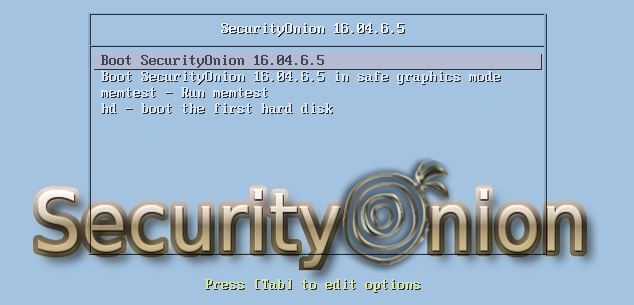
Security Onion 16.04.6.5 boot menu

Major Changes Since Last ISO Image
Zeek 3.0.3
Suricata 4.1.7
Elastic 6.8.7
CyberChef 9.18.2

Thanks
Thanks to Bryant Treacle for testing this ISO image!

Package Updates
This release also includes the following updated packages:
securityonion-setup - 20120912-0ubuntu0securityonion327
securityonion-web-page - 20141015-0ubuntu0securityonion106
pinguybuilder - 20180514-1ubuntu1securityonion22
securityonion-iso - 20151016-1ubuntu1securityonion35

These packages resolve the following issues:

sosetup-minimal: remove old check for securityonion_ssh.conf #1731
https://github.com/Security-Onion-Solutions/security-onion/issues/1731

sosetup: new production deployments should default to LOGSTASH_MINIMAL #1732
https://github.com/Security-Onion-Solutions/security-onion/issues/1732

sosetup-minimal: improve service check #1738
https://github.com/Security-Onion-Solutions/security-onion/issues/1738

sosetup: set LOGSTASH_MINIMAL if running sosetup-minimal #1739
https://github.com/Security-Onion-Solutions/security-onion/issues/1739

cheat sheet: convert to two pages #1717
https://github.com/Security-Onion-Solutions/security-onion/issues/1717

Docs: add new cloud documentation #1733
https://github.com/Security-Onion-Solutions/security-onion/issues/1733

CyberChef 9.18.2 #1730
https://github.com/Security-Onion-Solutions/security-onion/issues/1730

securityonion-iso: latest chromium-browser packages #1721
https://github.com/Security-Onion-Solutions/security-onion/issues/1721

pinguybuilder: increment version to 16.04.6.5 #1736
https://github.com/Security-Onion-Solutions/security-onion/issues/1736

Production Mode Now Defaults to LOGSTASH_MINIMAL For New Deployments
Please note that the new version of Setup now defaults to LOGSTASH_MINIMAL for new Production Mode deployments.  LOGSTASH_MINIMAL means that Logstash transports unparsed logs to Elasticsearch where they are parsed using ingest node parsing, which results in better performance.  Here are a few examples:

  • If you choose Production Mode and New to create a master server, then Setup will set LOGSTASH_MINIMAL in /etc/nsm/securityonion.conf on your master server.
  • If you then add a storage node to that master server, it will inherit the LOGSTASH_MINIMAL setting from the master server.
  • If you have an existing deployment without LOGSTASH_MINIMAL (traditional Logstash parsing), then if you add new nodes they will continue using traditional Logstash parsing.
  • Evaluation Mode is unchanged and will continue to use traditional Logstash parsing.


Issues Resolved
For a list of all issues resolved in this release, please see:
https://github.com/Security-Onion-Solutions/security-onion/projects/11

Release Notes
For more information about this release, please see:
https://securityonion.net/docs/release-notes.html

Installation Guide
We've updated the Installation guide to reflect the download locations for the new ISO image:
https://securityonion.net/docs/installation.html

Existing Deployments
If you have existing 16.04 installations, there is no need to download the new ISO image.  You can simply continue using our standard update process to install updated packages as they are made available:
https://securityonion.net/docs/Upgrade

If you have existing installations of Security Onion 14.04, you can upgrade from 14.04 to 16.04:
https://securityonion.net/docs/upgrading-from-14.04-to-16.04.html

Documentation
You can find our documentation here:
https://securityonion.net/docs

Also, we're now offering a printed copy of our official documentation with foreword by Richard Bejtlich and proceeds going to Rural Technology Fund:
https://securityonion.net/book

Support
Need support?  Please see:
https://securityonion.net/docs/Support

Training
Security Onion Solutions is the only official authorized training provider for Security Onion:
https://securityonionsolutions.com

Appliances
We now offer hardware appliances!  For more information, please see:
https://securityonionsolutions.com

Screenshot Tour
ISO boot menu

Once the Live Desktop appears, double-click the Install icon and follow the prompts

Once you've completed the installer and rebooted, login using the username and password you created in the installer

After logging in, you are prompted to run Setup

Welcome to Setup
 

Configure network interfaces
 
If your hostname is securityonion, Setup gives you the opportunity to rename it


Configure your network interfaces, reboot, then log back in

Launch Setup again and skip network configuration to go to service configuration

Production Mode now defaults to LOGSTASH_MINIMAL for better performance

If you choose New to create a master server, Setup will add LOGSTASH_MINIMAL to /etc/nsm/securityonion.conf

Create username

Create Password

Confirm Password

In most cases, we recommend choosing Best Practices

Choose your NIDS ruleset

Choose your NIDS engine

Choose to enable or disable network services

Set PF_RING min_num_slots

Verify sniffing interface

Set HOME_NET 
Choose to store logs locally or add storage nodes


Allocate storage for Elasticsearch

Confirm all options

Setup complete

Desktop no longer prompts to run Setup and includes icons for analyst applications 
The README shortcut includes links to the cheat sheet and online and offline documentation

CyberChef 9.18.2


Single Sign On (SSO) for Squert, CapMe, and Kibana

Analyze IDS alerts using Squert
 
Retrieve full packet capture with CapMe


Kibana Overview Dashboard

Help

Zeek Notices

ElastAlert

HIDS Alerts from OSSEC/Wazuh

NIDS Alerts from Snort or Suricata

Zeek Connections

Zeek Total Bytes

Zeek DCERPC

Zeek DHCP

Zeek DNP3

Zeek DNS

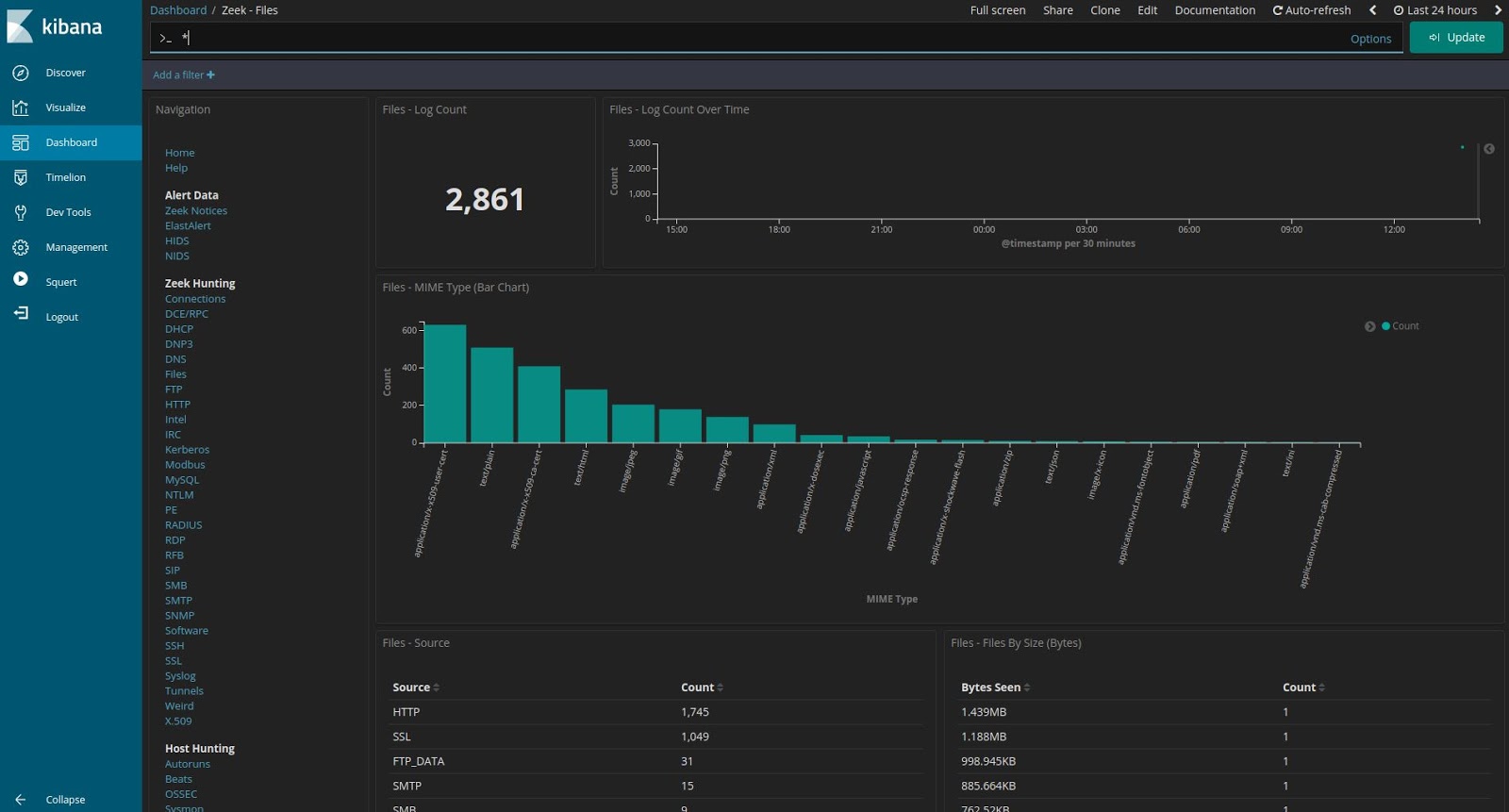
Zeek Files

Zeek FTP

Zeek HTTP

Zeek Intel
 
Zeek IRC


Zeek Kerberos

Zeek Modbus

Zeek MySQL

Zeek NTLM

Zeek PE

Zeek RADIUS

Zeek RDP

Zeek RFB

Zeek SIP

Zeek SMB

Zeek SMTP

Zeek SNMP

Zeek Software

Zeek SSH

Zeek SSL

Zeek Tunnels

Zeek Weird

Zeek X.509

OSSEC/Wazuh Logs

Syslog

Search This Blog

Featured Post

Security Onion 3.3.0 Hotfix 20260911 Now Available!

Earlier this week, we released Security Onion 3.3.0: https://blog.securityonion.net/2026/09/security-onion-330-now-available.html Today we a...

Popular Posts

Blog Archive