Showing posts with label networkminer. Show all posts

Wednesday, December 20, 2023

Quick Malware Analysis: ICEDID BOKBOT infection pcap from 2023-07-25

Thanks to Brad Duncan for sharing this pcap from 2023-07-25 on his malware traffic analysis site! Google currently has a warning for the site, so we're not including the actual hyperlink but it should be easy to find.


We did a quick analysis of this pcap on the NEW Security Onion 2.4. If you'd like to follow along, you can do the following:


The screenshots at the bottom of this post show some of the interesting alerts, metadata logs, and session transcripts. Want more practice? Check out our other Quick Malware Analysis posts at:

https://blog.securityonion.net/search/label/quick%20malware%20analysis


About Security Onion


Security Onion is a versatile and scalable platform that can run on small virtual machines and can also scale up to the opposite end of the hardware spectrum to take advantage of extremely powerful server-class machines.  Security Onion can also scale horizontally, growing from a standalone single-machine deployment to a full distributed deployment with tens or hundreds of machines as dictated by your enterprise visibility needs. To learn more about Security Onion, please see:
https://securityonion.net


Do you want to deploy the new Security Onion 2.4 to your enterprise but need training? We just announced a new class with 10% discount:
https://blog.securityonion.net/2023/12/10-early-bird-discount-for-security.html


Do you want to deploy Security Onion to your enterprise and want the best enterprise hardware? Here are the top 5 reasons to purchase appliances from Security Onion Solutions: https://blog.securityonion.net/2023/08/top-5-reasons-to-purchase-security.html


Screenshots


First, we start with the overview of all alerts and logs:


Next, let's focus on just the alerts:


Let's look at the Win32/IcedID Request alerts:


Both of these alerts are for the same TCP stream, so let's take a look at the full packet capture for that stream:


Now let's switch to the ASCII transcript:


Next, let's review all of the protocol metadata:


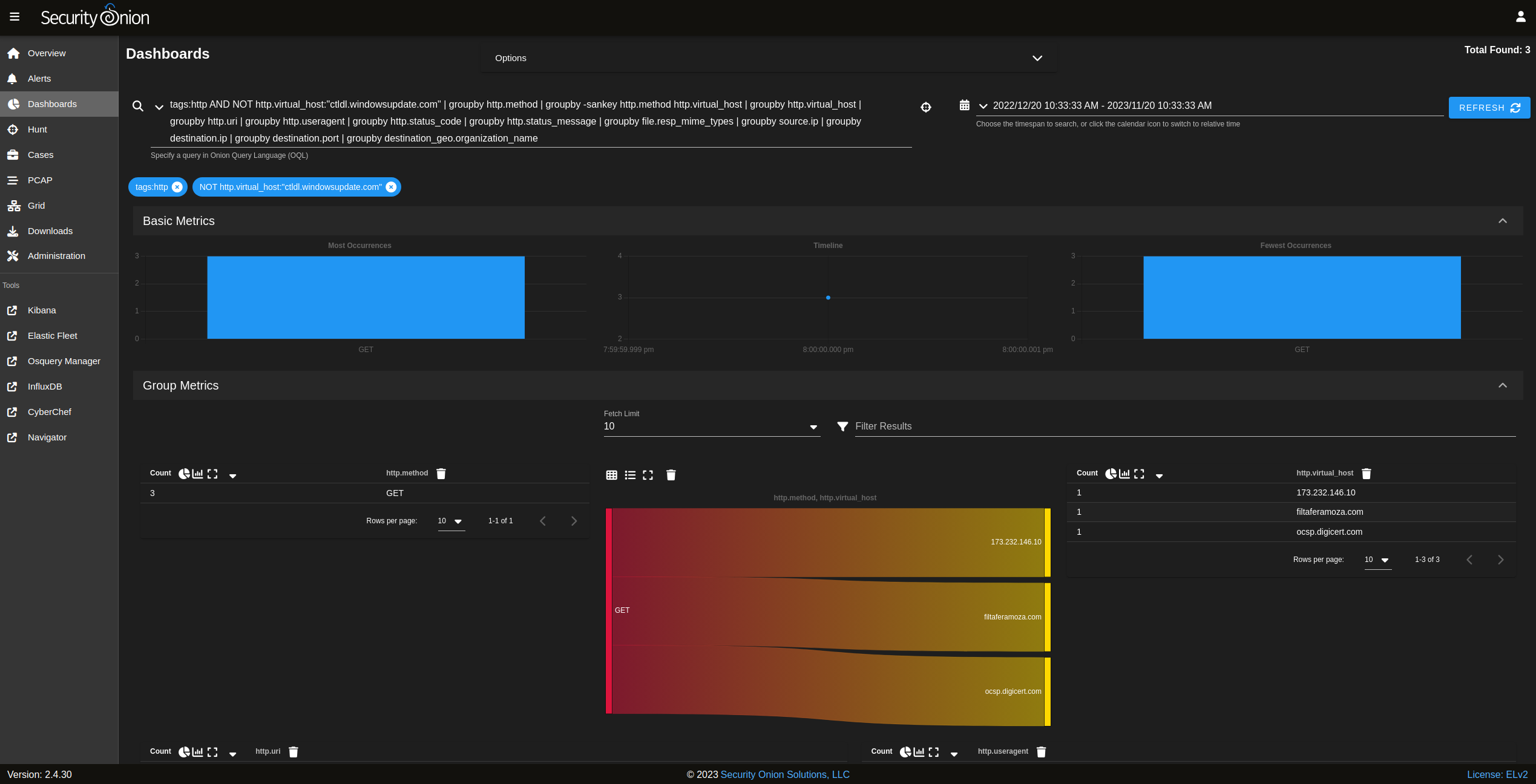
Let's begin our tour of the protocol metadata with HTTP:


One of these HTTP transactions is a 302 redirect:


Next let's review DNS lookups:


Next let's look at SSL logs:


Notice that there's an interesting organization name of "Stark Industries Solutions Ltd" with 2 interesting domain names:


If we switch to Zeek Notices we see that the Stark Industries certificates were self-signed:


Here's an overview of all connections:


If we sort those connections by client.ip_bytes, we will find one client connection that transferred much more data than the others:


We can then drill into that connection:


Pivoting to PCAP, we see evidence that this is VNC:


We can then download the PCAP and open it in NetworkMiner (included in Security Onion Desktop). The Images tab shows what was transferred via VNC:


We can then open those images to get a sense of what was happening via VNC:


Back in NetworkMiner, we can go to the Parameters tab and see the keystrokes for amazon.com being sent over VNC:


Monday, August 7, 2023

Security Onion 2.4 Release Candidate 2 (RC2) Now Available!

We recently released the first Release Candidate version of Security Onion 2.4:
https://blog.securityonion.net/2023/07/security-onion-24-release-candidate-1.html

Today, we are excited to release Security Onion 2.4 Release Candidate 2 (RC2)!


Highlights

A few highlights of this release:

You can now directly add a value from Alerts, Dashboards, or Hunt as an observable to a new or existing case:
https://github.com/Security-Onion-Solutions/securityonion/issues/7992

Security Onion Desktop now includes NetworkMiner:
https://github.com/Security-Onion-Solutions/securityonion/issues/10865

Elastic has been upgraded to 8.8.2:
https://github.com/Security-Onion-Solutions/securityonion/issues/10864

Please review the Release Notes for all other changes in this release:
https://docs.securityonion.net/en/2.4/release-notes.html

Base OS

If you haven't already, please review our recent blog post on our 2.4 base OS changes:
https://blog.securityonion.net/2023/07/security-onion-24-base-os.html

Known Issues

Here are some known issues that should be resolved in later releases:

  • You cannot do an in-place upgrade from 2.3 to 2.4. We are still investigating data migration.
  • Security Onion Desktop is still considered experimental. It should work when installing from our ISO image but will not work for network installations currently.
  • File extraction may not work if you've manually switched from the default of Zeek metadata to Suricata metadata.

In-place Upgrades

If you have an existing installation of 2.4 RC1 (not Beta), then you should be able to update to RC2 via soup. Please be aware of a couple of issues:

  • Due to a bug in RC1, you may be prompted to re-run soup up to four times so that it gets fully updated. 
  • Soup may fail due to a non-critical error while updating Elastic Fleet (more likely with Import or Eval installations).
  • If you upgrade an Import or Eval installation and do not have new logs coming in, then you may need to go to Elastic Fleet - Settings - Outputs - so-manager_elasticsearch - Actions and enable both options at the bottom marked "Make this output the default".
  • Elastic Agents are not automatically updated.
  • If you tried to run soup before this announcement was posted, then you may need to run the following command to remove any old remnants:
    sudo rm -f /tmp/supersoup/soup*

For more information about soup, please see:
https://docs.securityonion.net/en/2.4/soup.html

Transition from 2.3 to 2.4

When we release the final version of Security Onion 2.4, we will announce an End Of Life (EOL) date for Security Onion 2.3. Security Onion 2.3 will continue to receive security patches and priority bug fixes until it reaches EOL.

Documentation

You can find 2.4 documentation at:
https://docs.securityonion.net/en/2.4/

Documentation is always a work in progress. If you find documentation that needs to be updated, please let us know as described in the Feedback section below.

Warnings and Disclaimers

  • Things may change between this release candidate version and the final GA release.
  • Ask your doctor if pre-GA software is right for you.
  • If it breaks, you get to keep both pieces!

Enough warnings and disclaimers? Let’s go!

License Reminder

Please be reminded of the license change we posted last year:
https://blog.securityonion.net/2022/08/security-onion-enterprise-features-and.html

Installation

We highly recommend starting with an IMPORT installation as shown at:
https://docs.securityonion.net/en/2.4/first-time-users.html

Once you’re comfortable with your IMPORT installation, then you can move on to more advanced installations as shown at:
https://docs.securityonion.net/en/2.4/architecture.html

Questions, Problems, and Feedback

If you have any questions or problems relating to Security Onion 2.4, please use the new 2.4 category at our Discussions site:
https://github.com/Security-Onion-Solutions/securityonion/discussions/categories/2-4

We welcome your detailed feedback!

Screenshot Tour

If you want the quickest and easiest way to try out Security Onion 2.4, just follow the screenshots below to install an Import node. This can be done in a minimal VM with only 4GB RAM! For more information, please see:
https://docs.securityonion.net/en/2.4/first-time-users.html


Search This Blog

Featured Post

Registration Now Open for Augusta Cyber Week 2026!

Registration is now open for Augusta Cyber Week in beautiful Augusta GA from October 19, 2026 through October 24, 2026! This includes: 4-day...

Popular Posts

Blog Archive