Showing posts with label barnyard. Show all posts

Wednesday, August 16, 2017

securityonion-nsmnow-admin-scripts - 20120724-0ubuntu0securityonion159 now available for Security Onion!

The following package is now available:
securityonion-nsmnow-admin-scripts - 20120724-0ubuntu0securityonion159

This package should resolve the following issues:

NSM: barnyard sending blank interface to syslog output #652
https://github.com/Security-Onion-Solutions/security-onion/issues/652

NSM: cron job to check if netsniff-ng is recording with a date other
than today #1117
https://github.com/Security-Onion-Solutions/security-onion/issues/1117

Thanks
Thanks to Kevin Branch and Wes Lambert for submitting pull requests!
Thanks to Kevin Branch and Wes Lambert for testing the new package!

Updating
Please see the following page for full update instructions:
https://securityonion.net/wiki/Upgrade

Want to show your support for Security Onion?
Security Onion t-shirts are available in our CafePress store!
http://www.cafepress.com/securityonion/11820053

Conference
Security Onion Conference will be on Friday September 15 in beautiful Augusta, GA!
https://securityonion.net/conference

Training
We have a 4-day Security Onion training class right before the Security Onion Conference in Augusta GA.  For this and other training options, please see:
https://securityonionsolutions.com

Support
Need support?  Please see:
https://securityonion.net/wiki/Support

Thanks!

Monday, January 26, 2009

Integrating Snort 3.0 (SnortSP) and Sguil in 3 Steps

So once you have Snort 3.0 installed, what can you do with it? One thing you can do with it (and the one that most people are interested in) is to configure it for IDS mode. The Snort 3.0 architecture includes the Snort 2.8.2 Detection Engine, so we'll have the Snort Security Platform (SnortSP) capturing packets and handing them off to Snort 2.8.2 for analysis and alerting.

The best open source tool to manage Snort alerts is Sguil and the easiest way to install Sguil is using NSMnow. NSMnow automatically installs and configures barnyard2 (compatible with SnortSP's unfied2 format), sancp, Sguil, and Snort 2.x. We're going to replace NSMnow's snort alert process with Snort 3.0.

This quick recipe assumes that you're running on Ubuntu 8.04 and your primary network interface is eth0. You should be able to copy/paste each of the three code blocks into your terminal.

Obligatory disclaimer: I offer no warranty of any kind. If this breaks your box, you get to keep both pieces.

Step 1: Get root privileges
##########################
sudo -i
##########################
Step 2: Install NSMnow
##########################
mkdir /usr/local/src/NSMnow
cd /usr/local/src/NSMnow
wget http://www.securixlive.com/download/nsmnow/NSMnow-1.3.4.tar.gz
tar zxvf NSMnow-1.3.4.tar.gz
./NSMnow -i -y
##########################
Step 3: Configure NSMnow and SnortSP and start
##########################
if ! grep "/nsm/server_data/server1/load" /etc/apparmor.d/usr.sbin.mysqld > /dev/null
then
sed -i 's|}| /nsm/server_data/server1/load/* r,|g' /etc/apparmor.d/usr.sbin.mysqld
echo "}" >> /etc/apparmor.d/usr.sbin.mysqld
fi
/etc/init.d/apparmor restart
/usr/local/sbin/nsm --server --start
/usr/local/sbin/nsm_sensor_ps-start --skip-snort-alert
mkdir /etc/snortsp_alert
cd /etc/snortsp_alert
cp -R /etc/nsm/sensor1/* .
mv snort.conf snort_orig.conf
sspiffy.sh /usr/local -c snort_orig.conf -i eth0
grep -v "sameip" rules/bad-traffic.rules > rules/bad-traffic.rules.2
rm -f rules/bad-traffic.rules
mv rules/bad-traffic.rules.2 rules/bad-traffic.rules
snortsp -C -L snort.lua
##########################
Snort 3.0 is now capturing packets on eth0 and analyzing them. Let's verify that now.

Launch the Sguil client by opening a new terminal and typing the following:
##########################
sguil.tk
##########################
When prompted, login to Sguil using the default credentials:
Username: sguil
Password: password

Next, create some alerts by opening a browser and going to:
http://www.testmyids.com

Finally, go into the Sguil console and you should see two new alerts:
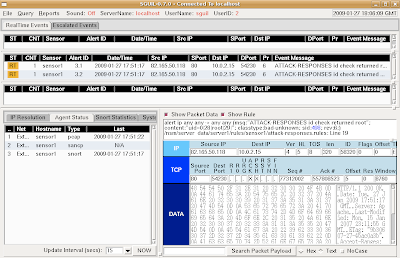

This demonstrates that SnortSP is capturing packets, analyzing them with the Snort 2.8.2 Detection Engine, and outputting in unified2 format, which is then read by Barnyard2 and inserted into the Sguil database.

When finished, return to your SnortSP window and press ctrl-c to terminate the SnortSP process. Then type "nsm --all --stop" to terminate all NSMnow processes.

Tuesday, January 20, 2009

NSMnow 1.3

I previously discussed the NSMnow project. These guys have made tremendous progress in the last few weeks and have fixed the bugs that I notified them of. They are now at version 1.3. Go check it out!

Tuesday, November 11, 2008

Securix-NSM

I mentioned in my last post that I'm using NSMnow to install Barnyard2, SANcp, Snort, and Sguil in my Security Onion LiveCD. The NSMnow guys have released their own LiveCD called Securix-NSM. Go check it out!

Wednesday, November 5, 2008

Barnyard2, SanCP, Snort, and Sguil using NSMnow

In my last post, I mentioned that I was working on integrating BASE into the Security Onion LiveCD. I chose BASE because I wanted a quick and easy GUI for Snort until I could get Sguil up and running. Little did I know that there was a quick and easy way to get Sguil up and running (even easier than installing BASE).

The stars aligned and I stumbled upon NSMnow. This is an amazing little project that will analyze your system; download and install Barnyard2, SanCP, Snort, and Sguil; and automatically configure the whole thing! I ran NSMnow in a terminal chrooted into the Security Onion LiveCD build environment (courtesy of Reconstructor) and a few minutes later it was done. I generated a new ISO, booted it, ran the init script, and fired up the Sguil client. That was too easy!

Thursday, October 30, 2008

Apache EnableSendfile directive

I'm currently working on integrating Barnyard and BASE into the Security Onion LiveCD. After generating a new ISO and booting it up, I opened Firefox and went to http://localhost/base/. I was greeted with the BASE setup screen, but it was plain white with no CSS formatting:


The /base/styles/base_style.css file was in place and had the proper permissions, but doing "curl http://localhost/base/styles/base_style.css" would result in "transfer closed with bytes remaining". I created a small "Hello World!" test page in the styles directory and Apache served it just fine. I then copied base_style.css and began taking things out until Apache served the file. Ultimately, I determined that Apache couldn't serve non-PHP files over 255 bytes. I did some research and stumbled upon the EnableSendfile directive. I added "EnableSendfile off" to my Apache configuration file, restarted Apache, and verified that Apache could serve files over 255 bytes. BASE then showed up with the proper formatting:

Search This Blog

Featured Post

Registration Now Open for Augusta Cyber Week 2026!

Registration is now open for Augusta Cyber Week in beautiful Augusta GA from October 19, 2026 through October 24, 2026! This includes: 4-day...

Popular Posts

Blog Archive