Showing posts with label logstash. Show all posts

Monday, December 13, 2021

Security Onion 2.3.90 20211213 Hotfix Now Available to Fully Mitigate All Known log4j Attack Vectors!

We recently released Security Onion 2.3.90 and a few hotfixes:
https://blog.securityonion.net/2021/11/security-onion-2390-now-available.html
https://docs.securityonion.net/en/2.3/release-notes.html#hotfix-wazuh
https://docs.securityonion.net/en/2.3/release-notes.html#hotfix-airgapfix
https://docs.securityonion.net/en/2.3/release-notes.html#hotfix-20211206
https://docs.securityonion.net/en/2.3/release-notes.html#hotfix-20211210

Today, we are releasing an additional hotfix:
https://docs.securityonion.net/en/2.3/release-notes.html#hotfix-20211213

If you haven't updated recently, then you should review all links above so that you are aware of all recent changes.

Summary

A vulnerability was recently announced in log4j:
https://github.com/advisories/GHSA-jfh8-c2jp-5v3q

We released an initial hotfix on Friday:
https://docs.securityonion.net/en/2.3/release-notes.html#hotfix-20211210

Elastic later released additional details:
https://discuss.elastic.co/t/apache-log4j2-remote-code-execution-rce-vulnerability-cve-2021-44228-esa-2021-31/291476

Today's hotfix addresses all known attack vectors for the log4j vulnerability by fully removing the JndiLookup class.

UPDATE 2021/12/14 An additional CVE was announced:
https://nvd.nist.gov/vuln/detail/CVE-2021-45046

This new CVE recommends removing the JndiLookup class and that was done in this 20211213 hotfix.

UPDATE 2021/12/16 If you scan with a vulnerability scanner that just looks at version numbers, then it may detect vulnerabilities as we kept the existing version numbers but removed the vulnerable JndiLookup class. Also, some scanners may flag elasticsearch-sql-cli-7.15.2.jar but there is no attack vector here according to Elastic:

This tool is standalone (NOT part of the server), for running ad-hoc SQL interactions. The tool does NOT accept external user input. The mere presence of the JndiLookup.class is not problematic here, but it looks interesting and could lead to confusion for scanners

UPDATE 2021/12/20 Elastic released 7.16.2 yesterday with updated Log4j 2.17.0, primarily to avoid false positives in vulnerability scanners. We are currently looking into this version. Updating to new Elastic containers will require a full release (not just a hotfix), so it will take some time.

Internet-Connected Deployments

If your Security Onion deployment has Internet access, simply run "sudo soup" as described here:
https://docs.securityonion.net/en/2.3/soup.html

Airgap Deployments

If you have an airgap deployment, download the new ISO image from the usual location:
https://securityonion.net/download

Then follow the steps here:
https://docs.securityonion.net/en/2.3/airgap.html#security-onion-version-updates

Security Onion 16.04

If you are still running Security Onion 16.04, please note that it is past End Of Life. Please take this opportunity to upgrade to Security Onion 2:
https://docs.securityonion.net/en/2.3/appendix.html

Questions or Problems

If you have questions or problems, please see our community support forum guidelines:
https://docs.securityonion.net/en/2.3/community-support.html

You can then find the community support forum at:
https://securityonion.net/discuss

Friday, December 10, 2021

Security Onion 2.3.90 20211210 Hotfix Now Available to Mitigate log4j Vulnerability!

We recently released Security Onion 2.3.90 and a few hotfixes:
https://blog.securityonion.net/2021/11/security-onion-2390-now-available.html
https://docs.securityonion.net/en/2.3/release-notes.html#hotfix-wazuh
https://docs.securityonion.net/en/2.3/release-notes.html#hotfix-airgapfix
https://docs.securityonion.net/en/2.3/release-notes.html#hotfix-20211206

Today, we are releasing an additional hotfix:
https://docs.securityonion.net/en/2.3/release-notes.html#hotfix-20211210

If you haven't updated recently, then you should review all links above so that you are aware of all recent changes.

A vulnerability was recently announced in log4j:
https://github.com/advisories/GHSA-jfh8-c2jp-5v3q

The following components have vulnerable versions of log4j:

  • Elasticsearch
  • Logstash
  • TheHive/Cortex have a separate Elasticsearch instance

For Elasticsearch, Logstash, and the Elasticsearch instance for TheHive/Cortex, we've added the log4j2.formatMsgNoLookups=true option to disable the vulnerable code. It should be noted that TheHive/Cortex includes log4j 2.9.1 but NOT log4j-core-2.9.1.jar, which is the JAR that contains the JNDI lookup code. Instead, TheHive and Cortex utilize the simple logging facade via log4j-to-slf4j-2.9.1.jar and that library does NOT contain the vulnerable JNDI lookup code.

UPDATE 2021/12/13 We've released an additional hotfix that more fully addresses all known log4j attack vectors:
https://blog.securityonion.net/2021/12/security-onion-2390-20211213-hotfix-now.html

Internet-Connected Deployments

If your Security Onion deployment has Internet access, simply run "sudo soup" as described here:
https://docs.securityonion.net/en/2.3/soup.html

Airgap Deployments

If you have an airgap deployment, download the new ISO image from the usual location:

https://securityonion.net/download

Then follow the steps here:

https://docs.securityonion.net/en/2.3/airgap.html#security-onion-version-updates

Security Onion 16.04

If you are still running Security Onion 16.04, please note that it is past End Of Life. Please take this opportunity to upgrade to Security Onion 2:
https://docs.securityonion.net/en/2.3/appendix.html

Questions or Problems

If you have questions or problems, please see our community support forum guidelines:

https://docs.securityonion.net/en/2.3/community-support.html

You can then find the community support forum at:

https://securityonion.net/discuss

Tuesday, April 21, 2020

Elastic 6.8.8 now available for Security Onion!

UPDATE 2020-04-22 7:00 Looks like there is an issue with domainstats in this release.  So if you're running domainstats, please do not update until we have resolved this issue.

UPDATE 2020-04-22 8:27 We've pushed a new domainstats image which should resolve this issue.

The following updates are now available for Security Onion!

  • Elastic 6.8.8 Docker images
  • securityonion-elastic - 20190510-1ubuntu1securityonion93

These updates should resolve the following issues:

Elastic 6.8.8 #1746
https://github.com/Security-Onion-Solutions/security-onion/issues/1746

LOGSTASH_MINIMAL doesn't include Beat config #1751
https://github.com/Security-Onion-Solutions/security-onion/issues/1751

securityonion-elastic: improve elasticsearch ingest parsing for sysmon logs via Wazuh #1754
https://github.com/Security-Onion-Solutions/security-onion/issues/1754

securityonion-elastic: bro_files file_ip should be copied to source_ip #1742
https://github.com/Security-Onion-Solutions/security-onion/issues/1742

securityonion-elastic: remove [data][sysmon][targetfilename] from winlogbeat sysmon parsing #1752
https://github.com/Security-Onion-Solutions/security-onion/issues/1752

securityonion-elastic: so-elastic-reset does not remove closed indices #1759
https://github.com/Security-Onion-Solutions/security-onion/issues/1759

securityonion-elastic: so-elastic-reset needs to disable elastalert and then re-enable afterward #1735
https://github.com/Security-Onion-Solutions/security-onion/issues/1735

so-import-pcap-configure: running alone results in error #1740
https://github.com/Security-Onion-Solutions/security-onion/issues/1740

Unanchored regexes in 8001_postprocess_common_ip_augmentation.conf wrongly skip geoip #1244
https://github.com/Security-Onion-Solutions/security-onion/issues/1244

Thanks
Thanks to the Elastic team for Elastic 6.8.8!
Thanks to Wes Lambert and John Bernal for testing and QA!

Updating
Please see the following page for full update instructions:
https://securityonion.net/docs/Upgrade

Support
Need support?  Please see:
https://securityonion.net/docs/Support

Documentation
You can find our documentation here:
https://securityonion.net/docs

Also, we're now offering a printed copy of our official documentation with foreword by Richard Bejtlich and proceeds going to Rural Technology Fund:
https://securityonion.net/book

Training
Security Onion Solutions is the only official authorized training provider for Security Onion.  For more information about our training classes, please see:
https://securityonionsolutions.com

Appliances
We now offer hardware appliances!  For more information, please see:
https://securityonionsolutions.com

Thanks!

Wednesday, March 18, 2020

Elastic 6.8.7 now available for Security Onion!

The following updates are now available for Security Onion!


  • Elastic 6.8.7 Docker images
  • securityonion-elastic - 20190510-1ubuntu1securityonion87


These updates should resolve the following issues:

Elastic 6.8.7 #1728
https://github.com/Security-Onion-Solutions/security-onion/issues/1728

securityonion-elastic: adjust bro_notice parsing #1724
https://github.com/Security-Onion-Solutions/security-onion/issues/1724

securityonion-elastic: check ingest geoip fields #1725
https://github.com/Security-Onion-Solutions/security-onion/issues/1725

so-import-pcap: support paths with spaces #1714
https://github.com/Security-Onion-Solutions/security-onion/issues/1714

so-import-pcap: enable file-extraction #1715
https://github.com/Security-Onion-Solutions/security-onion/issues/1715

securityonion-elastic: change template name in 9002_output_import.conf #1723
https://github.com/Security-Onion-Solutions/security-onion/issues/1723

securityonion-elastic: logstash custom config should get copied for LOGSTASH_MINIMAL #1719
https://github.com/Security-Onion-Solutions/security-onion/issues/1719

Thanks
Thanks to the Elastic team for Elastic 6.8.7!
Thanks to Wes Lambert and Bryant Treacle for testing and QA!

Updating
Please see the following page for full update instructions:
https://securityonion.net/docs/Upgrade

Support
Need support?  Please see:
https://securityonion.net/docs/Support

Documentation
You can find our documentation here:
https://securityonion.net/docs

Also, we're now offering a printed copy of our official documentation with foreword by Richard Bejtlich and proceeds going to Rural Technology Fund:
https://securityonion.net/book

Training
Security Onion Solutions is the only official authorized training provider for Security Onion.  For more information about our training classes, please see:
https://securityonionsolutions.com

Appliances
We now offer hardware appliances!  For more information, please see:
https://securityonionsolutions.com

Thanks!

Wednesday, December 4, 2019

Security Onion 16.04.6.3 now available featuring Elastic 6.8.4, CyberChef 9.11.7, Bro 2.6.4, Suricata 4.1.5, Snort 2.9.15.0, and more!

Security Onion 16.04.6.3 is now available!

Security Onion 16.04.6.3
Major Changes Since Last ISO Image

  • Elastic 6.8.4
  • CyberChef 9.11.7
  • Bro 2.6.4
  • Suricata 4.1.5
  • Snort 2.9.15.0

Thanks
Thanks to Wes Lambert for testing this ISO image!

Package Updates
This release also includes the following updated packages:
pinguybuilder - 20180514-1ubuntu1securityonion20

This package resolves the following issue:

pinguybuilder: increment version to 16.04.6.3 #1668
https://github.com/Security-Onion-Solutions/security-onion/issues/1668

Issues Resolved
For a list of all issues resolved in this release, please see:
https://github.com/Security-Onion-Solutions/security-onion/projects/8

Release Notes
For more information about this release, please see:
https://securityonion.net/docs/release-notes.html

Installation Guide
We've updated the Installation guide to reflect the download locations for the new ISO image:
https://securityonion.net/docs/installation.html

Existing Deployments
If you have existing 16.04 installations, there is no need to download the new ISO image.  You can simply continue using our standard update process to install updated packages as they are made available:
https://securityonion.net/docs/Upgrade

If you have existing installations of Security Onion 14.04, you can upgrade from 14.04 to 16.04:
https://securityonion.net/docs/upgrading-from-14.04-to-16.04.html

Documentation
We've got a new documentation site!  Please let us know if anything needs to be updated:
https://securityonion.net/docs

Also, we're now offering a printed copy of our official documentation with foreword by Richard Bejtlich and proceeds going to Rural Technology Fund:
https://securityonion.net/book

Training
Security Onion Solutions is the only official authorized training provider for Security Onion and we have 4-day Basic and 4-day Advanced onsite training classes.  We also offer online classes as well.  For more information, please see:
https://securityonionsolutions.com

Appliances
We now offer hardware appliances!  For more information, please see:
https://blog.securityonion.net/2018/10/introducing-security-onion-solutions.html

Support
Need support?  Please see:
https://securityonion.net/docs/Support

Screenshot Tour

ISO Boot Menu

Once the Live Desktop appears, double-click the Install icon and follow the prompts

Once you've completed the installer and rebooted, login using the username and password you created in the installer

After logging in, you are prompted to run Setup

Setup can now run interactively via CLI and sosetup-minimal can be used to minimize RAM and CPU usage

Welcome to Setup

Configure network interfaces

If your hostname is securityonion, Setup gives you the opportunity to rename it

Configure your network interfaces, reboot, then log back in

Launch Setup again and skip network configuration to go to service configuration

sosetup-minimal can run Evaluation Mode in 4GB RAM

Confirm sniffing interface

Create username

Create Password

Confirm Password

Confirm all options

Please wait while Setup configures your system

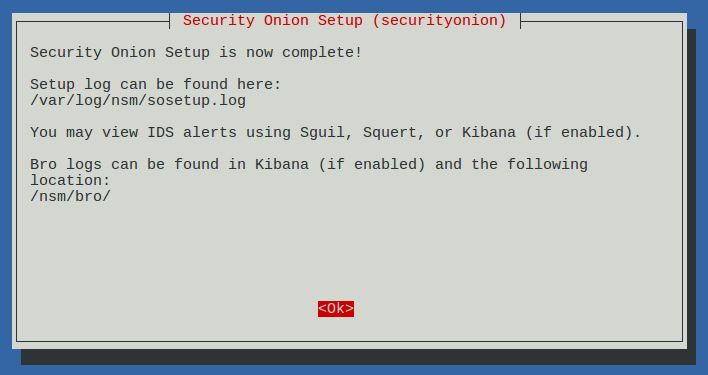
Setup complete

Desktop no longer prompts to run Setup and includes icons for analyst applications 

The README shortcut includes links to the cheat sheet and online and offline documentation

CyberChef 9.11.7

Single Sign On (SSO) for Squert, CapMe, and Kibana

sosetup-minimal can run Evaluation Mode in only 4GB RAM

Analyze IDS alerts using Squert

Retrieve full packet capture with CapMe

Kibana Overview Dashboard

Help

Bro Notices

HIDS Alerts from OSSEC/Wazuh

NIDS Alerts from Snort or Suricata

Bro Connections

Bro DCERPC

Bro DHCP

Bro DNP3

Bro DNS

Bro Files

Bro FTP

Bro HTTP

Bro Intel

Bro IRC

Bro Kerberos

Bro Modbus

Bro MySQL

Bro NTLM

Bro PE

Bro RADIUS

Bro RDP

Bro RFB

Bro SIP

Bro SMB

Bro SMTP

Bro SNMP
 
Bro Software


Bro SSH

Bro SSL

Bro Syslog

Bro Tunnels

Bro Weird

Bro X.509

OSSEC (Wazuh)

Syslog

Search This Blog

Featured Post

Registration Now Open for Augusta Cyber Week 2026!

Registration is now open for Augusta Cyber Week in beautiful Augusta GA from October 19, 2026 through October 24, 2026! This includes: 4-day...

Popular Posts

Blog Archive