Thursday, February 13, 2020

Security Onion Hybrid Hunter 1.1.4 - Alpha 4 Available for Testing!

In 2018, we started working on the next major version of Security Onion, code-named Hybrid Hunter:
https://blog.securityonion.net/2018/11/security-onion-hybrid-hunter-101-tech.html

We're excited to announce that Hybrid Hunter 1.1.4 is now available for testing and is considered our ALPHA 4 release!
https://github.com/Security-Onion-Solutions/securityonion-saltstack/blob/master/README.md

This is our last planned alpha release for Hybrid Hunter.  If all goes according to plan, our next Hybrid Hunter release should be Beta!

Major Highlights in this Release


  • Added new in-house auth method Security Onion Auth.
  • Web user creation is done via the browser now instead of so-user-add.
  • New Logstash pipeline setup. Now uses multiple pipelines.
  • New Master + Search node type and well as a Heavy Node type in the install.
  • Change all nodes to point to the docker registry on the Master. This cuts down on the calls to dockerhub.
  • Zeek 3.0.1
  • Elastic 6.8.6
  • New SO Start | Stop | Restart scripts for all components (eg. so-playbook-restart).
  • BPF support for Suricata (NIDS), Steno (PCAP) & Zeek (docs).
  • Updated Domain Stats & Frequency Server containers to Python3 & created new Salt states for them.
  • Added so-status script which gives an easy to read look at container status.
  • Manage threshold.conf for Suricata using the thresholding pillar (docs).
  • The ISO now includes all the docker containers for faster install speeds.
  • You now set the password for the onion account during the iso install. This account is temporary and will be removed after so-setup.
  • Updated Helix parsers for better compatibility.
  • Updated telegraf docker to include curl and jq.
  • CVE-2020-0601 Zeek Detection Script.
  • ISO Install now prompts you to create a password for the onion user during imaging. This account gets disabled during setup.
Thanks

Lots of love went into this release!

Special thanks to all our folks working so hard to make this release happen!


  • Mike Reeves
  • Wes Lambert
  • Josh Brower
  • Josh Patterson
  • William Wernert


Screenshots

so-status

Registering first user account

Logging in

Creating additional user

Warnings and Disclaimers


  • This ALPHA release is BLEEDING EDGE and TOTALLY UNSUPPORTED!
  • If this breaks your system, you get to keep both pieces!
  • This is a work in progress and is in constant flux.
  • This is intended to build a quick prototype proof of concept so you can see what our new platform might look like. This configuration will change drastically over time leading up to the final release.
  • Do NOT run this on a system that you care about!
  • Do NOT run this on a system that has data that you care about!
  • This should only be run on a TEST box with TEST data!
  • Use of this ALPHA RELEASE may result in nausea, vomiting, or a burning sensation.


Ready to try it out?

If you want to try our new ISO image, please follow the instructions here:
https://github.com/Security-Onion-Solutions/securityonion-saltstack/wiki/ISO

Otherwise, you can install Hybrid Hunter on Ubuntu 16.04 or CentOS 7 using the instructions here:
https://github.com/Security-Onion-Solutions/securityonion-saltstack

Feedback
If you have questions, problems, or other feedback regarding Hybrid Hunter, please post to our subreddit and prefix the title with [Hybrid Hunter]:
https://www.reddit.com/r/securityonion/

Wednesday, February 5, 2020

Zeek 3.0.1, Elastic 6.8.6, and CyberChef 9.12.0 now available for Security Onion!

The following updates are now available for Security Onion!

Elastic 6.8.6 Docker images
securityonion-bro - 3.0.1-1ubuntu1securityonion10 (Zeek 3.0.1)
securityonion-bro-afpacket - 1.3.0-1ubuntu1securityonion17
securityonion-bro-scripts - 20121004-0ubuntu0securityonion100
securityonion-elastic - 20190510-1ubuntu1securityonion83
securityonion-nsmnow-admin-scripts - 20120724-0ubuntu0securityonion225
securityonion-onionsalt - 20140917-0ubuntu0securityonion28
securityonion-samples-bro - 20170824-1ubuntu1securityonion4
securityonion-setup - 20120912-0ubuntu0securityonion325
securityonion-sostat - 20120722-0ubuntu0securityonion141
securityonion-tcpudpflow - 001-0ubuntu0securityonion10
securityonion-web-page - 20141015-0ubuntu0securityonion105

These updates should resolve the following issues:

Zeek 3.0.1 #1645
https://github.com/Security-Onion-Solutions/security-onion/issues/1645

Elastic 6.8.6 #1684
https://github.com/Security-Onion-Solutions/security-onion/issues/1684

CyberChef 9.12.0 #1689
https://github.com/Security-Onion-Solutions/security-onion/issues/1689

securityonion-bro-scripts: migrate from Bro to Zeek #1683
https://github.com/Security-Onion-Solutions/security-onion/issues/1683

securityonion-bro-scripts: remove conn-add-country #1630
https://github.com/Security-Onion-Solutions/security-onion/issues/1630

securityonion-bro-scripts: improve postinst to avoid errors when reinstalling #1711
https://github.com/Security-Onion-Solutions/security-onion/issues/1711

securityonion-bro-scripts: add cve-2020-0601 script #1709
https://github.com/Security-Onion-Solutions/security-onion/issues/1709

securityonion-samples-bro: add cve-2020-0601 pcaps #1710
https://github.com/Security-Onion-Solutions/security-onion/issues/1710

securityonion-elastic: update parsers for Zeek 3 #1680
https://github.com/Security-Onion-Solutions/security-onion/issues/1680

securityonion-elastic: improve logstash parser for pfsense filterlog #1696
https://github.com/Security-Onion-Solutions/security-onion/issues/1696

securityonion-elastic: update dashboards for Zeek migration #1685
https://github.com/Security-Onion-Solutions/security-onion/issues/1685

securityonion-elastic: Update Kibana dashboard for firewall logs #1697
https://github.com/Security-Onion-Solutions/security-onion/issues/1697

securityonion-elastic: add elasticsearch ingest parser for pfsense filterlog #1698
https://github.com/Security-Onion-Solutions/security-onion/issues/1698

securityonion-elastic: elasticsearch ingest pipelines need to support "ips" fields #1666
https://github.com/Security-Onion-Solutions/security-onion/issues/1666

securityonion-elastic: update dns domain info for elasticsearch ingest #1667
https://github.com/Security-Onion-Solutions/security-onion/issues/1667

securityonion-elastic: improve support for custom ingest parsers #1671
https://github.com/Security-Onion-Solutions/security-onion/issues/1671

securityonion-elastic: Docker daemon.json conflict #1674
https://github.com/Security-Onion-Solutions/security-onion/issues/1674

securityonion-elastic: improve postinst update check #1699
https://github.com/Security-Onion-Solutions/security-onion/issues/1699

securityonion-elastic: migrate script.* settings from elasticsearch.yml.bak to elasticsearch.yml #1676
https://github.com/Security-Onion-Solutions/security-onion/issues/1676

securityonion-elastic: container status scripts should check system uptime before declaring fail #1686
https://github.com/Security-Onion-Solutions/security-onion/issues/1686

securityonion-elastic: Bro HTTP Logs "user" field not mapped in Elasticsearch template #1672
https://github.com/Security-Onion-Solutions/security-onion/issues/1672

securityonion-elastic: so-elastic-start times out waiting for elasticsearch #1695
https://github.com/Security-Onion-Solutions/security-onion/issues/1695

Elastalert - Update new_term.yaml #1706
https://github.com/Security-Onion-Solutions/security-onion/issues/1706

securityonion-onionsalt: replicate /etc/elasticsearch/custom #1693
https://github.com/Security-Onion-Solutions/security-onion/issues/1693

securityonion-sostat: migrate from Bro to Zeek #1692
https://github.com/Security-Onion-Solutions/security-onion/issues/1692

NSM: change Bro references to Zeek #1682
https://github.com/Security-Onion-Solutions/security-onion/issues/1682

NSM: increase timeout in /etc/systemd/system/securityonion.service #1708
https://github.com/Security-Onion-Solutions/security-onion/issues/1708

NSM: broctl and zeekctl need to check if parameters were passed #1713
https://github.com/Security-Onion-Solutions/security-onion/issues/1713

Docs: Change bro to zeek #1690
https://github.com/Security-Onion-Solutions/security-onion/issues/1690

Setup: change #inter#face to #interface #1675
https://github.com/Security-Onion-Solutions/security-onion/issues/1675

Setup: change Bro references to Zeek #1681
https://github.com/Security-Onion-Solutions/security-onion/issues/1681

securityonion-tcpudpflow: update for Zeek #1700
https://github.com/Security-Onion-Solutions/security-onion/issues/1700

securityonion-web-page: change bro to zeek #1687
https://github.com/Security-Onion-Solutions/security-onion/issues/1687

securityonion-web-page: update docs and cheat sheet for 16.04.6.4 #1688
https://github.com/Security-Onion-Solutions/security-onion/issues/1688

Test Zeek 3.0.1, Elastic 6.8.6, and related updates #1691
https://github.com/Security-Onion-Solutions/security-onion/issues/1691

Thanks
Thanks to the Zeek team for Zeek 3.0.1!
Thanks to the Elastic team for Elastic 6.8.6!
Thanks to the CyberChef team for CyberChef 9.12.0!
Thanks to the following for testing and QA!
Bryant Treacle
Wes Lambert
Josh Brower
Chris Cuevas

Updating
Please see the following page for full update instructions:
https://securityonion.net/docs/Upgrade

Since we are transitioning from Bro to Zeek, Bro will automatically stop before the packages are upgraded.  Once soup completes, double-check your Bro/Zeek configuration and then restart Zeek:
sudo so-zeek-restart

Support
Need support?  Please see:
https://securityonion.net/docs/Support

Documentation
You can find our documentation here:
https://securityonion.net/docs

Also, we're now offering a printed copy of our official documentation with foreword by Richard Bejtlich and proceeds going to Rural Technology Fund:
https://securityonion.net/book

Training
Security Onion Solutions is the only official authorized training provider for Security Onion and we have 4-day Basic and 4-day Advanced onsite training classes.  We also offer online classes as well.  For more information, please see:
https://securityonionsolutions.com

Appliances
We now offer hardware appliances!  For more information, please see:
https://securityonionsolutions.com

Thanks!

10% Early Bird discount for 4-day Security Onion Basic Training class in Alexandria VA!

We just scheduled a 4-day Security Onion Basic training class in Alexandria VA!  Use promotional code earlybird to get 10% off through 3/5/2020 at 11:59 PM ET!  For more information and to register, please see:
https://securityonionsolutions.com/onsitetraining

If you can't make it to this onsite class, we also offer online training!
https://onlinetraining.securityonionsolutions.com/

For more information and other training options, please see:
https://securityonionsolutions.com


Thursday, January 23, 2020

Snort 2.9.15.1 now available for Security Onion!

securityonion-snort - 2.9.15.1-1ubuntu1securityonion1 is now available for Security Onion!  This package resolves the following issues:

Snort 2.9.15.1 #1703
https://github.com/Security-Onion-Solutions/security-onion/issues/1703

Snort 2.9.15.1

Thanks
Thanks to Cisco for Snort 2.9.15.1!
Thanks to Wes Lambert for testing!

Updating
Please see the following page for full update instructions:
https://securityonion.net/docs/Upgrade

Support
Need support?  Please see:
https://securityonion.net/docs/Support

Documentation
We've got a new documentation site!  Please let us know if anything needs to be updated:
https://securityonion.net/docs

Also, we're now offering a printed copy of our official documentation with foreword by Richard Bejtlich and proceeds going to Rural Technology Fund:
https://securityonion.net/book

Training
Security Onion Solutions is the only official authorized training provider for Security Onion and we have 4-day Basic and 4-day Advanced onsite training classes.  We also offer online classes as well.  For more information, please see:
https://securityonionsolutions.com

Appliances
We now offer hardware appliances!  For more information, please see:
https://securityonionsolutions.com

Thanks!

Monday, December 16, 2019

Suricata 4.1.6 now available for Security Onion!

Suricata 4.1.6 is now available for Security Onion!  The new package version is:

securityonion-suricata - 4.1.6-1ubuntu1securityonion2

This package resolves the following issue:

Suricata 4.1.6 #1677
https://github.com/Security-Onion-Solutions/security-onion/issues/1677


Suricata 4.1.6

Thanks
Thanks to the Suricata team for Suricata 4.1.6!
Thanks to Matt Svensson and Wes Lambert for testing!

Updating
Please see the following page for full update instructions:
https://securityonion.net/docs/Upgrade

Support
Need support?  Please see:
https://securityonion.net/docs/Support

Documentation
We've got a new documentation site!  Please let us know if anything needs to be updated:
https://securityonion.net/docs

Also, we're now offering a printed copy of our official documentation with foreword by Richard Bejtlich and proceeds going to Rural Technology Fund:
https://securityonion.net/book

Training
Security Onion Solutions is the only official authorized training provider for Security Onion and we have 4-day Basic and 4-day Advanced onsite training classes.  We also offer online classes as well.  For more information, please see:
https://securityonionsolutions.com

Appliances
We now offer hardware appliances!  For more information, please see:
https://securityonionsolutions.com

Thanks!

Security Onion Hybrid Hunter 1.1.3 - Alpha 3 Available for Testing!

In 2018, we started working on the next major version of Security Onion, code-named Hybrid Hunter:
https://blog.securityonion.net/2018/11/security-onion-hybrid-hunter-101-tech.html

We're excited to announce that Hybrid Hunter 1.1.3 is now available for testing and is considered our ALPHA 3 release!
https://github.com/Security-Onion-Solutions/securityonion-saltstack/blob/master/README.md

Major Highlights in this Release
  • Cortex integration with TheHive
  • Pre-loaded plays in Playbook from the Sigma community repo
  • OS patch scheduling
  • Python 3 for CentOS
Screenshots


TheHive Cortex Integration

TheHive Alerts - Playbook NIDS

TheHive - NIDS Alert

TheHive - Playbook Alert

Playbook - Bulk Activate

Playbook - Sigma Community Rules - Sysmon 
so-playbook-ruleupdate


Warnings and Disclaimers

  • This ALPHA release is BLEEDING EDGE and TOTALLY UNSUPPORTED!
  • If this breaks your system, you get to keep both pieces!
  • This is a work in progress and is in constant flux.
  • This is intended to build a quick prototype proof of concept so you can see what our new platform might look like. This configuration will change drastically over time leading up to the final release.
  • Do NOT run this on a system that you care about!
  • Do NOT run this on a system that has data that you care about!
  • This should only be run on a TEST box with TEST data!
  • Use of this ALPHA RELEASE may result in nausea, vomiting, or a burning sensation.

Ready to try it out?

If you want to try our new minimal ISO image, please follow the instructions here:
https://github.com/Security-Onion-Solutions/securityonion-saltstack/wiki/ISO

Otherwise, you can install Hybrid Hunter on Ubuntu 16.04 or CentOS 7 using the instructions here:
https://github.com/Security-Onion-Solutions/securityonion-saltstack

After you've installed, if you want to try out the new Playbook functionality, take a look at:
https://github.com/Security-Onion-Solutions/securityonion-saltstack/wiki/Playbook

Feedback
If you have questions, problems, or other feedback regarding Hybrid Hunter, please post to our subreddit and prefix the title with [Hybrid Hunter]:
https://www.reddit.com/r/securityonion/

Tuesday, December 10, 2019

Third Edition of Security Onion Documentation printed book now available!

Many folks have asked for a printed version of our official online documentation and we're excited to provide that!  Whether you work on airgapped networks or simply want a portable reference that doesn't require an Internet connection or batteries, this is what you've been asking for.

Thanks to Richard Bejtlich for writing the inspiring foreword!

Proceeds go to the Rural Technology Fund!

This third edition has been updated for our latest ISO image release and includes a 10% discount code for our online training!


This book covers the following Security Onion topics:

  • Getting Started
  • Analyst Tools
  • Network Visibility
  • Host Visibility
  • Elastic Stack
  • Updating
  • Customizing for your Environment
  • Tuning
  • Tricks and Tips
  • Services
  • Utilities
  • Help
  • Integrations


Q&A

What is the difference between this book and the online documentation?

This book is the online documentation formatted specifically for print.  It also includes an inspiring foreword by Richard Bejtlich that is not available anywhere else!  Proceeds go to the Rural Technology Fund!  Finally, the printed book includes a 10% discount code for our online training.

Who should get this book?

You should get this book if you work on airgapped networks or simply want a portable reference that doesn't require an Internet connection or batteries! Also anyone who wants to donate to a worthy cause like Rural Technology Fund!

How often will the book be updated?

Currently, we plan to release a new edition of the book every time we release a new version of our ISO image.

What is the difference between this edition and the previous edition?

This edition has been updated for our latest ISO image release!

Where do we get it?

The following URL will always take you to the latest version of the printed book at Amazon:
https://securityonion.net/book

Monday, December 9, 2019

securityonion-sostat - 20120722-0ubuntu0securityonion137 now available for Security Onion!

securityonion-sostat - 20120722-0ubuntu0securityonion137 is now available.  This should resolve the following issue:

securityonion-sostat: improve netsniff packet loss calculation #1673
https://github.com/Security-Onion-Solutions/security-onion/issues/1673

Thanks
Thanks to Wes Lambert for testing!

Updating
Please see the following page for full update instructions:
https://securityonion.net/docs/Upgrade

Support
Need support?  Please see:
https://securityonion.net/docs/Support

Documentation
We've got a new documentation site!  Please let us know if anything needs to be updated:
https://securityonion.net/docs

Also, we're now offering a printed copy of our official documentation with foreword by Richard Bejtlich and proceeds going to Rural Technology Fund:
https://securityonion.net/book

Training
Security Onion Solutions is the only official authorized training provider for Security Onion and we have 4-day Basic and 4-day Advanced onsite training classes.  We also offer online classes as well.  For more information, please see:
https://securityonionsolutions.com

Appliances
We now offer hardware appliances!  For more information, please see:
https://securityonionsolutions.com

Thanks!

Wednesday, December 4, 2019

Security Onion 16.04.6.3 now available featuring Elastic 6.8.4, CyberChef 9.11.7, Bro 2.6.4, Suricata 4.1.5, Snort 2.9.15.0, and more!

Security Onion 16.04.6.3 is now available!

Security Onion 16.04.6.3
Major Changes Since Last ISO Image

  • Elastic 6.8.4
  • CyberChef 9.11.7
  • Bro 2.6.4
  • Suricata 4.1.5
  • Snort 2.9.15.0

Thanks
Thanks to Wes Lambert for testing this ISO image!

Package Updates
This release also includes the following updated packages:
pinguybuilder - 20180514-1ubuntu1securityonion20

This package resolves the following issue:

pinguybuilder: increment version to 16.04.6.3 #1668
https://github.com/Security-Onion-Solutions/security-onion/issues/1668

Issues Resolved
For a list of all issues resolved in this release, please see:
https://github.com/Security-Onion-Solutions/security-onion/projects/8

Release Notes
For more information about this release, please see:
https://securityonion.net/docs/release-notes.html

Installation Guide
We've updated the Installation guide to reflect the download locations for the new ISO image:
https://securityonion.net/docs/installation.html

Existing Deployments
If you have existing 16.04 installations, there is no need to download the new ISO image.  You can simply continue using our standard update process to install updated packages as they are made available:
https://securityonion.net/docs/Upgrade

If you have existing installations of Security Onion 14.04, you can upgrade from 14.04 to 16.04:
https://securityonion.net/docs/upgrading-from-14.04-to-16.04.html

Documentation
We've got a new documentation site!  Please let us know if anything needs to be updated:
https://securityonion.net/docs

Also, we're now offering a printed copy of our official documentation with foreword by Richard Bejtlich and proceeds going to Rural Technology Fund:
https://securityonion.net/book

Training
Security Onion Solutions is the only official authorized training provider for Security Onion and we have 4-day Basic and 4-day Advanced onsite training classes.  We also offer online classes as well.  For more information, please see:
https://securityonionsolutions.com

Appliances
We now offer hardware appliances!  For more information, please see:
https://blog.securityonion.net/2018/10/introducing-security-onion-solutions.html

Support
Need support?  Please see:
https://securityonion.net/docs/Support

Screenshot Tour

ISO Boot Menu

Once the Live Desktop appears, double-click the Install icon and follow the prompts

Once you've completed the installer and rebooted, login using the username and password you created in the installer

After logging in, you are prompted to run Setup

Setup can now run interactively via CLI and sosetup-minimal can be used to minimize RAM and CPU usage

Welcome to Setup

Configure network interfaces

If your hostname is securityonion, Setup gives you the opportunity to rename it

Configure your network interfaces, reboot, then log back in

Launch Setup again and skip network configuration to go to service configuration

sosetup-minimal can run Evaluation Mode in 4GB RAM

Confirm sniffing interface

Create username

Create Password

Confirm Password

Confirm all options

Please wait while Setup configures your system

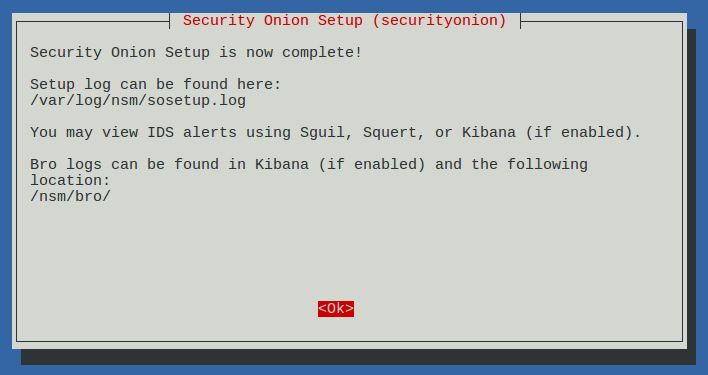
Setup complete

Desktop no longer prompts to run Setup and includes icons for analyst applications 

The README shortcut includes links to the cheat sheet and online and offline documentation

CyberChef 9.11.7

Single Sign On (SSO) for Squert, CapMe, and Kibana

sosetup-minimal can run Evaluation Mode in only 4GB RAM

Analyze IDS alerts using Squert

Retrieve full packet capture with CapMe

Kibana Overview Dashboard

Help

Bro Notices

HIDS Alerts from OSSEC/Wazuh

NIDS Alerts from Snort or Suricata

Bro Connections

Bro DCERPC

Bro DHCP

Bro DNP3

Bro DNS

Bro Files

Bro FTP

Bro HTTP

Bro Intel

Bro IRC

Bro Kerberos

Bro Modbus

Bro MySQL

Bro NTLM

Bro PE

Bro RADIUS

Bro RDP

Bro RFB

Bro SIP

Bro SMB

Bro SMTP

Bro SNMP
 
Bro Software


Bro SSH

Bro SSL

Bro Syslog

Bro Tunnels

Bro Weird

Bro X.509

OSSEC (Wazuh)

Syslog

Search This Blog

Featured Post

Registration Now Open for Augusta Cyber Week 2026!

Registration is now open for Augusta Cyber Week in beautiful Augusta GA from October 19, 2026 through October 24, 2026! This includes: 4-day...

Popular Posts

Blog Archive