The following package is now available:
pinguybuilder - 20180514-1ubuntu1securityonion14
This should resolve the following issues:
pinguybuilder: increment version to 16.04.5.5 #1380
https://github.com/Security-Onion-Solutions/security-onion/issues/1380
pinguybuilder: don't remove /etc/apt/apt.conf.d/01autoremove #1390
https://github.com/Security-Onion-Solutions/security-onion/issues/1390
Thanks
Thanks to Wes Lambert for testing this new package!
Updating
Please see the following page for full update instructions:
https://securityonion.net/wiki/Upgrade
Training
We have 4-day Security Onion training classes coming up in San Antonio, Texas and Atlanta, Georgia! If you can't make it to either of these onsite classes, we have a new online training platform! For more information and other training options, please see:
https://securityonionsolutions.com
Appliances
We now offer hardware appliances! For more information, please see:
https://blog.securityonion.net/2018/10/introducing-security-onion-solutions.html
Support
Need support? Please see:
https://securityonion.net/wiki/Support
Thanks!
Monday, December 17, 2018


Friday, December 14, 2018
Security Onion Hybrid Hunter 1.0.5 Tech Preview Available for Testing!
We recently announced Security Onion Hybrid Hunter:
https://blog.securityonion.net/2018/11/security-onion-hybrid-hunter-101-tech.html
We're excited to announce that Hybrid Hunter 1.0.5 is now available for testing!
https://github.com/Security-Onion-Solutions/securityonion-saltstack/blob/master/README.md
This release includes Kolide Fleet for managing osquery deployments and many other improvements! For more information, please see the Changelog:
https://github.com/Security-Onion-Solutions/securityonion-saltstack/wiki/Changelog
https://blog.securityonion.net/2018/11/security-onion-hybrid-hunter-101-tech.html
We're excited to announce that Hybrid Hunter 1.0.5 is now available for testing!
https://github.com/Security-Onion-Solutions/securityonion-saltstack/blob/master/README.md
This release includes Kolide Fleet for managing osquery deployments and many other improvements! For more information, please see the Changelog:
https://github.com/Security-Onion-Solutions/securityonion-saltstack/wiki/Changelog
 |
| Kolide Fleet |
Tuesday, December 11, 2018
Wazuh 3.7.1 now available for Security Onion 16.04!
The following are now available for Security Onion 16.04:
Wazuh 3.7.1 (packaged as ossec-hids-server - 3.7.1.3-ubuntu1securityonion1)
securityonion-ossec-rules - 20120726-0ubuntu0securityonion10
This should resolve the following issues:
Wazuh 3.7.1 #1363
https://github.com/Security-Onion-Solutions/security-onion/issues/1363
ossec-hids-server: include local_rules.xml #1345
https://github.com/Security-Onion-Solutions/security-onion/issues/1345
ossec-hids-server: ossec-init.conf #1360
https://github.com/Security-Onion-Solutions/security-onion/issues/1360
ossec-hids-server: fix ownership and perms on /var/ossec/var/db and /var/ossec/var/multigroups #1392
https://github.com/Security-Onion-Solutions/security-onion/issues/1392
ossec-hids-server: postinst should check for symlinks before creating them #1393
https://github.com/Security-Onion-Solutions/security-onion/issues/1393
ossec-hids-server: errors relating to syscheck sqlite database #1394
https://github.com/Security-Onion-Solutions/security-onion/issues/1394
securityonion-ossec-rules: do not alert on known file addition/deletion in /etc/nsm/rules/backup/ or /etc/nsm/backup/ #1346
https://github.com/Security-Onion-Solutions/security-onion/issues/1346
securityonion-ossec-rules: detect apache auth failure correctly #1391
https://github.com/Security-Onion-Solutions/security-onion/issues/1391
Thanks
Thanks to the Wazuh team for Wazuh 3.7.1!
Thanks to Wes Lambert for testing!
Updating
Please see the following page for full update instructions:
https://securityonion.net/wiki/Upgrade
Training
We have 4-day Security Onion training classes coming up in San Antonio, Texas and Atlanta, Georgia! If you can't make it to either of these onsite classes, we have a new online training platform! For more information and other training options, please see:
https://securityonionsolutions.com
Appliances
We now offer hardware appliances! For more information, please see:
https://blog.securityonion.net/2018/10/introducing-security-onion-solutions.html
Support
Need support? Please see:
https://securityonion.net/wiki/Support
Thanks!
Wazuh 3.7.1 (packaged as ossec-hids-server - 3.7.1.3-ubuntu1securityonion1)
securityonion-ossec-rules - 20120726-0ubuntu0securityonion10
This should resolve the following issues:
Wazuh 3.7.1 #1363
https://github.com/Security-Onion-Solutions/security-onion/issues/1363
ossec-hids-server: include local_rules.xml #1345
https://github.com/Security-Onion-Solutions/security-onion/issues/1345
ossec-hids-server: ossec-init.conf #1360
https://github.com/Security-Onion-Solutions/security-onion/issues/1360
ossec-hids-server: fix ownership and perms on /var/ossec/var/db and /var/ossec/var/multigroups #1392
https://github.com/Security-Onion-Solutions/security-onion/issues/1392
ossec-hids-server: postinst should check for symlinks before creating them #1393
https://github.com/Security-Onion-Solutions/security-onion/issues/1393
ossec-hids-server: errors relating to syscheck sqlite database #1394
https://github.com/Security-Onion-Solutions/security-onion/issues/1394
securityonion-ossec-rules: do not alert on known file addition/deletion in /etc/nsm/rules/backup/ or /etc/nsm/backup/ #1346
https://github.com/Security-Onion-Solutions/security-onion/issues/1346
securityonion-ossec-rules: detect apache auth failure correctly #1391
https://github.com/Security-Onion-Solutions/security-onion/issues/1391
Thanks
Thanks to the Wazuh team for Wazuh 3.7.1!
Thanks to Wes Lambert for testing!
Updating
Please see the following page for full update instructions:
https://securityonion.net/wiki/Upgrade
Training
We have 4-day Security Onion training classes coming up in San Antonio, Texas and Atlanta, Georgia! If you can't make it to either of these onsite classes, we have a new online training platform! For more information and other training options, please see:
https://securityonionsolutions.com
Appliances
We now offer hardware appliances! For more information, please see:
https://blog.securityonion.net/2018/10/introducing-security-onion-solutions.html
Support
Need support? Please see:
https://securityonion.net/wiki/Support
Thanks!
Elastic 6.5.2 now available for Security Onion 16.04!
The following are now available for Security Onion 16.04:
Docker images for Elastic 6.5.2
securityonion-elastic - 20180130-1ubuntu1securityonion148
This should resolve the following issues:
Elastic 6.5.2 #1374
https://github.com/Security-Onion-Solutions/security-onion/issues/1374
Elastic: Improve Kibana config/dashboard import #1389
https://github.com/Security-Onion-Solutions/security-onion/issues/1389
Elastic: Logstash support for ja3 and hassh #1375
https://github.com/Security-Onion-Solutions/security-onion/issues/1375
Elastic: enable redis-server service if LOGSTASH_OUTPUT_REDIS enabled #1385
https://github.com/Security-Onion-Solutions/security-onion/issues/1385
Thanks
Thanks to the Elastic team for Elastic 6.5.2!
Thanks to Wes Lambert for testing!
Updating
Please see the following page for full update instructions:
https://securityonion.net/wiki/Upgrade
Training
We have 4-day Security Onion training classes coming up in San Antonio, Texas and Atlanta, Georgia! If you can't make it to either of these onsite classes, we have a new online training platform! For more information and other training options, please see:
https://securityonionsolutions.com
Appliances
We now offer hardware appliances! For more information, please see:
https://blog.securityonion.net/2018/10/introducing-security-onion-solutions.html
Support
Need support? Please see:
https://securityonion.net/wiki/Support
Thanks!
Docker images for Elastic 6.5.2
securityonion-elastic - 20180130-1ubuntu1securityonion148
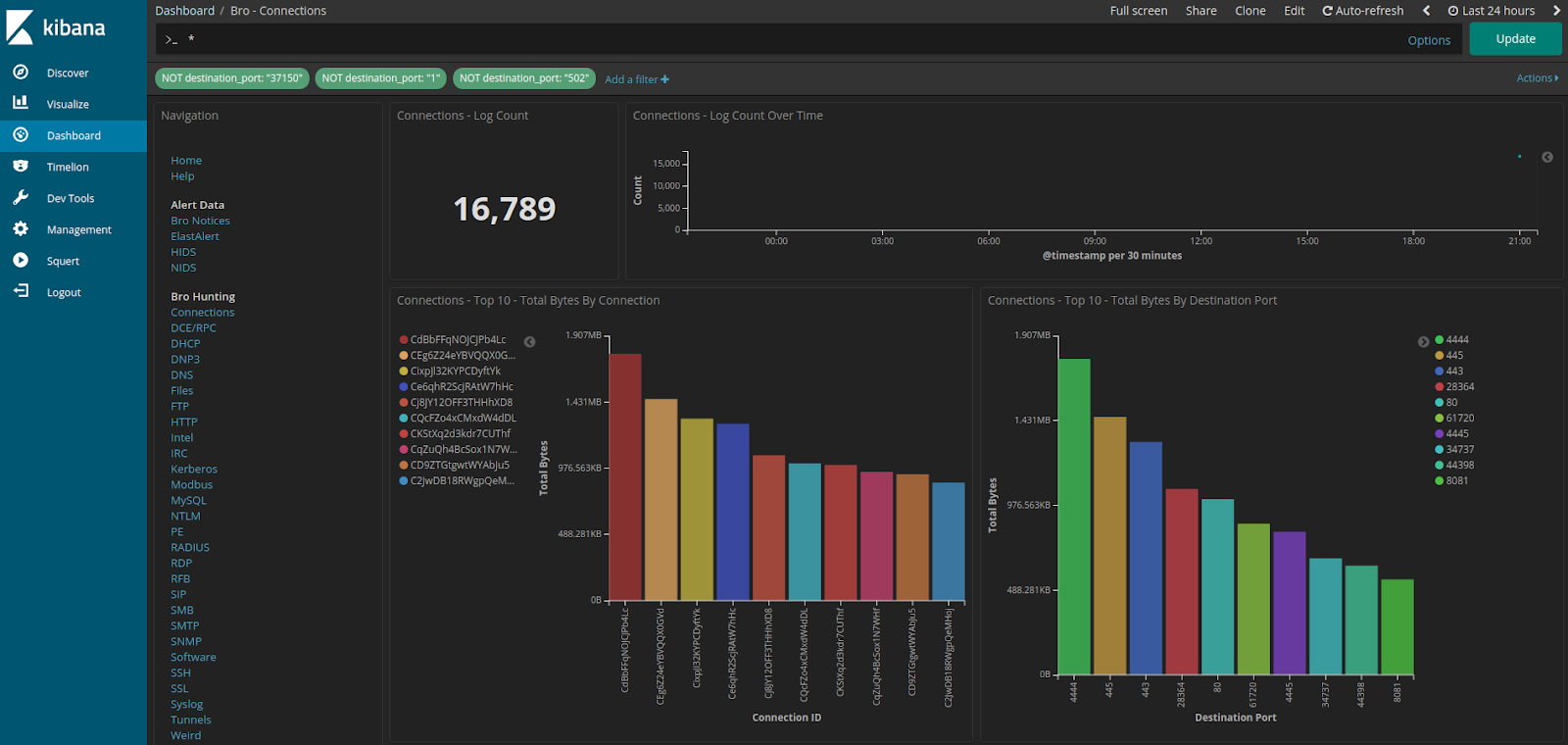 |
| Elastic 6.5.2 |
Elastic 6.5.2 #1374
https://github.com/Security-Onion-Solutions/security-onion/issues/1374
Elastic: Improve Kibana config/dashboard import #1389
https://github.com/Security-Onion-Solutions/security-onion/issues/1389
Elastic: Logstash support for ja3 and hassh #1375
https://github.com/Security-Onion-Solutions/security-onion/issues/1375
Elastic: enable redis-server service if LOGSTASH_OUTPUT_REDIS enabled #1385
https://github.com/Security-Onion-Solutions/security-onion/issues/1385
Thanks
Thanks to the Elastic team for Elastic 6.5.2!
Thanks to Wes Lambert for testing!
Updating
Please see the following page for full update instructions:
https://securityonion.net/wiki/Upgrade
Training
We have 4-day Security Onion training classes coming up in San Antonio, Texas and Atlanta, Georgia! If you can't make it to either of these onsite classes, we have a new online training platform! For more information and other training options, please see:
https://securityonionsolutions.com
Appliances
We now offer hardware appliances! For more information, please see:
https://blog.securityonion.net/2018/10/introducing-security-onion-solutions.html
Support
Need support? Please see:
https://securityonion.net/wiki/Support
Thanks!
Monday, December 10, 2018
CyberChef 8.12.3 now available for Security Onion 16.04!
CyberChef 8.12.3 was recently released:
https://github.com/gchq/CyberChef/blob/master/CHANGELOG.md
securityonion-web-page - 20141015-0ubuntu0securityonion87 is now available and includes CyberChef 8.12.3. This should resolve the following issue:
CyberChef 8.12.3 #1384
https://github.com/Security-Onion-Solutions/security-onion/issues/1384
Thanks
Thanks to the CyberChef team for CyberChef 8.12.3!
Thanks to Wes Lambert for testing this package!
Updating
Please see the following page for full update instructions:
https://securityonion.net/wiki/Upgrade
Training
We have 4-day Security Onion training classes coming up in San Antonio, Texas and Atlanta, Georgia! If you can't make it to either of these onsite classes, we have a new online training platform! For more information and other training options, please see:
https://securityonionsolutions.com
Appliances
We now offer hardware appliances! For more information, please see:
https://blog.securityonion.net/2018/10/introducing-security-onion-solutions.html
Support
Need support? Please see:
https://securityonion.net/wiki/Support
Thanks!
https://github.com/gchq/CyberChef/blob/master/CHANGELOG.md
securityonion-web-page - 20141015-0ubuntu0securityonion87 is now available and includes CyberChef 8.12.3. This should resolve the following issue:
CyberChef 8.12.3 #1384
https://github.com/Security-Onion-Solutions/security-onion/issues/1384
 |
| CyberChef 8.12.3 |
Thanks
Thanks to the CyberChef team for CyberChef 8.12.3!
Thanks to Wes Lambert for testing this package!
Updating
Please see the following page for full update instructions:
https://securityonion.net/wiki/Upgrade
Training
We have 4-day Security Onion training classes coming up in San Antonio, Texas and Atlanta, Georgia! If you can't make it to either of these onsite classes, we have a new online training platform! For more information and other training options, please see:
https://securityonionsolutions.com
Appliances
We now offer hardware appliances! For more information, please see:
https://blog.securityonion.net/2018/10/introducing-security-onion-solutions.html
Support
Need support? Please see:
https://securityonion.net/wiki/Support
Thanks!
Updated securityonion-iso, securityonion-logo, and securityonion-setup packages now available for Security Onion 16.04!
The following packages are now available:
securityonion-iso - 20151016-1ubuntu1securityonion28
securityonion-logo - 20120722-0ubuntu0securityonion3
securityonion-setup - 20120912-0ubuntu0securityonion280
These updated packages should resolve the following issues:
Setup: after configuring network, remind user to run Setup after reboot #1368
https://github.com/Security-Onion-Solutions/security-onion/issues/1368
Setup: remove old OSSEC code #1377
https://github.com/Security-Onion-Solutions/security-onion/issues/1377
Setup: Storage Node should enable ossec_agent #1378
https://github.com/Security-Onion-Solutions/security-onion/issues/1378
Setup: copy wallpaper into place to prompt user #1382
https://github.com/Security-Onion-Solutions/security-onion/issues/1382
securityonion-logo: prompt user to run Setup #1379
https://github.com/Security-Onion-Solutions/security-onion/issues/1379
so-iso-boot: if user hasn't run Setup yet, copy wallpaper into place to prompt them #1383
https://github.com/Security-Onion-Solutions/security-onion/issues/1383
Screenshots
Thanks
Thanks to Digininja for suggesting the Setup prompts!
Thanks to Wes Lambert for testing these packages!
Updating
Please see the following page for full update instructions:
https://securityonion.net/wiki/Upgrade
Training
We have 4-day Security Onion training classes coming up in San Antonio, Texas and Atlanta, Georgia! If you can't make it to either of these onsite classes, we have a new online training platform! For more information and other training options, please see:
https://securityonionsolutions.com
Appliances
We now offer hardware appliances! For more information, please see:
https://blog.securityonion.net/2018/10/introducing-security-onion-solutions.html
Support
Need support? Please see:
https://securityonion.net/wiki/Support
Thanks!
securityonion-iso - 20151016-1ubuntu1securityonion28
securityonion-logo - 20120722-0ubuntu0securityonion3
securityonion-setup - 20120912-0ubuntu0securityonion280
These updated packages should resolve the following issues:
Setup: after configuring network, remind user to run Setup after reboot #1368
https://github.com/Security-Onion-Solutions/security-onion/issues/1368
Setup: remove old OSSEC code #1377
https://github.com/Security-Onion-Solutions/security-onion/issues/1377
Setup: Storage Node should enable ossec_agent #1378
https://github.com/Security-Onion-Solutions/security-onion/issues/1378
Setup: copy wallpaper into place to prompt user #1382
https://github.com/Security-Onion-Solutions/security-onion/issues/1382
securityonion-logo: prompt user to run Setup #1379
https://github.com/Security-Onion-Solutions/security-onion/issues/1379
so-iso-boot: if user hasn't run Setup yet, copy wallpaper into place to prompt them #1383
https://github.com/Security-Onion-Solutions/security-onion/issues/1383
Screenshots
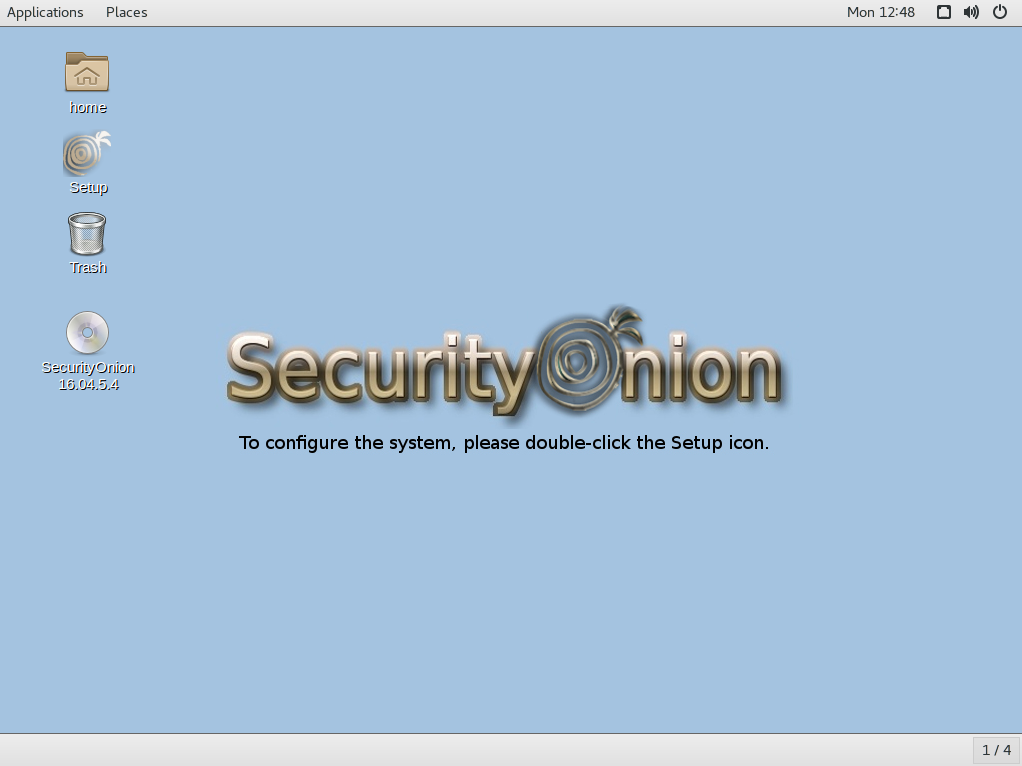 |
| After installing the ISO image, the desktop guides the user to running Setup |
 |
| After Setup configures network interfaces and reboots, the desktop guides the user to run Setup again to continue to the second phase of Setup |
 |
| Once the second phase of Setup completes, the desktop displays the normal wallpaper with no prompts |
Thanks
Thanks to Digininja for suggesting the Setup prompts!
Thanks to Wes Lambert for testing these packages!
Updating
Please see the following page for full update instructions:
https://securityonion.net/wiki/Upgrade
Training
We have 4-day Security Onion training classes coming up in San Antonio, Texas and Atlanta, Georgia! If you can't make it to either of these onsite classes, we have a new online training platform! For more information and other training options, please see:
https://securityonionsolutions.com
Appliances
We now offer hardware appliances! For more information, please see:
https://blog.securityonion.net/2018/10/introducing-security-onion-solutions.html
Support
Need support? Please see:
https://securityonion.net/wiki/Support
Thanks!
securityonion-nsmnow-admin-scripts - 20120724-0ubuntu0securityonion195 now available for Security Onion 16.04!
securityonion-nsmnow-admin-scripts - 20120724-0ubuntu0securityonion195 is now available and should resolve the following issues:
NSM: refactor config backup cron jobs #1376
https://github.com/Security-Onion-Solutions/security-onion/issues/1376
NSM: cron jobs should only log if their respective service is enabled #1337
https://github.com/Security-Onion-Solutions/security-onion/issues/1337
Thanks
Thanks to Wes Lambert for testing this package!
Updating
Please see the following page for full update instructions:
https://securityonion.net/wiki/Upgrade
Training
We have 4-day Security Onion training classes coming up in San Antonio, Texas and Atlanta, Georgia! If you can't make it to either of these onsite classes, we have a new online training platform! For more information and other training options, please see:
https://securityonionsolutions.com
Appliances
We now offer hardware appliances! For more information, please see:
https://blog.securityonion.net/2018/10/introducing-security-onion-solutions.html
Support
Need support? Please see:
https://securityonion.net/wiki/Support
Thanks!
NSM: refactor config backup cron jobs #1376
https://github.com/Security-Onion-Solutions/security-onion/issues/1376
NSM: cron jobs should only log if their respective service is enabled #1337
https://github.com/Security-Onion-Solutions/security-onion/issues/1337
Thanks
Thanks to Wes Lambert for testing this package!
Updating
Please see the following page for full update instructions:
https://securityonion.net/wiki/Upgrade
Training
We have 4-day Security Onion training classes coming up in San Antonio, Texas and Atlanta, Georgia! If you can't make it to either of these onsite classes, we have a new online training platform! For more information and other training options, please see:
https://securityonionsolutions.com
Appliances
We now offer hardware appliances! For more information, please see:
https://blog.securityonion.net/2018/10/introducing-security-onion-solutions.html
Support
Need support? Please see:
https://securityonion.net/wiki/Support
Thanks!
Tuesday, December 4, 2018
Security Onion Basic Course now available on GSA Schedule!
If you work for a US Government agency and have 8 or more students, Security Onion Solutions can now provide the Security Onion Basic Course on GSA Schedule with our partner IntelliGenesis! Security Onion Solutions is the only official source for Security Onion training and our instructors are the only Security Onion Certified Instructors in the world!
For more information, please see https://securityonionsolutions.com/#gsa and reach out to us using the GSA contact information there.
For more information, please see https://securityonionsolutions.com/#gsa and reach out to us using the GSA contact information there.
Thursday, November 29, 2018
securityonion-sostat - 20120722-0ubuntu0securityonion114 now available for Security Onion 16.04!
securityonion-sostat - 20120722-0ubuntu0securityonion114 is now available and should resolve the following issues:
Issue 1386: securityonion-sostat: postinst should detect stopped redis and enable/start if necessary
https://github.com/Security-Onion-Solutions/security-onion/issues/1386
Thanks
Thanks to Wes Lambert for testing this package!
Updating
Please see the following page for full update instructions:
https://securityonion.net/wiki/Upgrade
Training
We have 4-day Security Onion training classes coming up in San Antonio, Texas and Atlanta, Georgia! Use promotional code CyberMonday to get 10% off through November 30!
If you can't make it to either of these onsite classes, we have a new online training platform! For more information and other training options, please see:
https://securityonionsolutions.com
Appliances
We now offer hardware appliances! For more information, please see:
https://blog.securityonion.net/2018/10/introducing-security-onion-solutions.html
Support
Need support? Please see:
https://securityonion.net/wiki/Support
Thanks!
Issue 1386: securityonion-sostat: postinst should detect stopped redis and enable/start if necessary
https://github.com/Security-Onion-Solutions/security-onion/issues/1386
Thanks
Thanks to Wes Lambert for testing this package!
Updating
Please see the following page for full update instructions:
https://securityonion.net/wiki/Upgrade
Training
We have 4-day Security Onion training classes coming up in San Antonio, Texas and Atlanta, Georgia! Use promotional code CyberMonday to get 10% off through November 30!
If you can't make it to either of these onsite classes, we have a new online training platform! For more information and other training options, please see:
https://securityonionsolutions.com
Appliances
We now offer hardware appliances! For more information, please see:
https://blog.securityonion.net/2018/10/introducing-security-onion-solutions.html
Support
Need support? Please see:
https://securityonion.net/wiki/Support
Thanks!
Monday, November 26, 2018
Security Onion 16.04.5.4 now available featuring Suricata 4.1.0, CyberChef 8.8.1, Elastic 6.4.3, and more!
Security Onion 16.04.5.4 is now available!
Issues Resolved
Issue 1366: 16.04.5.4 ISO image
https://github.com/Security-Onion-Solutions/security-onion/issues/1366
Release Notes
For more information about this release, please see:
https://github.com/Security-Onion-Solutions/security-onion/wiki/16.04.5.4
Security Onion 14.04 EOL Reminder
As a reminder, all new development is now on Security Onion 16.04 and Security Onion 14.04 will reach EOL on November 30, 2018:
https://blog.securityonion.net/2018/06/6-month-eol-notice-for-security-onion.html
After that date, we will not provide any support for Security Onion 14.04. Please plan to upgrade or replace any existing 14.04 systems before that date.
Installation Guide
We've updated the Installation guide to reflect the download locations for the new ISO image:
https://github.com/Security-Onion-Solutions/security-onion/wiki/Installation
Existing Deployments
If you have existing 16.04 installations, there is no need to download the new ISO image. You can simply continue using our standard update process to install updated packages as they are made available:
https://github.com/Security-Onion-Solutions/security-onion/wiki/Upgrade
If you have existing installations of Security Onion 14.04, you can upgrade from 14.04 to 16.04:
https://github.com/Security-Onion-Solutions/security-onion/wiki/Upgrading-from-14.04-to-16.04
Thanks
Thanks to Wes Lambert for testing this new ISO image!
Training
We have 4-day Security Onion training classes coming up in San Antonio, Texas and Atlanta, Georgia! Use promotional code CyberMonday to get 10% off through November 30!
If you can't make it to either of these onsite classes, we have a new online training platform! For more information and other training options, please see:
https://securityonionsolutions.com
Appliances
We now offer hardware appliances! For more information, please see:
https://blog.securityonion.net/2018/10/introducing-security-onion-solutions.html
Support
Need support? Please see:
https://securityonion.net/wiki/Support
Screenshot Tour
 |
Issues Resolved
Issue 1366: 16.04.5.4 ISO image
https://github.com/Security-Onion-Solutions/security-onion/issues/1366
Release Notes
For more information about this release, please see:
https://github.com/Security-Onion-Solutions/security-onion/wiki/16.04.5.4
Security Onion 14.04 EOL Reminder
As a reminder, all new development is now on Security Onion 16.04 and Security Onion 14.04 will reach EOL on November 30, 2018:
https://blog.securityonion.net/2018/06/6-month-eol-notice-for-security-onion.html
After that date, we will not provide any support for Security Onion 14.04. Please plan to upgrade or replace any existing 14.04 systems before that date.
Installation Guide
We've updated the Installation guide to reflect the download locations for the new ISO image:
https://github.com/Security-Onion-Solutions/security-onion/wiki/Installation
Existing Deployments
If you have existing 16.04 installations, there is no need to download the new ISO image. You can simply continue using our standard update process to install updated packages as they are made available:
https://github.com/Security-Onion-Solutions/security-onion/wiki/Upgrade
If you have existing installations of Security Onion 14.04, you can upgrade from 14.04 to 16.04:
https://github.com/Security-Onion-Solutions/security-onion/wiki/Upgrading-from-14.04-to-16.04
Thanks
Thanks to Wes Lambert for testing this new ISO image!
Training
We have 4-day Security Onion training classes coming up in San Antonio, Texas and Atlanta, Georgia! Use promotional code CyberMonday to get 10% off through November 30!
If you can't make it to either of these onsite classes, we have a new online training platform! For more information and other training options, please see:
https://securityonionsolutions.com
Appliances
We now offer hardware appliances! For more information, please see:
https://blog.securityonion.net/2018/10/introducing-security-onion-solutions.html
Support
Need support? Please see:
https://securityonion.net/wiki/Support
Screenshot Tour
 |
| ISO Boot Menu |
 |
| Once Live Desktop appears, double-click the Install icon |
 |
| Once you've completed the installer and rebooted, login with the credentials you specified in the installer |
 |
| After logging in, run Setup |
 |
| Welcome to Setup |
 |
| Configure network interfaces, reboot, and log back in |
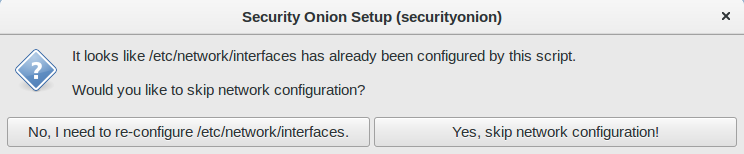 |
| Run Setup again and skip network configuration |
 |
| Choose Evaluation Mode or Production Mode |
 |
| Monitor Interface Selection |
 |
| Create username |
 |
| Create password |
 |
| Confirm password |
 |
| Confirm options |
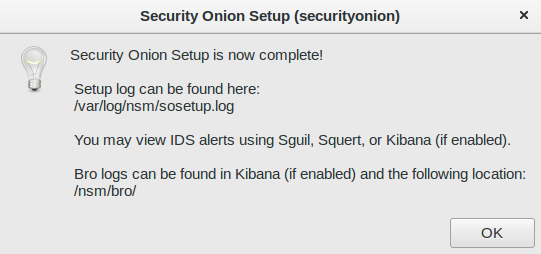 |
| Setup complete |
 |
| /usr/sbin/so-* scripts |
 |
| CyberChef 8.8.1 |
 |
| Single Sign On (SSO) for Squert, Kibana, and CapMe |
 |
| Reviewing NIDS and HIDS alerts with Squert |
 |
| Retrieving full packet capture with CapMe |
 |
| Kibana Overview Dashboard |
 |
| If you prefer light dashboards, you can run so-elastic-configure-kibana-dashboards-light |
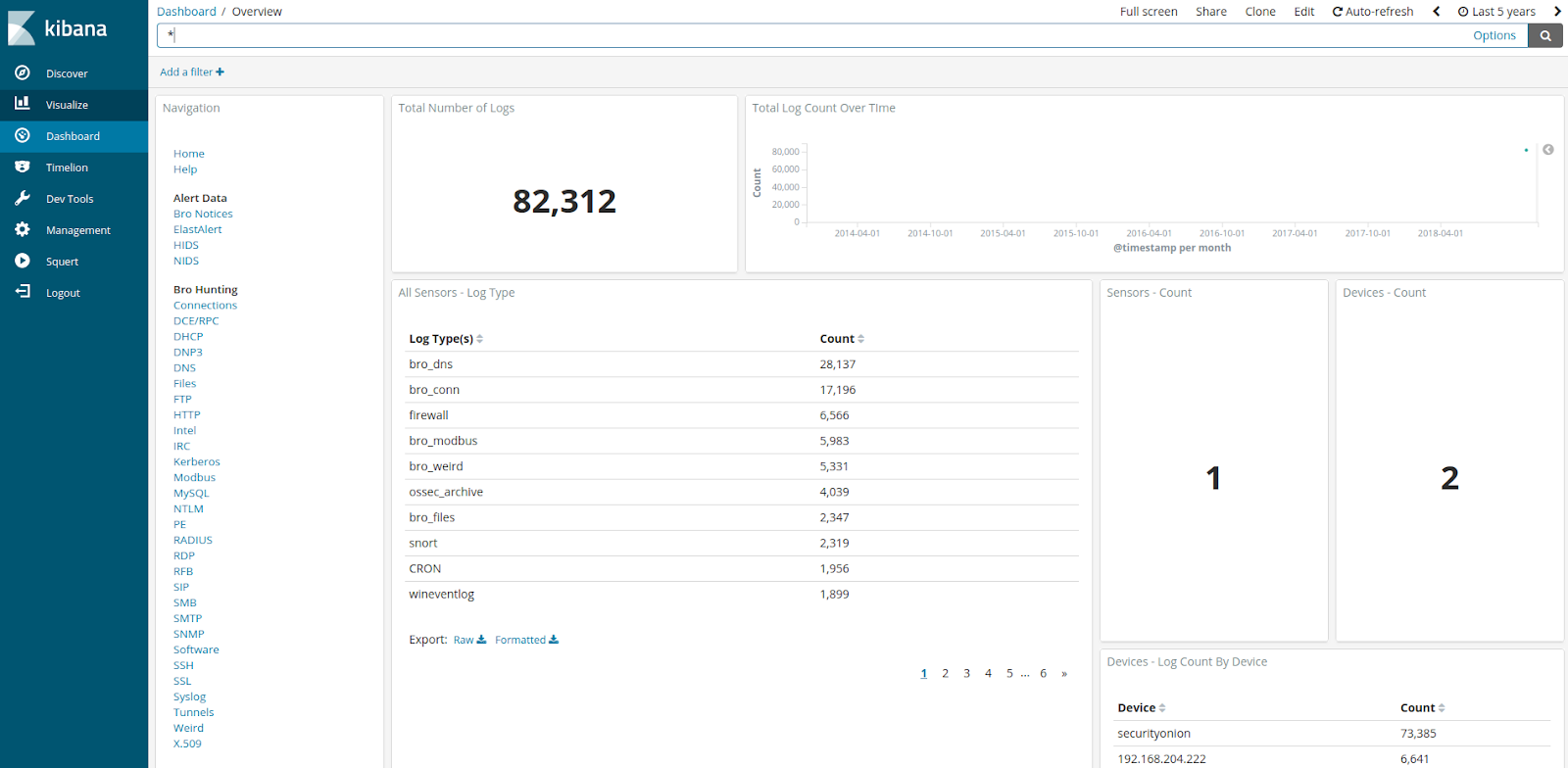 |
| Light Dashboards |
 |
| If you want to switch back to dark dashboards, run so-elastic-configure-kibana-dashboards |
 |
| Kibana Overview is now back to dark |
 |
| Help |
 |
| Bro Notices |
 |
| ElastAlert |
 |
| HIDS Alerts |
 |
| NIDS Alerts |
 |
| Connections |
 |
| DCE/RPC |
 |
| DHCP |
 |
| DNP3 |

 |
| DNS |
 |
| Files |
 |
| FTP |
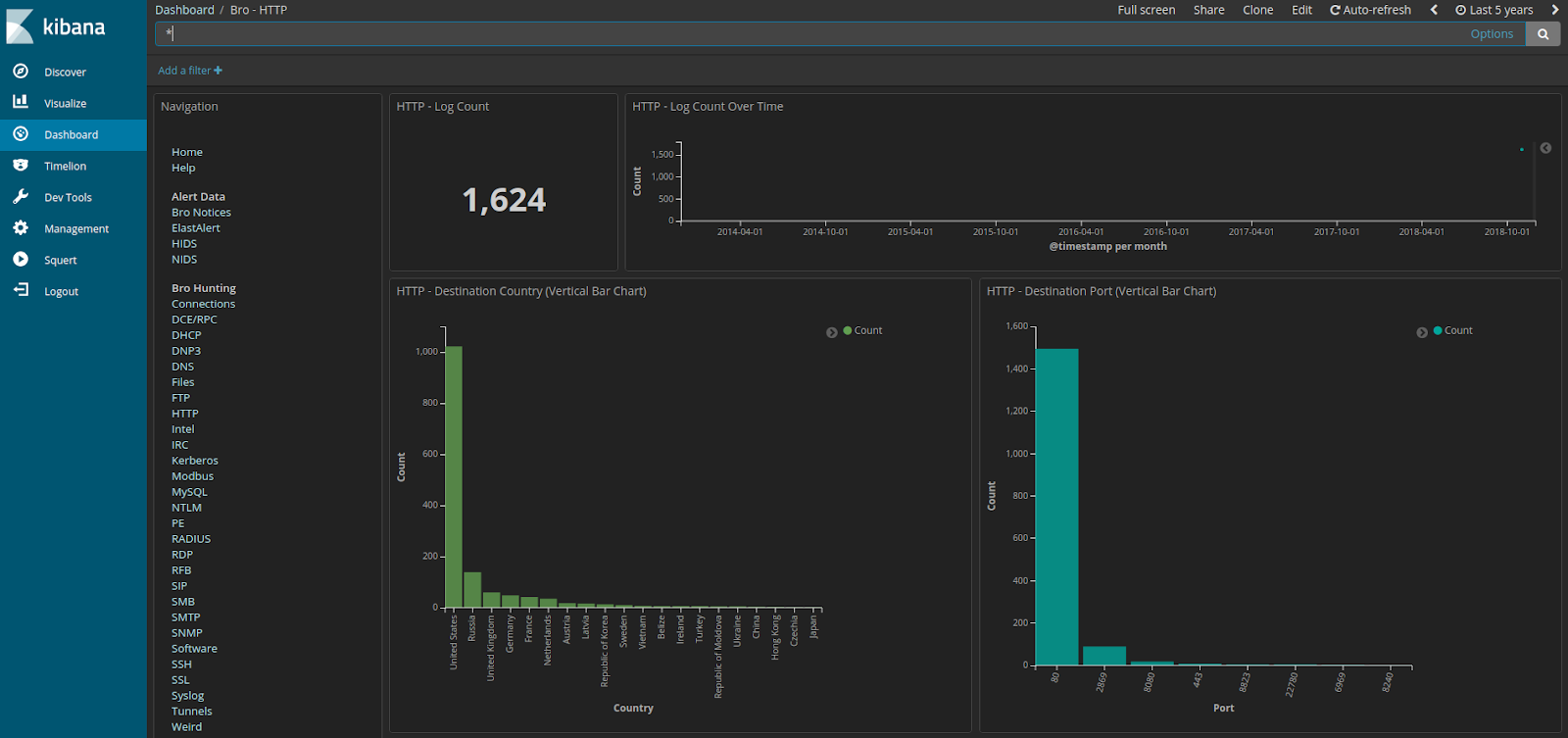 |
| HTTP |
 |
| Intel |
 |
| IRC |
 |
| Kerberos |
 |
| Modbus |
 |
| MySQL |
 |
| NTLM |
 |
| PE |
 |
| RADIUS |
 |
| RDP |

 |
| RFB |
 |
| SIP |
 |
| SMB |
 |
| SMTP |
 |
| SNMP |
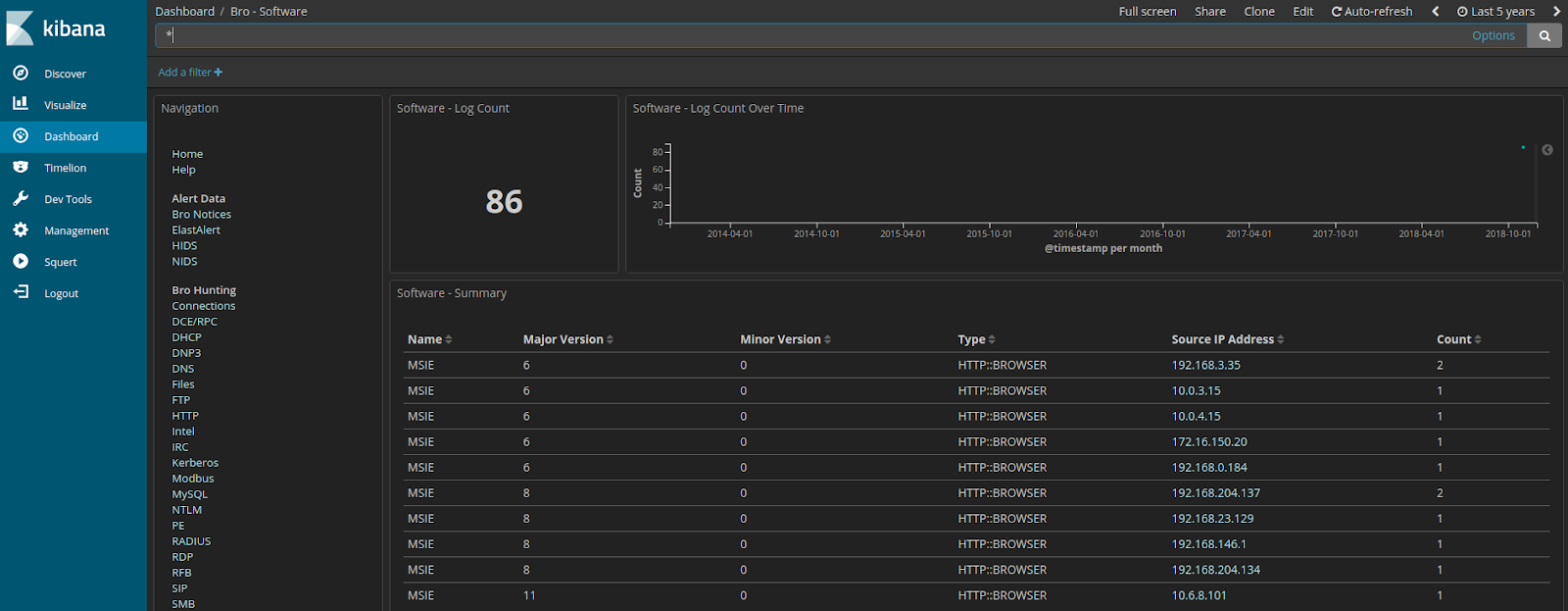 |
| Software |
 |
| SSH |
 |
| SSL |
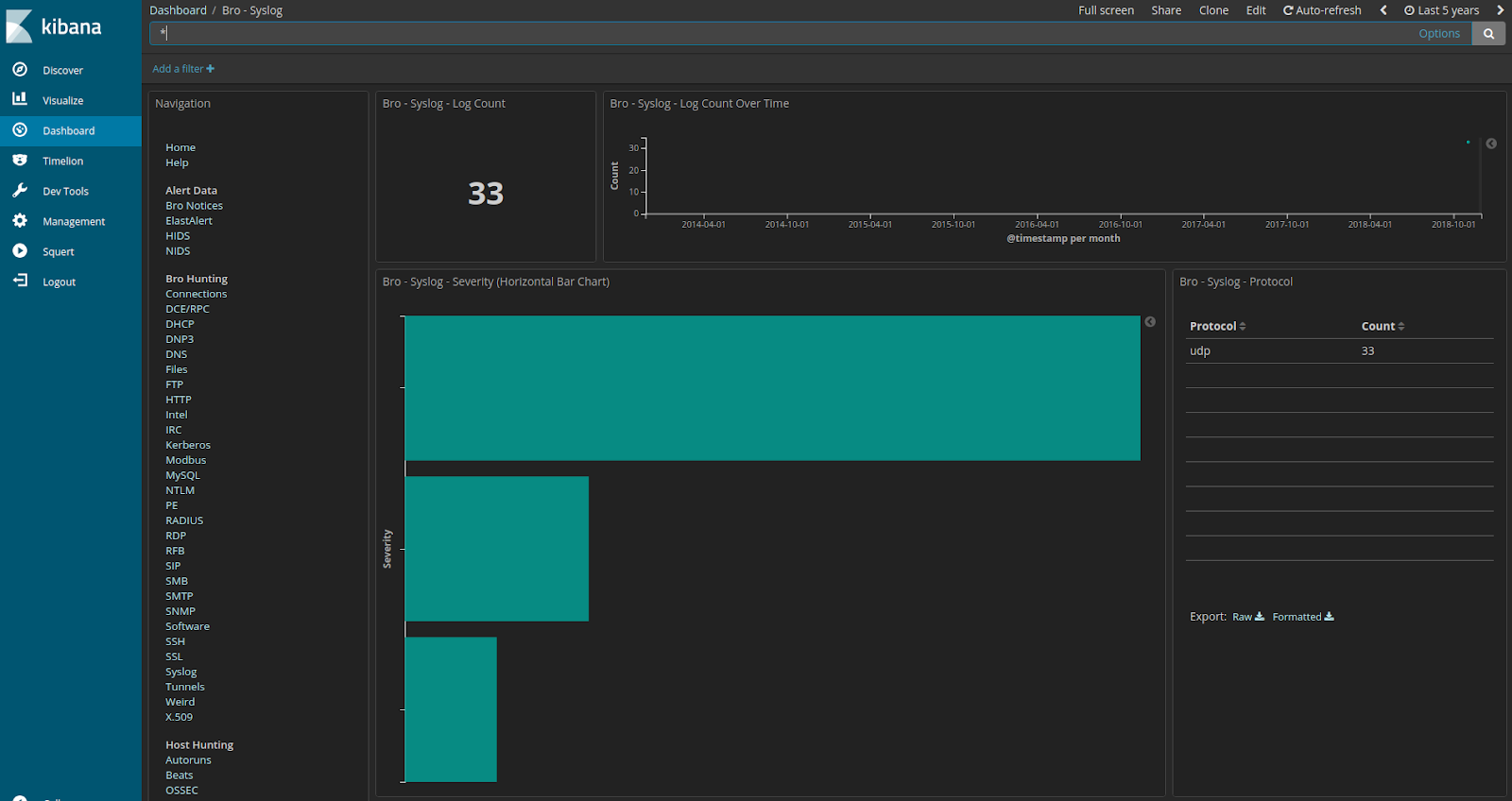 |
| Syslog |
 |
| Tunnels |
 |
| Weird |
 |
| X.509 |
 |
| Autoruns |
 |
| Beats |

 |
| OSSEC/Wazuh Logs |
 |
| Sysmon |
 |
| Domain Stats |
 |
| Firewall |
 |
| Frequency Analysis |
 |
| Stats |

 |
| Syslog |
Subscribe to:
Posts (Atom)