Showing posts with label pcap. Show all posts

Wednesday, September 25, 2024

Did you know Security Onion includes our own custom web interfaces for Alerts, Dashboards, Hunt, Cases, Detections, PCAP, Grid Health, and Administration?

Yesterday, we talked about how Security Onion is built BY defenders FOR defenders:

https://blog.securityonion.net/2024/09/did-you-know-security-onion-is-built-by.html


As defenders, we built the platform that we've always wanted! This includes our own custom web interfaces for Alerts, Dashboards, Hunt, Cases, Detections, PCAP, Grid Health, and Administration. These interfaces are streamlined and integrated to make you more effective and efficient as a defender!


Alerts:


Dashboards:

Hunt:


Cases:


Detections:


PCAP:


Grid Health:


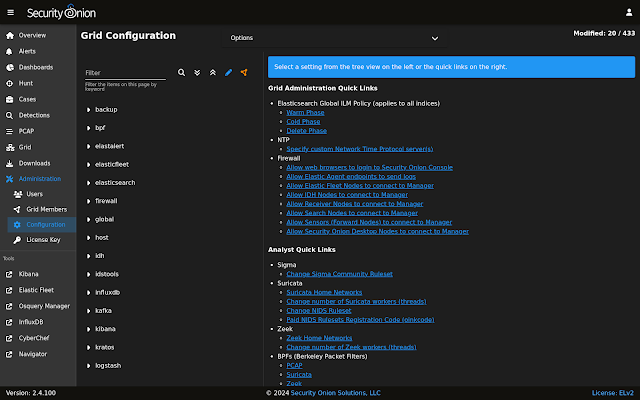
Configuration:


Monday, September 16, 2024

Did you know that you can run Security Onion in as little as 4GB RAM?

Do you just want to import PCAP or EVTX files into Security Onion?

Or do you have limited hardware and just want the minimal installation to get some basic experience with Security Onion?

If so, then you can install Security Onion and choose the Import option. You can do this in a minimal virtual machine with as little as 4GB RAM!

You can see the 4GB RAM in the Memory Usage section of this screenshot:


You can read more about Import in the Architecture section of our documentation:

https://docs.securityonion.net/en/2.4/architecture.html


You can also see a full walkthrough of the Import option in the First Time Users section of our documentation:

https://docs.securityonion.net/en/2.4/first-time-users.html


Friday, September 13, 2024

Did you know that you can configure Security Onion to only record PCAP for Suricata NIDS alerts?

Folks sometimes ask how to only record PCAP for Suricata NIDS alerts so that they can save disk space. Our preference is to NOT limit PCAP to alerts only since disk is cheap and most sophisticated adversaries are going to try to evade IDS alerts anyway. However, for folks that really need the space savings, here is how you would do it.


First, check to see whether you are using Stenographer or Suricata for PCAP. If you are using Stenographer, you will need to switch to Suricata as shown here (please note the warning):

https://docs.securityonion.net/en/2.4/suricata.html#pcap


Once you're running Suricata for PCAP, you would then set conditional PCAP to "alerts" as shown here:

https://docs.securityonion.net/en/2.4/suricata.html#conditional-pcap


Friday, September 6, 2024

Quick Malware Analysis: GULOADER and REMCOS RAT pcap from 2024-08-26

Thanks to Brad Duncan for sharing this pcap from 2024-08-26 on his malware traffic analysis site! Due to issues with Google flagging a warning for the site, we're not including the actual hyperlink but it should be easy to find.


We did a quick analysis of this pcap on the NEW Security Onion 2.4.100:

https://blog.securityonion.net/2024/08/security-onion-24100-now-available.html


If you'd like to follow along, you can do the following:


The screenshots at the bottom of this post show some of the interesting alerts, metadata logs, and session transcripts. Want more practice? Check out our other Quick Malware Analysis posts at:

https://blog.securityonion.net/search/label/quick%20malware%20analysis


About Security Onion


Security Onion is a versatile and scalable platform that can run on small virtual machines and can also scale up to the opposite end of the hardware spectrum to take advantage of extremely powerful server-class machines.  Security Onion can also scale horizontally, growing from a standalone single-machine deployment to a full distributed deployment with tens or hundreds of machines as dictated by your enterprise visibility needs. To learn more about Security Onion, please see:
https://securityonion.net


Screenshots


First, we start with the overview of all alerts and logs:


Next, let's look at just the alerts:


Notice that all of the Remcos alerts are for the same TCP stream:


Let's pivot to see that entire TCP stream:


Now let's switch to ASCII transcript where we see the victim PC sending information to the attacker:


Next, let's look at the Zeek protocol metadata:


We'll start with the HTTP dashboard where we see a request that does a GeoPlugin lookup (related to the GeoPlugin information in a previous screenshot):


Next, we look at the Files dashboard where we see the GeoPlugin response via HTTP:


Next, let's review the SSL/TLS dashboard:


We'll next review the corresponding X509 dashboard:


Here is the DNS dashboard:


Finally, let's review the Connections dashboard:


Here we can see all of the connections that we've seen above and one that we haven't looked at previously (source port 50646):


If we pivot to PCAP on source port 50646, then we see the transfer of a packed EXE:


Near the end of that TCP stream we see usernames and passwords being exfiltrated:


Tuesday, August 29, 2023

Quick Malware Analysis: 2023-05-24 OBAMA264 QAKBOT

Today, the FBI and DOJ announced an operation to dismantle Qakbot infrastructure:
https://www.fbi.gov/news/stories/fbi-partners-dismantle-qakbot-infrastructure-in-multinational-cyber-takedown
https://www.justice.gov/usao-cdca/pr/qakbot-malware-disrupted-international-cyber-takedown

Let's take a look at a recent Qakbot sample. Thanks to Brad Duncan for sharing this pcap:
https://www.malware-traffic-analysis.net/2023/05/24/index.html

We did a quick analysis of this pcap on the NEW Security Onion 2.4. If you'd like to follow along, you can install Security Onion 2.4 in a VM and import the pcap using so-import-pcap:
https://docs.securityonion.net/en/2.4/first-time-users.html
https://docs.securityonion.net/en/2.4/so-import-pcap.html#so-import-pcap

The screenshots at the bottom of this post show some of the interesting NIDS alerts, metadata logs, and session transcripts. Want more practice? Check out our other Quick Malware posts at:
https://blog.securityonion.net/search/label/quick%20malware%20analysis

About Security Onion

Security Onion is a versatile and scalable platform that can run on small virtual machines and can also scale up to the opposite end of the hardware spectrum to take advantage of extremely powerful server-class machines.  Security Onion can also scale horizontally, growing from a standalone single-machine deployment to a full distributed deployment with tens or hundreds of machines as dictated by your enterprise visibility needs. To learn more about Security Onion, please see https://securityonion.net.

Our 10th Annual Security Onion Conference is coming up soon! Reserve your seat today! Last day to register is September 29! For more details, please see https://socaugusta2023.eventbrite.com/.

Do you want to deploy the new Security Onion 2.4 to your enterprise but need training? Our first 4-day public training class on Security Onion 2.4 will be in beautiful Augusta GA as part of Augusta Cyber Week! The class is at a very special price AND you get a free ticket to BOTH Security Onion Conference AND BSidesAugusta! For more information, please see https://blog.securityonion.net/2023/07/registration-now-open-for-augusta-cyber.html.

Do you want to deploy Security Onion to your enterprise and want the best enterprise hardware? We know Security Onion's hardware needs, and our appliances are the perfect match for the platform. Leave the hardware research, testing, and support to us, so you can focus on what's important for your organization. Not only will you have confidence that your Security Onion deployment is running on the best-suited hardware, you will also be supporting future development and maintenance of the Security Onion project! For more information, please see https://securityonionsolutions.com/hardware.

Screenshots

First, we start with the overview of all alerts and logs:


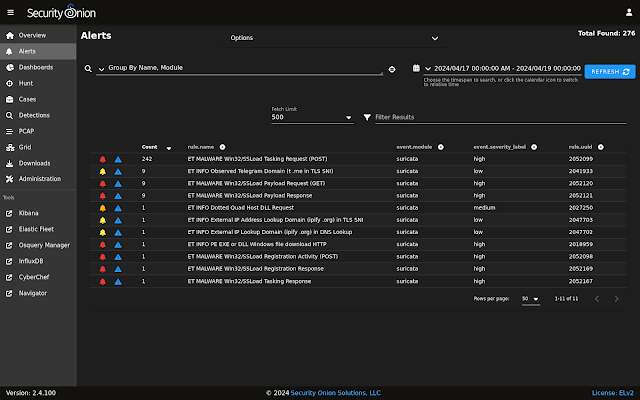
Next, let's review the alerts:


When we pivot from the EXE alert to the PCAP transcript, we notice that the HTTP request is to a bare IP address instead of a fully qualified domain name, the file requested is a .dat file, and the file returned has the standard MZ file header of an EXE:


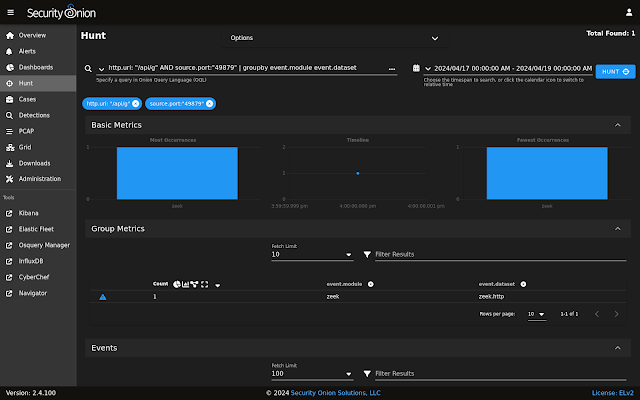
Next, let's review all of the network protocol metadata:


Drilling into the Zeek Notices, we see an interesting connection on port 2222:


Here are the SSL/TLS logs including that port 2222 connection noted in the previous screenshot:


Here is an overview of all connections:


Drilling into HTTP logs we notice that, in addition to the EXE that we looked at earlier, there was a ZIP download:


Pivoting on that file transfer, we see the PK file header and that the embedded file appears to be called Claim_A615.wsf:


From there, we pivot to CyberChef and carve the WSF (Windows Script File):


The top of the file seemed innocent enough, but as we scroll down we see something more nefarious:

Tuesday, January 4, 2022

Quick Malware Analysis: log4j pcap from 2021-12-20

Thanks to Brad Duncan for sharing this pcap!
https://www.malware-traffic-analysis.net/2021/12/20/index.html

We did a quick analysis of this pcap on the latest version of Security Onion with Zeek log4j scripts and so-import-pcap:
https://docs.securityonion.net/en/2.3/zeek.html#custom-script-example-log4j
https://docs.securityonion.net/en/2.3/so-import-pcap.html

About Security Onion

Security Onion is a versatile and scalable platform that can run on small virtual machines and can also scale up to the opposite end of the hardware spectrum to take advantage of extremely powerful server-class machines.  Security Onion can also scale horizontally, growing from a standalone single-machine deployment to a full distributed deployment with tens or hundreds of machines as dictated by your enterprise visibility needs.

To learn more about Security Onion, please see:
https://securityonion.net
https://securityonion.net/docs

More Samples

Find all of our Quick Malware posts at:
https://blog.securityonion.net/search/label/quick%20malware%20analysis

Screenshots


Tuesday, May 7, 2019

securityonion-samples-mta - 20150103-0ubuntu0securityonion4 now available for Security Onion!

securityonion-samples-mta - 20150103-0ubuntu0securityonion4 is now available and resolves the following issue:

securityonion-samples-mta: Add/Remove PCAPs #1476
https://github.com/Security-Onion-Solutions/security-onion/issues/1476

Thanks
Thanks to Brad Duncan for the PCAPs he posts at https://www.malware-traffic-analysis.net/!
Thanks to Phil Plantamura and Wes Lambert for testing!

Updating
Please see the following page for full update instructions:
https://securityonion.net/docs/Upgrade

Conference
Please mark your calendar! Security Onion Conference 2019 will be on Friday, October 4, 2019 and registration will open July 18! CFP is open now and we want to hear from you!
https://blog.securityonion.net/2019/04/security-onion-conference-2019-cfp.html

Training
We have 4-day Security Onion Basic Training classes coming up in Costa Mesa CA and Columbia MD!  Use promotional code earlybird for 10% off the Columbia MD class through 5/21 at 11:59 PM ET.  If you can't make it to an onsite class, we have a new online training platform.  For more information and other training options, please see:
https://securityonionsolutions.com

Appliances
We now offer hardware appliances!  For more information, please see:
https://blog.securityonion.net/2018/10/introducing-security-onion-solutions.html

Documentation
We've got a brand new documentation site!  Please let us know if anything needs to be updated:
https://securityonion.net/docs

Support
Need support?  Please see:
https://securityonion.net/docs/Support

Thanks!

Wednesday, April 11, 2018

NetworkMiner 2.3 now available for Security Onion!

NetworkMiner 2.3 was released recently:
http://www.netresec.com/?page=Blog&month=2018-04&post=NetworkMiner-2-3-Released

The following package is now available:
securityonion-networkminer - 20180410-1ubuntu1securityonion1

This package should resolve the following issues:

NetworkMiner 2.3 #1231
https://github.com/Security-Onion-Solutions/security-onion/issues/1231

Thanks
Thanks to Erik Hjelmvik for NetworkMiner 2.3!
Thanks to Wes Lambert for testing the new package!

Updating
Please see the following page for full update instructions:
https://securityonion.net/wiki/Upgrade

Training
We offer onsite and online training:
https://securityonionsolutions.com

Support
Need support?  Please see:
https://securityonion.net/wiki/Support

Thanks!

Monday, October 17, 2016

securityonion-capme - 20121213-0ubuntu0securityonion61 resolves an issue

The following package is now available:
securityonion-capme - 20121213-0ubuntu0securityonion61

This new package should resolve the following issue:

Issue 1007: CapMe: transcript data sometimes overruns the transcript window
https://github.com/Security-Onion-Solutions/security-onion/issues/1007

This package has been tested by Wes Lambert (thanks, Wes!).

Updating
This package is now available in our stable repo.  Please see the following page for full update instructions:
https://github.com/Security-Onion-Solutions/security-onion/wiki/Upgrade

Want to show your support for Security Onion?
Security Onion t-shirts are available in our CafePress store!
http://www.cafepress.com/securityonion/11820053

Training
Security Onion Solutions provides onsite, online, and on-demand training.  For more information, please see:
https://securityonionsolutions.com

Support
Need support?  Please see:
https://github.com/Security-Onion-Solutions/security-onion/wiki/Support

Thanks!

Tuesday, September 9, 2014

New pcap samples package securityonion-samples-jackcr

Jack Crook provided a fun pcap (thanks Jack!):
https://twitter.com/dougburks/status/494829729523171328

I've put the pcap into a new package called securityonion-samples-jackcr, which will install the pcap to:
/opt/samples/jackcr/

This package has been tested by the following (thanks!):
Brian Kellogg
David Zawdie

Issues Resolved

Issue 568: New package securityonion-samples-jackcr
https://code.google.com/p/security-onion/issues/detail?id=568

Installation
This package will be included in the upcoming 12.04.5 ISO image, but it's an optional package so it won't automatically install on existing installations.  If you'd like to install this package onto your existing installation, you can use the graphical Update Manager or the following one-liner:
sudo apt-get update && sudo apt-get install securityonion-samples-jackcr

Feedback
If you have any questions or problems, please use our security-onion mailing list:
https://code.google.com/p/security-onion/wiki/MailingLists

Training
$400 off the new 3-day Security Onion class in Richmond VA!
http://blog.securityonion.net/2014/09/400-off-our-new-3-day-security-onion.html

Help Wanted
If you and/or your organization have found value in Security Onion, please consider giving back to the community by joining one of our teams:
https://code.google.com/p/security-onion/wiki/TeamMembers

We especially need help in answering support questions on the mailing list:
http://groups.google.com/group/security-onion

We also need help testing new packages:
http://groups.google.com/group/security-onion-testing

Thanks!

Monday, May 27, 2013

New pcap samples package securityonion-samples-markofu

Mark Hillick put together some pcap samples (thanks Mark!) and I've put them into a new package called securityonion-samples-markofu.  The package will install the pcaps to:
/opt/samples/markofu/

Installation
This package will be included in the upcoming 12.04.1 ISO image, but it's an optional package so it won't automatically install on existing installations.  If you'd like to install this package onto your existing installation, you can use the graphical Update Manager or the following one-liner:
sudo apt-get update && sudo apt-get install securityonion-samples-markofu

Screenshot
Installation
Feedback
If you have any questions or problems, please use our mailing list:
https://code.google.com/p/security-onion/wiki/MailingLists

Help Wanted
If you and/or your organization have found value in Security Onion, please consider giving back to the community by joining one of our teams:
https://code.google.com/p/security-onion/wiki/TeamMembers

We especially need help in answering support questions on the mailing list and IRC channel.  Thanks!

New pcap samples package securityonion-samples-pnsm

Richard Bejtlich put together some pcap samples (thanks Richard!) and I've put them into a new package called securityonion-samples-pnsm.  The package will install the pcaps to:
/opt/samples/pnsm/

Some of the pcaps have file extensions other than .pcap, so the default Ubuntu AppArmor policy won't allow tcpdump to read them.  This package will automatically update the AppArmor policy to fix this.

Installation
This package will be included in the upcoming 12.04.1 ISO image, but it's an optional package so it won't automatically install on existing installations.  If you'd like to install this package onto your existing installation, you can use the graphical Update Manager or the following one-liner:
sudo apt-get update && sudo apt-get install securityonion-samples-pnsm

Screenshot
Installation
Feedback
If you have any questions or problems, please use our mailing list:
https://code.google.com/p/security-onion/wiki/MailingLists

Help Wanted
If you and/or your organization have found value in Security Onion, please consider giving back to the community by joining one of our teams:
https://code.google.com/p/security-onion/wiki/TeamMembers

We especially need help in answering support questions on the mailing list and IRC channel.  Thanks!

Search This Blog

Featured Post

Registration Now Open for Augusta Cyber Week 2026!

Registration is now open for Augusta Cyber Week in beautiful Augusta GA from October 19, 2026 through October 24, 2026! This includes: 4-day...

Popular Posts

Blog Archive