Wednesday, January 9, 2019

Bro 2.6.1, Elastic 6.5.4, JA3, and HASSH now available for Security Onion!

The following are now available for Security Onion:
Docker images for Elastic 6.5.4
securityonion-elastic - 20180130-1ubuntu1securityonion153
securityonion-bro - 2.6.1-1ubuntu1securityonion4
securityonion-bro-afpacket - 1.3.0-1ubuntu1securityonion10
securityonion-bro-scripts - 20121004-0ubuntu0securityonion69

This should resolve the following issues:

Bro 2.6.1 #1388
https://github.com/Security-Onion-Solutions/security-onion/issues/1388

securityonion-bro-afpacket: create package for Bro af_packet plugin #1411
https://github.com/Security-Onion-Solutions/security-onion/issues/1411

securityonion-bro-scripts: support securityonion-bro-afpacket #1412
https://github.com/Security-Onion-Solutions/security-onion/issues/1412

securityonion-bro-scripts: add JA3 #1115
https://github.com/Security-Onion-Solutions/security-onion/issues/1115

securityonion-bro-scripts: add HASSH #1338
https://github.com/Security-Onion-Solutions/security-onion/issues/1338

securityonion-elastic: Update for Bro 2.6.1 #1409
https://github.com/Security-Onion-Solutions/security-onion/issues/1409

securityonion-elastic: Improve so-elastalert scripts #1403
https://github.com/Security-Onion-Solutions/security-onion/issues/1403

Elastic 6.5.4 #1404
https://github.com/Security-Onion-Solutions/security-onion/issues/1404

securityonion-elastic: store Kibana dashboard color preference in securityonion.conf #1405
https://github.com/Security-Onion-Solutions/security-onion/issues/1405

securityonion-elastic: preserve custom config #1401
https://github.com/Security-Onion-Solutions/security-onion/issues/1401

Screenshots
Elastic 6.5.4
JA3

HASSH

Thanks
Thanks to the Bro team for Bro 2.6.1!
Thanks to the Elastic team for Elastic 6.5.4!
Thanks to the Salesforce team for JA3 and HASSH!
Thanks to Wes Lambert for testing!

Updating
Please see the following page for full update instructions:
https://securityonion.net/wiki/Upgrade

Training
We have 4-day Security Onion training classes coming up in San Antonio TX, Atlanta GA, and Columbia MD!  If you can't make it to one of these onsite classes, we have a new online training platform!  For more information and other training options, please see:
https://securityonionsolutions.com

Appliances
We now offer hardware appliances!  For more information, please see:
https://blog.securityonion.net/2018/10/introducing-security-onion-solutions.html

Support
Need support?  Please see:
https://securityonion.net/wiki/Support

Thanks!

Monday, January 7, 2019

4-day Security Onion training class in Columbia MD!

In addition to our previously announced classes in San Antonio and Atlanta, we just scheduled a 4-day Security Onion training class in Columbia MD!  Use promotional code earlybird to get 10% off through January 31, 2019!  For more information about these onsite classes and to register, please see:
https://securityonionsolutions.com/onsitetraining

If you can't make it to either of these onsite classes, we have a new online training platform!
https://onlinetraining.securityonionsolutions.com/

For more information and other training options, please see:
https://securityonionsolutions.com

securityonion-sensor - 20120722-0ubuntu0securityonion26 now available for Security Onion!

securityonion-sensor - 20120722-0ubuntu0securityonion26 is now available and should resolve the following issue:

securityonion-sensor: add syslog-ng dependency #1410
https://github.com/Security-Onion-Solutions/security-onion/issues/1410

Thanks
Thanks to Dustin Lee for the suggestion!
Thanks to Wes Lambert for testing this package!

Updating
Please see the following page for full update instructions:
https://securityonion.net/wiki/Upgrade

Training
We have 4-day Security Onion training classes coming up in San Antonio, Texas and Atlanta, Georgia!  If you can't make it to either of these onsite classes, we have a new online training platform!  For more information and other training options, please see:
https://securityonionsolutions.com

Appliances
We now offer hardware appliances!  For more information, please see:
https://blog.securityonion.net/2018/10/introducing-security-onion-solutions.html

Support
Need support?  Please see:
https://securityonion.net/wiki/Support

Thanks!

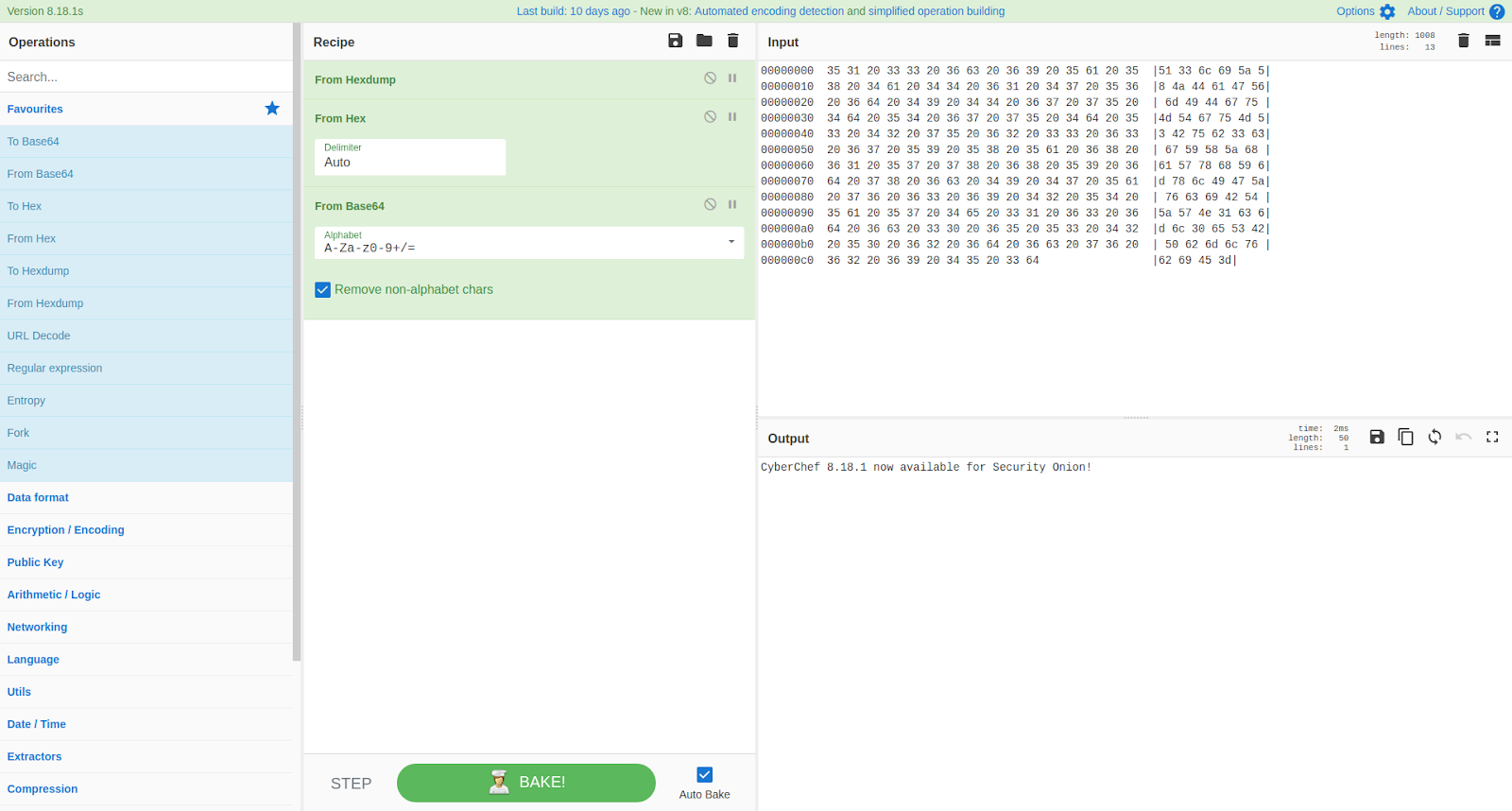
CyberChef 8.18.1 now available for Security Onion!

CyberChef 8.18.1 was recently released:
https://github.com/gchq/CyberChef/blob/master/CHANGELOG.md

securityonion-web-page - 20141015-0ubuntu0securityonion88 is now available and includes CyberChef 8.18.1.  This should resolve the following issue:

CyberChef 8.18.1 #1406
https://github.com/Security-Onion-Solutions/security-onion/issues/1406

CyberChef 8.18.1
Thanks
Thanks to the CyberChef team for CyberChef 8.18.1!
Thanks to Wes Lambert for testing this package!

Updating
Please see the following page for full update instructions:
https://securityonion.net/wiki/Upgrade

Training
We have 4-day Security Onion training classes coming up in San Antonio, Texas and Atlanta, Georgia!  If you can't make it to either of these onsite classes, we have a new online training platform!  For more information and other training options, please see:
https://securityonionsolutions.com

Appliances
We now offer hardware appliances!  For more information, please see:
https://blog.securityonion.net/2018/10/introducing-security-onion-solutions.html

Support
Need support?  Please see:
https://securityonion.net/wiki/Support

Thanks!
Wednesday, January 2, 2019

Wazuh 3.7.2 now available for Security Onion!

The following packages are now available:
Wazuh 3.7.2 (packaged as ossec-hids-server - 3.7.2.2-ubuntu1securityonion1)
securityonion-ossec-rules - 20120726-0ubuntu0securityonion11

These packages should resolve the following issues:

Wazuh 3.7.2 #1400
https://github.com/Security-Onion-Solutions/security-onion/issues/1400

securityonion-ossec-rules: ignore 401 for Kibana and Squert #1408
https://github.com/Security-Onion-Solutions/security-onion/issues/1408

Thanks
Thanks to the Wazuh team for Wazuh 3.7.2!
Thanks to Wes Lambert for testing!

Updating
Please see the following page for full update instructions:
https://securityonion.net/wiki/Upgrade

Training
We have 4-day Security Onion training classes coming up in San Antonio, Texas and Atlanta, Georgia!  If you can't make it to either of these onsite classes, we have a new online training platform!  For more information and other training options, please see:
https://securityonionsolutions.com

Appliances
We now offer hardware appliances!  For more information, please see:
https://blog.securityonion.net/2018/10/introducing-security-onion-solutions.html

Support
Need support?  Please see:
https://securityonion.net/wiki/Support

Thanks!

securityonion-nsmnow-admin-scripts - 20120724-0ubuntu0securityonion196 now available for Security Onion!

The following package is now available:
securityonion-nsmnow-admin-scripts - 20120724-0ubuntu0securityonion196

This package should resolve the following issue:

NSM: nsm_server_configure_sshd should check for existing config #1396
https://github.com/Security-Onion-Solutions/security-onion/issues/1396

Thanks
Thanks to Wes Lambert for testing!

Updating
Please see the following page for full update instructions:
https://securityonion.net/wiki/Upgrade

Training
We have 4-day Security Onion training classes coming up in San Antonio, Texas and Atlanta, Georgia!  If you can't make it to either of these onsite classes, we have a new online training platform!  For more information and other training options, please see:
https://securityonionsolutions.com

Appliances
We now offer hardware appliances!  For more information, please see:
https://blog.securityonion.net/2018/10/introducing-security-onion-solutions.html

Support
Need support?  Please see:
https://securityonion.net/wiki/Support

Thanks!

Monday, December 31, 2018

securityonion-suricata - 4.1.2-1ubuntu1securityonion2 now available for Security Onion!

We recently released our Suricata 4.1.2 package:
https://blog.securityonion.net/2018/12/suricata-412-now-available-for-security.html

This package was missing a minor build dependency.  This has been corrected and the following package is now available:
securityonion-suricata - 4.1.2-1ubuntu1securityonion2

This package should resolve the following issue:

securityonion-suricata: new dependency python-yaml #1407
https://github.com/Security-Onion-Solutions/security-onion/issues/1407

Suricata 4.1.2

Thanks
Thanks to the Suricata team for Suricata 4.1.2!
Thanks to Wes Lambert for testing!

Updating
Please see the following page for full update instructions:
https://securityonion.net/wiki/Upgrade

Training
We have 4-day Security Onion training classes coming up in San Antonio, Texas and Atlanta, Georgia!  If you can't make it to either of these onsite classes, we have a new online training platform!  For more information and other training options, please see:
https://securityonionsolutions.com

Appliances
We now offer hardware appliances!  For more information, please see:
https://blog.securityonion.net/2018/10/introducing-security-onion-solutions.html

Support
Need support?  Please see:
https://securityonion.net/wiki/Support

Thanks!

Thursday, December 27, 2018

securityonion-setup - 20120912-0ubuntu0securityonion281 now available for Security Onion!

securityonion-setup - 20120912-0ubuntu0securityonion281 is now available and should resolve the following issues:

Setup: Prevent ES ports from being allocated for snort_agent #1397
https://github.com/Security-Onion-Solutions/security-onion/issues/1397

Setup: update sosetup-storage.conf to align with new storage node config #1395
https://github.com/Security-Onion-Solutions/security-onion/issues/1395

Thanks
Thanks to Kevin Branch for the pull request!
Thanks to Wes Lambert for testing this package!

Updating
Please see the following page for full update instructions:
https://securityonion.net/wiki/Upgrade

Training
We have 4-day Security Onion training classes coming up in San Antonio, Texas and Atlanta, Georgia!  If you can't make it to either of these onsite classes, we have a new online training platform!  For more information and other training options, please see:
https://securityonionsolutions.com

Appliances
We now offer hardware appliances!  For more information, please see:
https://blog.securityonion.net/2018/10/introducing-security-onion-solutions.html

Support
Need support?  Please see:
https://securityonion.net/wiki/Support

Thanks!

Suricata 4.1.2 now available for Security Onion!

Suricata 4.1.2 was released recently:
https://suricata-ids.org/2018/12/21/suricata-4-1-2-released/

We've packaged Suricata 4.1.2 and the following package is now available:
securityonion-suricata - 4.1.2-1ubuntu1securityonion1

This package should resolve the following issue:

Issue 1398: Suricata 4.1.2
https://github.com/Security-Onion-Solutions/security-onion/issues/1398

Suricata 4.1.2
Thanks
Thanks to the Suricata team for Suricata 4.1.2!
Thanks to Wes Lambert for testing!

Updating
Please see the following page for full update instructions:
https://securityonion.net/wiki/Upgrade

Training
We have 4-day Security Onion training classes coming up in San Antonio, Texas and Atlanta, Georgia!  If you can't make it to either of these onsite classes, we have a new online training platform!  For more information and other training options, please see:
https://securityonionsolutions.com

Appliances
We now offer hardware appliances!  For more information, please see:
https://blog.securityonion.net/2018/10/introducing-security-onion-solutions.html

Support
Need support?  Please see:
https://securityonion.net/wiki/Support

Thanks!

Monday, December 17, 2018

Security Onion 16.04.5.5 now available featuring CyberChef 8.12.3, Elastic 6.5.2, Wazuh 3.7.1, and more!

Security Onion 16.04.5.5 is now available!


Release Notes
For more information about this release, please see:
https://github.com/Security-Onion-Solutions/security-onion/wiki/16.04.5.5

Installation Guide
We've updated the Installation guide to reflect the download locations for the new ISO image:
https://github.com/Security-Onion-Solutions/security-onion/wiki/Installation

Existing Deployments
If you have existing 16.04 installations, there is no need to download the new ISO image.  You can simply continue using our standard update process to install updated packages as they are made available:
https://github.com/Security-Onion-Solutions/security-onion/wiki/Upgrade

If you have existing installations of Security Onion 14.04, you can upgrade from 14.04 to 16.04:
https://github.com/Security-Onion-Solutions/security-onion/wiki/Upgrading-from-14.04-to-16.04

Thanks
Thanks to Wes Lambert for testing this new ISO image!

Training
We have 4-day Security Onion training classes coming up in San Antonio, Texas and Atlanta, Georgia!  If you can't make it to either of these onsite classes, we have a new online training platform!  For more information and other training options, please see:
https://securityonionsolutions.com

Appliances
We now offer hardware appliances!  For more information, please see:
https://blog.securityonion.net/2018/10/introducing-security-onion-solutions.html

Support
Need support?  Please see:
https://securityonion.net/wiki/Support

Screenshot Tour
ISO Boot Menu

Once the Live Desktop appears, double-click the Install icon

Once you've completed the installer and rebooted, you are prompted to enter the credentials you created in the installer

After logging in, you are prompted to run Setup

Setup Wizard

Configure network interfaces, reboot, then log back in

You are then prompted to run Setup again to continue to the second phase of Setup 
Skip network configuration to go to service configuration


Evaluation Mode vs Production Mode

Monitoring Interface Selection

Create username

Set password

Confirm password

Confirm all options

Setup complete

Desktop no longer prompts you to run Setup

/usr/sbin/so-* scripts

CyberChef 8.12.3

Single Sign On (SSO) for Squert, CaMe, and Kibana

Reviewing IDS alerts using Squert

Retrieving full packet capture via CapMe

Kibana Overview

If you want to change from dark dashboards to light, you can run so-elastic-configure-kibana-dashboards-light

Light Dashboards

If you want to switch from light dashboards to dark, you can run so-elastic-configure-kibana-dashboards

Back to dark dashboards

Help

Bro Notices

ElastAlert

HIDS Alerts

NIDS Alerts

Connections

DCE/RPC

DHCP

DNP3

DNS

Files

FTP

HTTP

Intel

IRC

Kerberos

Modbus

MySQL

NTLM

PE

RADIUS

RDP

RFB

SIP

SMB

SMTP

SNMP

Software

SSH

SSL

Syslog

Tunnels

Weird

X.509

Autoruns

Beats

OSSEC Logs

Sysmon

Baby Domains

Firewall

Frequency Analysis

Syslog

Search This Blog

Featured Post

Security Onion 3.3.0 Hotfix 20260911 Now Available!

Earlier this week, we released Security Onion 3.3.0: https://blog.securityonion.net/2026/09/security-onion-330-now-available.html Today we a...

Popular Posts

Blog Archive