Once again, Adrian Crenshaw sets a land speed record for publishing conference videos! The Security Onion presentation was on Saturday and Adrian had the video published by Monday night. Thanks to Irongeek, rel1k, and the rest of the Derbycon crew!
Tuesday, October 2, 2012


Saturday, September 29, 2012
Security Onion 12.04 Beta Available Now!
After many months of hard work, I'm excited to announce that Security Onion 12.04 Beta is available now! Thanks to everyone who has helped get us this far!
Quick highlights:
If you're at DerbyCon this weekend, come check out the new Security Onion 12.04 Beta on Saturday at 6:00 PM!
Quick highlights:
- Choose your favorite flavor of 32-bit/64-bit Ubuntu (Ubuntu, Kubuntu, Lubuntu, Xubuntu, or Ubuntu Server)
- Add our PPA and our packages and run through the Setup wizard to get:
- Snort, Suricata, Bro, Sguil, Squert, Snorby, NetworkMiner
- PF_RING and AF_PACKET fanout for high performance and scalability
- ELSA - Enterprise Log Search and Archive
If you're at DerbyCon this weekend, come check out the new Security Onion 12.04 Beta on Saturday at 6:00 PM!
 |
| Sguil showing 2 load-balanced Snort processes using PF_RING |
 |
| Snorby showing 2 load-balanced Snort processes using PF_RING |
 |
| Squert showing 2 load-balanced Snort processes using PF_RING |
 |
| ELSA with new Dashboard functionality |
Friday, August 24, 2012
Security Onion and Ubuntu 12.04.1
The current version of Security Onion is based on Ubuntu 10.04. Ubuntu 12.04.1 was just released yesterday and is being offered to users of 10.04 as an upgrade. Existing users of Security Onion should NOT accept this upgrade to 12.04! This is untested, unsupported, and is likely to break your system.
We are currently working on the new version of Security Onion that is based on Ubuntu 12.04.1. As a reminder, we won't be able to support in-place upgrades from Security Onion 10.04 to Security Onion 12.04.1 since most folks will be migrating from 32-bit to 64-bit. Begin planning your migrations now.
For more details on the upcoming version of Security Onion, please see the following:
http://code.google.com/p/security-onion/wiki/Roadmap
http://code.google.com/p/security-onion/issues/detail?id=247
http://groups.google.com/group/security-onion-testing
We are currently working on the new version of Security Onion that is based on Ubuntu 12.04.1. As a reminder, we won't be able to support in-place upgrades from Security Onion 10.04 to Security Onion 12.04.1 since most folks will be migrating from 32-bit to 64-bit. Begin planning your migrations now.
For more details on the upcoming version of Security Onion, please see the following:
http://code.google.com/p/security-onion/wiki/Roadmap
http://code.google.com/p/security-onion/issues/detail?id=247
http://groups.google.com/group/security-onion-testing
Friday, August 17, 2012
Dr. J's Poor Man DNS Anomaly Detection using Bro
Dr. Johannes Ullrich of the SANS Internet Storm Center posted a great DNS Anomaly Detection script based on the query logs coming from his DNS server. We can do the same thing with Bro's dns.log (where Bro captures all the DNS queries it sees on the network):
http://code.google.com/p/security-onion/wiki/DNSAnomalyDetection
http://code.google.com/p/security-onion/wiki/DNSAnomalyDetection
Friday, May 18, 2012
Security Onion 20120518 now available!
Security Onion 20120518 is now available! This resolves the following issues:
Issue 261: Add Mark Baggett's reassembler.py
http://code.google.com/p/security-onion/issues/detail?id=261
Look for an upcoming blog post by Mark Baggett (@MarkBaggett) talking about reassembler.py and what it can show you.
UPDATE: Mark's blog post has been posted to the Internet Storm Center:
http://isc.sans.edu/diary.html?storyid=13282
New Users
New users can download and install the 20120125 ISO image using the instructions here. The step marked "Install Security Onion updates" will automatically install this update.
In-place Upgrade
Existing Security Onion users can perform an in-place upgrade using the following command (if you're behind a proxy, remember to set your proxy variables as described in the Proxy page of our FAQ):
sudo -i "curl -L http://sourceforge.net/projects/security-onion/files/security-onion-upgrade.sh > ~/security-onion-upgrade.sh && bash ~/security-onion-upgrade.sh"
Screenshots
 |
| Upgrade Process |
If you have any questions, please join our mailing list and ask away!
http://groups.google.com/group/security-onion
Thanks
Thanks to Mark Baggett for reassembler.py!
Thanks to the following for their help in testing this release!
Joe Stevensen
Mark Hillick
Help Wanted!
Security Onion needs you! Please see the new Team Members page on the wiki!
Want to learn more about Intrusion Detection?
Doug Burks will be teaching SANS 503 Intrusion Detection In-Depth in Augusta, GA in June! For more information, please see:
http://securityonion.blogspot.com/2012/03/sans-is-coming-to-augusta-ga-in-june.html
Monday, May 14, 2012
Security Onion at DC404 in Atlanta GA this Saturday 5/19
I'll be presenting Security Onion at the DC404 meeting this Saturday 5/19!
Brad Shoop will also be there presenting his Splunk app for Security Onion!
For more information, please see:
http://dc404.org/
Want to learn more about Intrusion Detection?
Doug Burks will be teaching SANS 503 Intrusion Detection In-Depth in Augusta, GA in June! For more information, please see:
http://securityonion.blogspot.com/2012/03/sans-is-coming-to-augusta-ga-in-june.html
Brad Shoop will also be there presenting his Splunk app for Security Onion!
For more information, please see:
http://dc404.org/
Want to learn more about Intrusion Detection?
Doug Burks will be teaching SANS 503 Intrusion Detection In-Depth in Augusta, GA in June! For more information, please see:
http://securityonion.blogspot.com/2012/03/sans-is-coming-to-augusta-ga-in-june.html
Thursday, May 10, 2012
Security Onion 20120511 now available!
Security Onion 20120511 is now available! This resolves the following issues:
Issue 205: Bro's http.log needs to be per-interface
http://code.google.com/p/security-onion/issues/detail?id=205
Issue 264: NSM package is missing the bro cron job
http://code.google.com/p/security-onion/issues/detail?id=264
Issue 265: Upgrade httpry_agent to http_agent to support Bro logs
http://code.google.com/p/security-onion/issues/detail?id=265
Issue 266: Remove httpry from NSM scripts
http://code.google.com/p/security-onion/issues/detail?id=266
In summary, this update migrates from the combination of httpry/httpry_agent to Bro/http_agent. As noted in http://securityonion.blogspot.com/2012/02/security-onion-20120224-now-available.html, this means that networks with VLAN tags will now get HTTP logs in Sguil.
New Users
New users can download and install the 20120125 ISO image using the instructions here. The step marked "Install Security Onion updates" will automatically install this update.
In-place Upgrade
Existing Security Onion users can perform an in-place upgrade using the following command (if you're behind a proxy, remember to set your proxy variables as described in the Proxy page of our FAQ):
sudo -i "curl -L http://sourceforge.net/projects/security-onion/files/security-onion-upgrade.sh > ~/security-onion-upgrade.sh && bash ~/security-onion-upgrade.sh"
Screenshots
 |
| Upgrade Process |
If you have any questions, please join our mailing list and ask away!
http://groups.google.com/group/security-onion
Thanks
Thanks to Paul Halliday for adding Bro http.log support to http_agent!
Thanks to Seth Hall for the security-onion.bro script for splitting Bro's http.log when necessary!
Thanks to the following for their help in testing this release!
Scott Runnels
Tom De Vries
David Zawdie
Help Wanted!
Security Onion needs you! Please see the new Team Members page on the wiki!
Want to learn more about Intrusion Detection?
Doug Burks will be teaching SANS 503 Intrusion Detection In-Depth in Augusta, GA in June! For more information, please see:
http://securityonion.blogspot.com/2012/03/sans-is-coming-to-augusta-ga-in-june.html
Tuesday, May 8, 2012
Security Onion 20120508 now available!
Security Onion 20120508 is now available! This resolves the following issue:
Issue 239: autossh tunnel from sensor to server needs to be more robust
Please note that the update does NOT automatically restart the running ssh tunnel. If you have sensors reporting to servers, please schedule a time to reboot them to get the new tunnel settings.
New Users
New users can download and install the 20120125 ISO image using the instructions here. The step marked "Install Security Onion updates" will automatically install this update.
In-place Upgrade
Existing Security Onion users can perform an in-place upgrade using the following command (if you're behind a proxy, remember to set your proxy variables as described in the Proxy page of our FAQ):
sudo -i "curl -L http://sourceforge.net/projects/security-onion/files/security-onion-upgrade.sh > ~/security-onion-upgrade.sh && bash ~/security-onion-upgrade.sh"
Screenshots
 |
| Upgrade Process |
If you have any questions, please join our mailing list and ask away!
http://groups.google.com/group/security-onion
Thanks
Thanks to the following for their help in testing this release!
Tom De Vries
Jason Boss
David Zawdie
Mark Hillick
Liam Randall
Help Wanted!
Security Onion needs you! Please see the new Team Members page on the wiki!
Want to learn more about Intrusion Detection?
Doug Burks will be teaching SANS 503 Intrusion Detection In-Depth in Augusta, GA in June! For more information, please see:
http://securityonion.blogspot.com/2012/03/sans-is-coming-to-augusta-ga-in-june.html
Thursday, April 26, 2012
Security Onion 20120427 now available!
Security Onion 20120427 is now available! This resolves the following issues:
Issue 245: Snort 2.9.2.2
Issue 259: Update Security Onion logo
Please note that if you are using the VRT ruleset and are a free "Registered User" (instead of a paid "Subscriber"), then you may need to wait until the 30-day wait period has elapsed to get the new 2.9.2.2 rules.
New Users
New users can download and install the 20120125 ISO image using the instructions here. The step marked "Install Security Onion updates" will automatically install this update.
In-place Upgrade
Existing Security Onion users can perform an in-place upgrade using the following command (if you're behind a proxy, remember to set your proxy variables as described in the Proxy page of our FAQ):
sudo -i "curl -L http://sourceforge.net/projects/security-onion/files/security-onion-upgrade.sh > ~/security-onion-upgrade.sh && bash ~/security-onion-upgrade.sh"Please note that the new snort.conf will overwrite your existing snort.conf. Your existing snort.conf will be backed up to /nsm/backup/20120427/NAME_OF_SENSOR/. Please copy any customizations (HOME_NET, etc.) from the backup copy to the production copy /etc/nsm/NAME_OF_SENSOR/snort.conf.
Screenshots
 |
| Upgrade Process |
 |
| Upgrade Process (cont.) |
If you have any questions, please join our mailing list and ask away!
http://groups.google.com/group/security-onion
Thanks
Thanks to Sourcefire for Snort 2.9.2.2!
Thanks to Jack Blanchard for the updated Security Onion logo!
Thanks to the following for their help in testing this release!
Heine Lysemose
Tom De Vries
Eric Ooi
David Zawdie
Help Wanted!
Security Onion needs you! Please see the new Team Members page on the wiki!
Want to learn more about Intrusion Detection?
Doug Burks will be teaching SANS 503 Intrusion Detection In-Depth in Augusta, GA in June! For more information, please see:
http://securityonion.blogspot.com/2012/03/sans-is-coming-to-augusta-ga-in-june.html
Wednesday, April 25, 2012
Security Onion 20120425 now available!
Security Onion 20120425 is now available! This resolves the following issues:
Issue 155: Modify Setup script so that IDS Engine choice is a list instead of Yes or No default
Issue 250: Setup needs to delete /var/www/squert/.scripts/Ip2c/*.md5 before running ip2c.tcl
Issue 251: /var/www/squert/.scripts/Ip2c/ip2c.tcl needs to run once a week
Issue 256: Update Setup to allow running multiple times in sensor-->server config
Issue 257: Setup should create snort.stats if user chooses Suricata
New Users
New users can download and install the 20120125 ISO image using the instructions here. The step marked "Install Security Onion updates" will automatically install this update.
In-place Upgrade
Existing Security Onion users can perform an in-place upgrade using the following command (if you're behind a proxy, remember to set your proxy variables as described in the Proxy page of our FAQ):
sudo -i "curl -L http://sourceforge.net/projects/security-onion/files/security-onion-upgrade.sh > ~/security-onion-upgrade.sh && bash ~/security-onion-upgrade.sh"
Screenshots
 |
| Upgrade Process |
If you have any questions, please join our mailing list and ask away!
http://groups.google.com/group/security-onion
Thanks!
Thanks to Paul Halliday for his suggestions for Squert!
Thanks to the following for their help in testing this release!
Scott Runnels
David Zawdie
Karolis
Help Wanted!
Security Onion needs you! Please see the new Team Members page on the wiki!
Want to learn more about Intrusion Detection?
Doug Burks will be teaching SANS 503 Intrusion Detection In-Depth in Augusta, GA in June! For more information, please see:
http://securityonion.blogspot.com/2012/03/sans-is-coming-to-augusta-ga-in-june.html
Monday, April 23, 2012
Security Onion 20120423 now available!
Security Onion 20120423 is now available! This resolves the following issues:
Issue 248: sostat doesn't handle single-digit date properly
Issue 258: sostat should display the size of each pcap directory
New Users
New users can download and install the 20120125 ISO image using the instructions here. The step marked "Install Security Onion updates" will automatically install this update.
In-place Upgrade
Existing Security Onion users can perform an in-place upgrade using the following command (if you're behind a proxy, remember to set your proxy variables as described in the Proxy page of our FAQ):
sudo -i "curl -L http://sourceforge.net/projects/security-onion/files/security-onion-upgrade.sh > ~/security-onion-upgrade.sh && bash ~/security-onion-upgrade.sh"Screenshots
 |
| Upgrade Process |
If you have any questions, please join our mailing list and ask away!
http://groups.google.com/group/security-onion
Thanks!
Thanks to Stephane Chazelas for his contributions to sostat!
Thanks to the following for their help in testing this release!
Eric Ooi
Scott Runnels
David Zawdie
Help Wanted!
Security Onion needs you! Please see the new Team Members page on the wiki!
Want to learn more about Intrusion Detection?
Doug Burks will be teaching SANS 503 Intrusion Detection In-Depth in Augusta, GA in June! For more information, please see:
http://securityonion.blogspot.com/2012/03/sans-is-coming-to-augusta-ga-in-june.html
Friday, April 20, 2012
Security Onion 20120418 now available!
Security Onion 20120418 is now available! This resolves the following issue:
Issue 254: tcpflow 1.1.1 connection counter breaks Sguil's transcript window
Notes
This update installs the new tcpflow 1.2.6 at /usr/local/bin/tcpflow and a shim at /usr/bin/tcpflow. The shim is just a bash script that runs the following:
/usr/local/bin/tcpflow -T%A.%a-%B.%b $@
The new version of tcpflow has a new output format so we execute the shim to call tcpflow with the correct -T options to produce the original tcpflow format that Sguil is expecting.
New Users
New users can download and install the 20120125 ISO image using the instructions here. The step marked "Install Security Onion updates" will automatically install this update.
In-place Upgrade
Existing Security Onion users can perform an in-place upgrade using the following command (if you're behind a proxy, remember to set your proxy variables as described in the proxy page of our FAQ):
sudo -i "curl -L http://sourceforge.net/projects/security-onion/files/security-onion-upgrade.sh > ~/security-onion-upgrade.sh && bash ~/security-onion-upgrade.sh"
Screenshots
 |
| Upgrade Process |
If you have any questions, please join our mailing list and ask away!
http://groups.google.com/group/security-onion
Thanks!
Thanks to Simson Garfinkel for the updated tcpflow!
Thanks to the following for their help in testing this release!
Sunil Gupta
Heine Lysemose
Tom De Vries
Help Wanted!
Security Onion needs you! Please see the new Team Members page on the wiki!
Want to learn more about Intrusion Detection?
Doug Burks will be teaching SANS 503 Intrusion Detection In-Depth in Augusta, GA in June! For more information, please see:
http://securityonion.blogspot.com/2012/03/sans-is-coming-to-augusta-ga-in-june.html
Friday, April 13, 2012
Security Onion 20120412 now available!
Security Onion 20120412 is now available! This resolves the following issues:
Issue 226: Rename bro workers
Issue 255: Add /etc/cron.d/nsm-watchdog back to nsmnow-admin-scripts package
Notes
Users with two or more interfaces will notice that the Bro worker configuration in /usr/local/etc/node.cfg has changed. Instead of worker-1, worker-2, etc., they now follow our normal naming convention (so-eth0, so-eth1, etc.). For users with only one interface, there will be no changes to the Bro configuration since the standalone Bro configuration doesn't have named workers.
New Users
New users can download and install the 20120125 ISO image using the instructions here. The step marked "Install Security Onion updates" will automatically install this update.
In-place Upgrade
Existing Security Onion users can perform an in-place upgrade using the following command (if you're behind a proxy, remember to set your proxy variables as described in the FAQ):
sudo -i "curl -L http://sourceforge.net/projects/security-onion/files/security-onion-upgrade.sh > ~/security-onion-upgrade.sh && bash ~/security-onion-upgrade.sh"
Screenshots
 |
| Upgrade Process |
If you have any questions, please join our mailing list and ask away!
http://groups.google.com/group/security-onion
Thanks!
Thanks to Karolis Cepulis for identifying the missing /etc/cron.d/nsm-watchdog file!
Thanks to the following for their help in testing this release!
Scott Burkhart
David Zawdie
Help Wanted!
Security Onion needs you! Please see the new Team Members page on the wiki!
Want to learn more about Intrusion Detection?
Doug Burks will be teaching SANS 503 Intrusion Detection In-Depth in Augusta, GA in June! For more information, please see:
http://securityonion.blogspot.com/2012/03/sans-is-coming-to-augusta-ga-in-june.html
Thursday, April 5, 2012
Security Onion 20120405 now available!
Security Onion 20120405 is now available! This resolves the following issue:
Issue 219: Default Web page
Notes
After this upgrade, you will have a new default web page for the Apache web server at https://localhost. This new page contains links to Squert, Snorby, and Xplico on the local server. It also contains links to the Security Onion blog, wiki, etc.
The existing README.html on user desktops will be replaced with a link to this page.
Any Firefox profiles that are still set to the default home page will be set to https://localhost.
PLEASE close any running instances of Firefox BEFORE running the upgrade to make sure that the home page gets set properly and not overwritten by the running Firefox instance.
New Users
New users can download and install the 20120125 ISO image using the instructions here. The step marked "Install Security Onion updates" will automatically install this update.
In-place Upgrade
Existing Security Onion users can perform an in-place upgrade using the following command (if you're behind a proxy, remember to set your proxy variables as described in the FAQ):
sudo -i "curl -L http://sourceforge.net/projects/security-onion/files/security-onion-upgrade.sh > ~/security-onion-upgrade.sh && bash ~/security-onion-upgrade.sh"
Screenshots
 |
| Upgrade Process |
If you have any questions, please join our mailing list and ask away!
http://groups.google.com/group/security-onion
Thanks!
Thanks to Eric Ooi for his work on the new web page and the Tools page in our Wiki!
Thanks to the following for their help in testing this release!
Joe Stevensen
Scott Burkhart
David Zawdie
Eric Ooi
Victor Julien
Help Wanted!
Security Onion needs you! Please see the new Team Members page on the wiki!
Want to learn more about Intrusion Detection?
Doug Burks will be teaching SANS 503 Intrusion Detection In-Depth in Augusta, GA in June! For more information, please see:
http://securityonion.blogspot.com/2012/03/sans-is-coming-to-augusta-ga-in-june.html
Thursday, March 29, 2012
Security Onion 20120329 now available!
Security Onion 20120329 is now available! This resolves the following issues:
Issue 114: Provide single location for configuring BPF filters
Issue 224: typo in nsm_sensor-ps-start
Issue 242: Set Suricata runmode to autofp
Issue 243: Remove VLAN setting from pcap_agent.conf
Notes
As you can see in the screenshot below, this update will create a bpf.conf file for each sensor interface on your system. For example, if you have two sensor interfaces (eth0 and eth1), you'll now have two bpf.conf files:
/etc/nsm/$HOSTNAME-eth0/bpf.conf
/etc/nsm/$HOSTNAME-eth1/bpf.conf
The NSM scripts now pass the "-F /etc/nsm/$HOSTNAME-$INTERFACE/bpf.conf" to Snort and Suricata and "-f /etc/nsm/$HOSTNAME-$INTERFACE/bpf.conf" to daemonlogger. However, Suricata's afpacket mode currently doesn't support bpf. I've created Suricata feature request #440 for this.
New Users
New users can download and install the 20120125 ISO image using the instructions here. The step marked "Install Security Onion updates" will automatically install this update.
In-place Upgrade
Existing Security Onion users can perform an in-place upgrade using the following command (if you're behind a proxy, remember to set your proxy variables as described in the FAQ):
sudo -i "curl -L http://sourceforge.net/projects/security-onion/files/security-onion-upgrade.sh > ~/security-onion-upgrade.sh && bash ~/security-onion-upgrade.sh"
Screenshots
 |
| Upgrade Process |
If you have any questions, please join our mailing list and ask away!
http://groups.google.com/group/security-onion
Thanks!
Thanks to the following for their help in testing this release!
Craig Shannon
Scott Runnels
Help Wanted!
Security Onion needs you! Please see the new Team Members page on the wiki!
Want to learn more about Intrusion Detection?
Doug Burks will be teaching SANS 503 Intrusion Detection In-Depth in Augusta, GA in June! For more information, please see:
http://securityonion.blogspot.com/2012/03/sans-is-coming-to-augusta-ga-in-june.html
Monday, March 26, 2012
Security Onion 20120326 now available!
Security Onion 20120326 is now available! This resolves the following issues:
Issue 197: Snort 2.9.2.1
Issue 218: /etc/nsm/gen-msg.map out of date
New Users
New users can download and install the 20120125 ISO image using the instructions here. The step marked "Install Security Onion updates" will automatically install this update.
In-place Upgrade
Existing Security Onion users can perform an in-place upgrade using the following command (if you're behind a proxy, remember to set your proxy variables as described in the FAQ):
sudo -i "curl -L http://sourceforge.net/projects/security-onion/files/security-onion-upgrade.sh > ~/security-onion-upgrade.sh && bash ~/security-onion-upgrade.sh"Please note that the new snort.conf will overwrite your existing snort.conf. Your existing snort.conf will be backed up to /nsm/backup/20120326/NAME_OF_SENSOR/. Please copy any customizations (HOME_NET, etc.) from the backup copy to the production copy /etc/nsm/NAME_OF_SENSOR/snort.conf.
Screenshots
 |
| Upgrade Process |
 |
| Upgrade Process (cont.) |
Feedback
If you have any questions, please join our mailing list and ask away!
http://groups.google.com/group/security-onion
Thanks!
Thanks to Sourcefire for Snort 2.9.2.1!
Thanks to the following for their help in testing this release!
Craig Shannon
Heine Lysemose
Help Wanted!
Security Onion needs you! Please see the new Team Members page on the wiki!
Want to learn more about Intrusion Detection?
Doug Burks will be teaching SANS 503 Intrusion Detection In-Depth in Augusta, GA in June! For more information, please see:
http://securityonion.blogspot.com/2012/03/sans-is-coming-to-augusta-ga-in-june.html
Thursday, March 22, 2012
Security Onion 20120321 now available!
Security Onion 20120321 is now available! This resolves the following issues:
Issue 237: Snorby 2.5.1 - This is a bugfix release. It fixes several issues in Snorby 2.5.0.
New Users
New users can download and install the 20120125 ISO image using the instructions here. The step marked "Install Security Onion updates" will automatically install this update.
In-place Upgrade
Existing Security Onion users can perform an in-place upgrade using the following command (if you're behind a proxy, remember to set your proxy variables as described in the FAQ):
sudo -i "curl -L http://sourceforge.net/projects/security-onion/files/security-onion-upgrade.sh > ~/security-onion-upgrade.sh && bash ~/security-onion-upgrade.sh"
Screenshots
 |
| Upgrade Process |
If you have any questions, please join our mailing list and ask away!
http://groups.google.com/group/security-onion
Thanks!
Thanks to Dustin Webber for the quick bugfixes in Snorby 2.5.1!
Thanks to the following for their help in testing this release!
Scott Runnels
Heine Lysemose
Help Wanted!
Security Onion needs help in the following areas:
- assisting users on the mailing list and in IRC
- quality assurance and testing new releases
- documentation
- package maintainers
If Security Onion has provided value to you and/or your organization, please consider giving back to the community by donating your time to the above needs! If interested, please contact me via email (I won't publish it here, but you can find it on our mailing list). Thanks!
Want to learn more about Intrusion Detection?
Doug Burks will be teaching SANS 503 Intrusion Detection In-Depth in Augusta, GA in June! For more information, please see:
http://securityonion.blogspot.com/2012/03/sans-is-coming-to-augusta-ga-in-june.html
Tuesday, March 20, 2012
Security Onion Documentation Updates
I spent some time this morning creating and updating several pages on the Security Onion Wiki:
Installation Procedure
http://code.google.com/p/security-onion/wiki/Installation
FAQ
http://code.google.com/p/security-onion/wiki/FAQ
Email Configuration
http://code.google.com/p/security-onion/wiki/Email
Passwords
http://code.google.com/p/security-onion/wiki/Passwords
Help
http://code.google.com/p/security-onion/wiki/Help
If you see any changes that need to be made or documentation that needs to be added, please write it up and we'll get it posted!
Help Wanted
Security Onion needs help in the following areas:
- assisting users on the mailing list and in IRC
- quality assurance and testing new releases
- documentation
- package maintainers
If Security Onion has provided value to you and/or your organization, please consider giving back to the community by donating your time to the above needs! If interested, please contact me via email. Thanks!
Want to learn more about Intrusion Detection?
Doug Burks will be teaching SANS 503 Intrusion Detection In-Depth in Augusta, GA in June! For more information, please see:
http://securityonion.blogspot.com/2012/03/sans-is-coming-to-augusta-ga-in-june.html
Monday, March 19, 2012
Security Onion 20120312 now available!
Security Onion 20120312 is now available! This resolves the following issues:
Our original Snorby package was a good way of getting it deployed quickly. However, the time has come to break the monolithic package up into separate packages:
1. securityonion-ruby contains Ruby 1.9.2-p290 and replaces the existing system-wide Ruby 1.8 (/usr/bin/ruby).
2. securityonion-snorby contains /usr/local/share/snorby (Snorby 2.5.0 and all required gems using "bundle install --deployment").
3. securityonion-passenger allows us to run Snorby under Apache instead of using Ruby's "thin" web server.
These separate packages will make our Snorby implementation faster, more standardized, more secure, and more maintainable. In addition, this update brings the newly-released Snorby 2.5.0, which has many features and bugfixes!
/usr/bin/sostat is a simple bash script which collects details about your system and its processes. When asking for help on the mailing list, we may ask you to run "sudo sostat" and copy the output to your email so that we can have some data to help us diagnose your issue. We also recommend running sostat in a daily cronjob and having it send you an email for review.
New Users
New users can download and install the 20120125 ISO image using the instructions here. The step marked "Install Security Onion updates" will automatically install this update.
In-place Upgrade
Existing Security Onion users can perform an in-place upgrade using the following command (if you're behind a proxy, remember to set your proxy variables as described in the FAQ):
sudo -i "curl -L http://sourceforge.net/projects/security-onion/files/security-onion-upgrade.sh > ~/security-onion-upgrade.sh && bash ~/security-onion-upgrade.sh"
Screenshots
 |
| Upgrade Process |
Feedback
If you have any questions, please join our mailing list and ask away!
Thanks
Thanks to Dustin Webber for his hard work on Snorby 2.5.0!
Thanks to the following for their help in testing this release!
Scott Runnels
Liam Randall
Eric Ooi
Heine Lysemose
Marshal Graham
Help Wanted
Security Onion needs help in the following areas:
- assisting users on the mailing list and in IRC
- quality assurance and testing new releases
- documentation
- package maintainers
If Security Onion has provided value to you and/or your organization, please consider giving back to the community by donating your time to the above needs! If interested, please contact me via email. Thanks!
Want to learn more about Intrusion Detection?
Doug Burks will be teaching SANS 503 Intrusion Detection In-Depth in Augusta, GA in June! For more information, please see:
Tuesday, March 13, 2012
Security Onion and Ubuntu's MySQL 5.1 update
Ubuntu just released new MySQL packages. A few things to be aware of for Security Onion users:
- The update will stop MySQL in order to perform the update. If sguild is running at the time, it will terminate as soon as MySQL stops. Once you've successfully completed the update and MySQL is back up and running, you should run the following on your Security Onion server to start sguild:
sudo nsm_server_ps-start
- When updating a Security Onion SENSOR (that sends its alerts to a separate Security Onion server), the update will try to start MySQL, but it will hang since port 3306 is already in use (being forwarded to the server over SSH). You can simply kill the startup since MySQL is currently not used on Security Onion sensors. On subsequent reboots, MySQL will startup, but when /etc/init/securityonion.conf executes, it will stop MySQL and bring up the SSH tunnel with port 3306 forwarded to the server.
If you have any questions or problems, please send a detailed email to our mailing list. Thanks!
Thursday, March 1, 2012
SANS is coming to Augusta GA in June!
SANS is coming to Augusta GA in June! Doug Burks will be teaching SANS SEC503: Intrusion Detection In-Depth and Mark Baggett will be teaching SANS SEC560: Network Penetration Testing.
UPDATE: You can save $500 if you register for one of these classes by May 2. In addition, ISSA members are eligible for a 10% discount! The discount code was sent to the ISSA Members mailing list. If you are a member and you didn't receive the discount code, please contact a Chapter Officer. If you're not already an ISSA member, please consider joining so that you will be eligible for this and other discounts in the future.
For more information, please see:
http://augusta.issa.org/drupal/SANS-Augusta-2012
http://www.sans.org/augusta-2012-cs/
UPDATE: You can save $500 if you register for one of these classes by May 2. In addition, ISSA members are eligible for a 10% discount! The discount code was sent to the ISSA Members mailing list. If you are a member and you didn't receive the discount code, please contact a Chapter Officer. If you're not already an ISSA member, please consider joining so that you will be eligible for this and other discounts in the future.
For more information, please see:
http://augusta.issa.org/drupal/SANS-Augusta-2012
http://www.sans.org/augusta-2012-cs/
Security Onion 20120229 now available!
Security Onion 20120229 is now available! This resolves the following issues:
Issue 220: Add mon to /usr/local/bin/setup
Issue 231: Snorby delayed_job running in development mode
New Users
New users can download and install the 20120125 ISO image using the instructions here. The step marked "Install Security Onion updates" will automatically install this update.
In-place Upgrade
Existing Security Onion users can perform an in-place upgrade using the following command (if you're behind a proxy, remember to set your proxy variables as described in the FAQ):
sudo -i "curl -L http://sourceforge.net/projects/security-onion/files/security-onion-upgrade.sh > ~/security-onion-upgrade.sh && bash ~/security-onion-upgrade.sh"
Screenshots
 |
| Upgrade Process |
If you have any questions, please join our mailing list and ask away!
http://groups.google.com/group/security-onion
Thanks
Thanks to Rhoda Dendron for reporting the missing mon interface in Setup!
Thanks to Heine Lysemose for reporting the Snorby development mode issue!
Thanks to the following for their help in testing this release!
Scott Runnels
Liam Randall
Eric Ooi
Heine Lysemose
Tuesday, February 28, 2012
Security Onion 20120224 now available!
Problem #1
Suppose you're monitoring traffic that has VLAN tags (in both directions). By default, when you right-click the Alert ID in Sguil and request the transcript/pcap, you would get nothing. In order to get transcripts/pcaps to work correctly in Sguil, you would have to manually set VLAN to "1" in pcap_agent.conf.
Problem #2
Suppose you're monitoring traffic that has VLAN tags in one direction but not the other. When you right-click the Alert ID in Sguil and request the transcript/pcap, you would only get the non-VLAN side of the flow. If you set VLAN to "1" in pcap_agent.conf, you would then receive just the VLAN side of the flow.
Solution
Security Onion 20120224 is now available! This resolves the following issues:
Issue 148: Update tcpflow
Issue 222: Modify pcap_agent.tcl to support ip & vlan tagged interfaces
The updated pcap_agent.tcl and tcpflow allow Sguil to transparently support all cases of traffic with VLAN tags, without VLAN tags, and with mixed VLAN tags. When you right-click the Alert ID and request the transcript/pcap, you should now get the entire flow.
Caveat
httpry doesn't support VLAN tags, so you still won't see HTTP events in Sguil where VLAN tags are involved. However, we'll soon be removing httpry in favor of Bro's HTTP logging, which does handle VLAN tags properly. In the meantime, you can query the Bro logs directly from the command-line using something like the following:
zgrep "192.168.123.234" /nsm/bro/logs/*/http*New Users
New users can download and install the 20120125 ISO image using the instructions here. The step marked "Install Security Onion updates" will automatically install this update.
In-place Upgrade
Existing Security Onion users can perform an in-place upgrade using the following command (if you're behind a proxy, remember to set your proxy variables as described in the FAQ):
sudo -i "curl -L http://sourceforge.net/projects/security-onion/files/security-onion-upgrade.sh > ~/security-onion-upgrade.sh && bash ~/security-onion-upgrade.sh"
Note
If you had manually set VLAN to "1" in pcap_agent.conf, then you should set it back to the default of 0 and restart pcap_agent:
sudo nsm_sensor_ps-restart --only-pcap-agent
Screenshots
 |
| Upgrade Process |
If you have any questions, please join our mailing list and ask away!
http://groups.google.com/group/security-onion
Thanks
Thanks to Bamm Visscher for the updated pcap_agent.tcl!
Thanks to Simson Garfinkel for the updated tcpflow!
Thanks to Liam Randall, Scott Runnels, and Eric Ooi for testing this release!
Wednesday, February 22, 2012
Security Onion 20120222 now available!
Security Onion 20120222 is now available! This resolves the following issues:
Issue 199: Snorby dashboard not updating
New Users
New users can download and install the 20120125 ISO image using the instructions here. The step marked "Install Security Onion updates" will automatically install this update.
In-place Upgrade
Existing Security Onion users can perform an in-place upgrade using the following command (if you're behind a proxy, remember to set your proxy variables as described in the FAQ):
sudo -i "curl -L http://sourceforge.net/projects/security-onion/files/security-onion-upgrade.sh > ~/security-onion-upgrade.sh && bash ~/security-onion-upgrade.sh"
Screenshots
 |
| Upgrade Process |
Feedback
If you have any questions, please join our mailing list and ask away!
http://groups.google.com/group/security-onion
Thanks
Thanks to Dustin Webber for his hard work on Snorby 2.4.0!
Thanks to Scott Runnels for his help in testing this release!
Thursday, February 2, 2012
Byobu and Security Onion
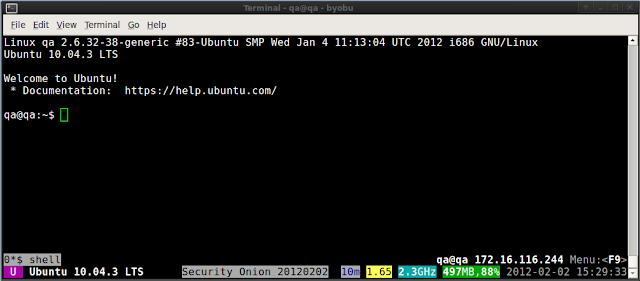
I really like having byobu configured for all my Security Onion SSH sessions, as it gives lots of good health/status information about the server in question:
If you're not already running Byobu, run it by executing "byobu". Then press the F9 key and set Byobu to launch automatically the next time you logon.
Now let's make byobu even more useful by having it display the Security Onion version number in the status bar at the bottom of the screen. Copy/paste the following into your terminal:
This could be extended to display interface/packet statistics or any other data you wish. For more information about Byobu, please see:
https://help.ubuntu.com/community/Byobu
 |
| Before |
mkdir -p $HOME/.byobu/binWithin a few seconds, your terminal should look like this:
cat > $HOME/.byobu/bin/60_so <<EOF
#!/bin/sh
echo -n "Security Onion "
grep VERSION /etc/nsm/securityonion.conf | cut -d\= -f2
EOF
chmod +x $HOME/.byobu/bin/60_so
 |
| After |
https://help.ubuntu.com/community/Byobu
Security Onion 20120202 now available!
Security Onion 20120202 is now available! This resolves the following issues:
Issue 195: Update nsm scripts to not create /etc/nsm/HOSTNAME-NIC/rules/
Issue 210: nsm_server_user-add doesn't need to ask for server name
Issue 217: nsm_sensor_ps-restart should wait for process to gracefully terminate before rotating log file
New Users
New users can download and install the 20120125 ISO image using the instructions here. The step marked "Install Security Onion updates" will automatically install this update.
In-place Upgrade
Existing Security Onion users can perform an in-place upgrade using the following command (if you're behind a proxy, remember to set your proxy variables as described in the FAQ):
sudo -i "curl -L http://sourceforge.net/projects/security-onion/files/security-onion-upgrade.sh > ~/security-onion-upgrade.sh && bash ~/security-onion-upgrade.sh"
Screenshots
 |
| In-Place Upgrade |
If you have any questions, please join our mailing list and ask away!
http://groups.google.com/group/security-onion
Thanks
Thanks to Scott Runnels for his help in testing this release!
Saturday, January 28, 2012
Attention Shmoocon attendees and Nova Hackers!
Only 2 days left to vote for 2011 Toolsmith Tool of the Year! If you're a fan of Security Onion, please vote!
http://holisticinfosec.blogspot.com/2011/12/choose-2011-toolsmith-tool-of-year.html
http://holisticinfosec.blogspot.com/2011/12/choose-2011-toolsmith-tool-of-year.html
Thursday, January 26, 2012
Security Onion 20120125 now available!
Security Onion 20120125 is now available! This resolves the following issues:
Issue 203: New users should have a more sensible default for Sguil client fonts
Issue 204: /usr/local/sbin/nsm_server_del: line 192: [: eq: binary operator expected
Issue 206: /usr/local/sbin/nsm_sensor_clean should purge old Bro logs
Issue 207: Re-install /etc/skel/.bashrc to enable bash coloring
Issue 208: Need a new ISO for NoVA Hackers presentation
New Users
New users can download and install the 20120125 ISO image using the instructions here.
In-place Upgrade
Existing Security Onion users can perform an in-place upgrade using the following command (if you're behind a proxy, remember to set your proxy variables as described in the FAQ):
sudo -i "curl -L http://sourceforge.net/projects/security-onion/files/security-onion-upgrade.sh > ~/security-onion-upgrade.sh && bash ~/security-onion-upgrade.sh"
Screenshots
 |
| Upgrade Process |
If you have any questions, please join our mailing list and ask away!
http://groups.google.com/group/security-onion
Toolsmith Tool of the Year
If you're a fan of Security Onion, please vote for it for 2011 Toolsmith Tool of the Year!
http://holisticinfosec.blogspot.com/2011/12/choose-2011-toolsmith-tool-of-year.html
Upcoming Security Onion Presentations
I'll be giving a Shmoocon Firetalk on Saturday 1/28 at 7:40 PM:
http://www.novainfosecportal.com/2012/01/25/shmoocon-2012-firetalks-%E2%80%93-update-5-schedule/
I'll also be presenting Security Onion at the NoVA Hackers Shmoocon Epilogue on Monday 1/30 at 8:00 PM:
http://novahackers.blogspot.com/2012/01/shmoocon-epilogue-speakers-and-location.html
If you're a fan of Security Onion, please vote for it for 2011 Toolsmith Tool of the Year!
http://holisticinfosec.blogspot.com/2011/12/choose-2011-toolsmith-tool-of-year.html
Monday, January 23, 2012
Security Onion Success Stories 2012
Last year, I received a few success stories from satisfied Security Onion users:
http://securityonion.blogspot.com/2011/05/security-onion-success-stories.html
Please share your Security Onion success story in the comments below!
If you're a fan of Security Onion, please vote for it for 2011 Toolsmith Tool of the Year!
http://holisticinfosec.blogspot.com/2011/12/choose-2011-toolsmith-tool-of-year.html
http://securityonion.blogspot.com/2011/05/security-onion-success-stories.html
Please share your Security Onion success story in the comments below!
If you're a fan of Security Onion, please vote for it for 2011 Toolsmith Tool of the Year!
http://holisticinfosec.blogspot.com/2011/12/choose-2011-toolsmith-tool-of-year.html
Security Onion 20120124 now available!
Security Onion 20120124 is now available! This resolves the following issue:
Issue 140: OSSEC agent needs to be integrated into NSM scripts
New Users
New users can download and install the 20111103 ISO image using the instructions here. The step marked "Install Security Onion updates" will automatically install this update.
In-place Upgrade
Existing Security Onion users can perform an in-place upgrade using the following command (if you're behind a proxy, remember to set your proxy variables as described in the FAQ):
sudo -i "curl -L http://sourceforge.net/projects/security-onion/files/security-onion-upgrade.sh > ~/security-onion-upgrade.sh && bash ~/security-onion-upgrade.sh"
Screenshots
 |
| Upgrade Process |
 |
| sudo service nsm status |
If you have any questions, please join our mailing list and ask away!
http://groups.google.com/group/security-onion
Toolsmith Tool of the Year
If you're a fan of Security Onion, please vote for it for 2011 Toolsmith Tool of the Year!
http://holisticinfosec.blogspot.com/2011/12/choose-2011-toolsmith-tool-of-year.html
Subscribe to:
Posts (Atom)