Friday, September 23, 2011

Security Onion 20110922 now available!

Security Onion 20110922 is now available!  This update resolves Issue 126.  It also spawns instances of httpry and httpry_agent for each monitored interface.  Thanks go to Jason Bittel for his work on httpry and Paul Halliday for his work on httpry_agent!

Please note!
httpry is going to be logging all HTTP traffic on every monitored interface and httpry_agent is going to be inserting those HTTP logs into the MySQL database so they can be queried in Sguil and SQueRT.  This may increase the load on your sensors and/or MySQL server.

In-place Upgrade
Existing Security Onion users can perform an in-place upgrade using the following command (if you're behind a proxy, remember to set your proxy variables as described in the FAQ):
sudo -i "curl -L http://sourceforge.net/projects/security-onion/files/security-onion-upgrade.sh > ~/security-onion-upgrade.sh && bash ~/security-onion-upgrade.sh"
 Screenshots

Upgrade Process


httpry events are autocategorized so as not to clutter the main Sguil window

If you're responding to an incident for an IP address, search for the IP and you'll see the httpry events are prefixed with "URL"


Clicking on a URL event will show further information in the Detail pane

Right-clicking on the Alert ID allows you to pull the entire transcript


SQueRT has an httpry search that will show all httpry logs


Tuesday, September 20, 2011

Security Onion 20110920 now available!


Security Onion 20110920 is now available!  This update enables IP-to-country mapping in the SQueRT web interface (great for showing off to executives)!

Please note!
This upgrade will make changes to the database and therefore it is recommended to backup your MySQL database and/or test the upgrade on a non-production system before deploying to production.

In-place Upgrade
Existing Security Onion users can perform an in-place upgrade using the following command (if you're behind a proxy, remember to set your proxy variables as described in the FAQ):
sudo -i "curl -L http://sourceforge.net/projects/security-onion/files/security-onion-upgrade.sh > ~/security-onion-upgrade.sh && bash ~/security-onion-upgrade.sh"
 Screenshots
Upgrade Process

SQueRT IP-to-country mapping

Monday, September 19, 2011

Security Onion 20110919 now available!

Security Onion 20110919 is now available!  This update does the following:

    • Updates the NSMnow admin scripts to support argus.
    • Starts argus on all monitored interfaces.

    Each argus instance will log to the following location:
    /nsm/sensor_data/NAME-OF-SENSOR/argus/YYYY-MM-DD.log

    In-place Upgrade
    Existing Security Onion users can perform an in-place upgrade using the following command (if you're behind a proxy, remember to set your proxy variables as described in the FAQ):
    sudo -i "curl -L http://sourceforge.net/projects/security-onion/files/security-onion-upgrade.sh > ~/security-onion-upgrade.sh && bash ~/security-onion-upgrade.sh"


    Screenshots
    Upgrade script installs new NSM scripts and starts argus on all monitored interfaces (eth0, eth1, and eth2 in this case)

    Running argus processes
    Argus processes log to /nsm/sensor_data/NAME-OF-SENSOR/argus/YYYY-MM-DD.log


    Running one of the argus clients (ranonymize, to anonymize my IP addresses) on the argus logs

    Friday, September 16, 2011

    Security Onion 20110915 now available!

    Security Onion 20110915 is now available!  This update does the following:
    In-place Upgrade
    Existing Security Onion users can perform an in-place upgrade using the following command 
    (if you're behind a proxy, remember to set your proxy variables as described in the FAQ):

    sudo -i "curl -L http://sourceforge.net/projects/security-onion/files/security-onion-upgrade.sh > ~/security-onion-upgrade.sh && bash ~/security-onion-upgrade.sh"
    Screenshots
    New Argus menu

    Thursday, September 15, 2011

    Security Onion 20110914 now available!

    Security Onion 20110914 is now available!  This will update the Setup script to use the new config file format and install a daily script to purge old alerts from the database.


    PLEASE NOTE!
    sguil-db-purge is scheduled to run every day at 5:01 AM. It will do the following:
    • stop sguild
    • purge old events from the database
    • repair the remaining MySQL tables
    • start sguild
    The default retention policy for the purge is 365 days. If you would like to change this value, please change the DAYSTOKEEP variable in /etc/nsm/securityonion.conf.

    The daily cron job logs its output to /var/log/nsm/sguil-db-purge.log.


    Since the purge script will be making changes to the database, it is recommended to backup your MySQL database and/or test the purge script on a non-production system before deploying to production.


    In-place Upgrade
    Existing Security Onion users can perform an in-place upgrade using the following command 
    (if you're behind a proxy, remember to set your proxy variables as described in the FAQ):

    sudo -i "curl -L http://sourceforge.net/projects/security-onion/files/security-onion-upgrade.sh > ~/security-onion-upgrade.sh && bash ~/security-onion-upgrade.sh"
    Screenshots
    Upgrade process


    Purge script

    Wednesday, September 14, 2011

    Security Onion 20110913 now available!

    Security Onion 20110913 is now available!  This update upgrades the SQueRT web interface to version 0.9.3b.  Thanks go to Paul Halliday at http://www.squertproject.org/ for all of his hard work on this new version of SQueRT!


    In-place Upgrade
    Existing Security Onion users can perform an in-place upgrade using the following command 
    (if you're behind a proxy, remember to set your proxy variables as described in the FAQ):

    sudo -i "curl -L http://sourceforge.net/projects/security-onion/files/security-onion-upgrade.sh > ~/security-onion-upgrade.sh && bash ~/security-onion-upgrade.sh"

    Screenshots


    SQueRT Summary Tab

    More screenshots can be found at the SQueRT screenshots page.


    Monday, September 12, 2011

    Security Onion 20110909 now available

    Security Onion 20110909 is now available!  This upgrade adds some new menu entries to make IDS tuning a little easier.  

    • The "IDS Rules" menu now has a new entry called "Add Local Rules" which will open /etc/nsm/rules/local.rules for editing using the "mousepad" GUI editor.  You can then add any rules that you want to maintain locally (outside of the downloaded VRT or Emerging Threats rulesets).
    • A new menu called "IDS Config" was added with a new menu entry called "Configure IDS engine(s)".  This will list all of the IDS engines on your system and allow you to choose one to configure.  It will then open the proper config file for whatever IDS engine you're running.  After you save and close the config file, it will offer to restart the IDS engine for you.


      • Example #1
        • Suppose you're currently running Snort and you choose eth0.  The program will open /etc/nsm/NAME_OF_YOUR_SENSOR-eth0/snort.conf for editing using the "mousepad" GUI editor.
      • Example #2
        • Suppose you're currently running Suricata and you choose eth1.  The program will open /etc/nsm/NAME_OF_YOUR_SENSOR-eth1/suricata.yaml for editing using the "mousepad" GUI editor.

    In-place Upgrade
    Existing Security Onion users can perform an in-place upgrade using the following command 
    (if you're behind a proxy, remember to set your proxy variables as described in the FAQ):

    sudo -i "curl -L http://sourceforge.net/projects/security-onion/files/security-onion-upgrade.sh > ~/security-onion-upgrade.sh && bash ~/security-onion-upgrade.sh"
    Screenshots


    New "Add Local Rules" menu entry under "IDS Rules"

    Clicking the above menu entry opens /etc/nsm/rules/local.rules for editing

    New "IDS Config" menu with "Configure IDS engine(s)" menu entry

    "Configure IDS engine(s)" allows you to pick which engine to configure

    Selecting an engine opens that engine's config file for editing

    After saving and closing the config file, you will have the option to restart the engine


    Tuesday, July 26, 2011

    tcpdump and ngrep

    Yesterday, I tweeted the following:
    tcpdump -nnvvAi eth1 -s0 | grep "Doug Burks is teaching SANS SEC503 Intrusion Detection In-Depth in Portland"
     So what does it all mean?

    -nn This option disables name resolution for IP addresses and port numbers.  Some versions of tcpdump do this with a single "-n", but the double "-nn" option should work on all of them.
    vv This option enables Very Verbose output.  It wasn't strictly needed for the purposes of this command, but I'm in a habit of using it.
    A This option prints just the ASCII text in the packets.  This is useful when looking for strings like "Doug Burks is teaching SANS SEC503 Intrusion Detection In-Depth in Portland" or "c99shell".
    i This option allows you to specify the Interface (in this case eth1).  eth1 on my Security Onion box at home is connected to a Dualcomm Switch Tap that monitors all ingress/egress of my home network.  Doesn't everybody do full packet capture at home?
    -s0 This option sets the snaplen. By default, tcpdump only captures 68 bytes and would therefore not see the entire payload of the HTTP connection.  Setting snaplen to 0 forces tcpdump to capture the entire packet regardless of its size.
    grep Since we had tcpdump output in ASCII, we can easily use the standard grep command to look for interesting text strings.

    I was waiting on someone to ask the question "Why not use ngrep instead?".  tcpdump's advantage is that it is more universally available than ngrep.  If you're doing Incident Response on a Unix box of some kind, chances are that it already has tcpdump installed and you can use that to look for suspicious traffic as defined above.

    Most Unix boxes do not have ngrep installed by default.  But let's assume that you've got a dedicated IDS platform such as Security Onion which just so happens to include ngrep by default.  Here's the  ngrep version of the command:
     ngrep -d eth1 -s0 "Doug Burks is teaching SANS SEC503 Intrusion Detection In-Depth in Portland"
    Here we use the "-d eth1" option to force ngrep to listen on device eth1 and the "-s0" option to force ngrep to look at the entire packet.  Note that, unlike tcpdump's default snaplen of 68 bytes, ngrep defaults to 65536, so this option isn't strictly needed here, but is included for completeness.  After specifying these options, we simply tell ngrep what string to look for.

    Doug Burks is teaching SANS SEC503 Intrusion Detection In-Depth in Portland Oregon 8/22 - 8/27.  Sign up today!
    http://www.sans.org/portland-2011-cs-2/description.php?tid=4866

    Monday, July 25, 2011

    Doug Burks is teaching SANS SEC503 Intrusion Detection In-Depth in Portland 8/22 - 8/27

    Doug Burks is teaching SANS SEC503 Intrusion Detection In-Depth in Portland Oregon 8/22 - 8/27.  For more information about the class, please see:
    http://www.sans.org/portland-2011-cs-2/description.php?tid=4866


    Enter Discount Code COINS10 at the time of registration to save $356 on Tuition!

    Thursday, July 14, 2011

    Security Onion 20110714 now available

    Security Onion 20110714 is now available!  This release completes the PulledPork reconfiguration to ignore a new Emerging Threats BLOCK category released on 7/8/2011.

    Existing Security Onion users can perform an in-place upgrade to version 20110714 using the following command (i
    f you're behind a proxy, remember to set your proxy variables as described in the FAQ):
    sudo -i "curl -L http://sourceforge.net/projects/security-onion/files/security-onion-upgrade.sh > ~/security-onion-upgrade.sh && bash ~/security-onion-upgrade.sh"

    Monday, July 11, 2011

    Security Onion 20110709 now available

    Security Onion 20110709 is now available!  This release configures PulledPork to ignore a new Emerging Threats BLOCK category released on 7/8/2011.

    Existing Security Onion users can perform an in-place upgrade to version 20110709 using the following command (if you're behind a proxy, remember to set your proxy variables as described in the FAQ):
    sudo -i "curl -L http://sourceforge.net/projects/security-onion/files/security-onion-upgrade.sh > ~/security-onion-upgrade.sh && bash ~/security-onion-upgrade.sh"

    Wednesday, June 29, 2011

    Security Onion 20110628 now available

    Security Onion 20110628 is now available!  This release fixes two minor issues with the OSSEC Sguil agent.

    Existing Security Onion users can perform an in-place upgrade to version 20110628 using the following command (if you're behind a proxy, remember to set your proxy variables as described in the FAQ):

    sudo -i "curl -L http://sourceforge.net/projects/security-onion/files/security-onion-upgrade.sh > ~/security-onion-upgrade.sh && bash ~/security-onion-upgrade.sh"

    Wednesday, June 22, 2011

    Security Onion and UTC

    Sguil uses UTC.  It does this for a few reasons:
    1. UTC avoids any timewarps when changing from standard time to daylight saving time and vice versa.
    2. UTC allows for correlation when sensors are in different time zones.
    Because Sguil uses UTC, it is recommended to set your Security Onion timezone to UTC.  Here's how:
    echo "Etc/UTC" | sudo tee /etc/timezone
    sudo dpkg-reconfigure --frontend noninteractive tzdata
    For more information, please see:

    Friday, June 17, 2011

    Security Onion 20110614

    Security Onion 20110614 is now available!  This upgrade fixes a few issues with downloading rules and adds some new menu entries to make rule editing a little easier.  For more information, please see Issue 111.


    In-place Upgrade
    Existing Security Onion users can perform an in-place upgrade to version 20110614 using the following commands:
    wget http://sourceforge.net/projects/security-onion/files/security-onion-upgrade.sh
    sudo bash security-onion-upgrade.sh
    Screenshots
    New menu entries

    Clicking "Disable Downloaded Rules" opens disablesid.conf in a text editor

    Clicking "Rule update" will run PulledPork and restart Barnyard2/Snort

    Monday, June 13, 2011

    Security Onion 20110607 featuring Sguil 0.8, Squert 0.8.3, and more polish!

    Update:  Looks like the Security Onion 20110607 files haven't fully replicated to all Sourceforge mirrors yet. If you're having trouble downloading, please try later today.


    Update 2011/06/14 6:00 AM: Sourceforge is reporting that the Security Onion 20110607 files have replicated to at least 15 mirrors now.

    Security Onion 20110607 is now available!  New features in this release are as follows:

    • Sguil 0.8 (now with more shininess and anti-aliased fonts!)
    • Squert 0.8.3 (now with user authentication!)
    • new tcl/tk packages (resolves a scaling issue when running in VMWare and allows for the anti-aliased fonts mentioned above)
    • httpry
    • a new Setup script (adds support for Sguil 0.8 and Squert 0.8.3 and also provides more information once Setup completes)


    New Users
    New users can download the latest ISO image from here.  It should be noted that pentest tools have been removed from this ISO.  This includes metasploit, john, ophcrack, and steghide.  For more information, please see Issue 106.

    In-place Upgrade
    Existing Security Onion users can perform an in-place upgrade to version 20110607 using the following commands:
    wget http://sourceforge.net/projects/security-onion/files/security-onion-upgrade.sh
    sudo bash security-onion-upgrade.sh
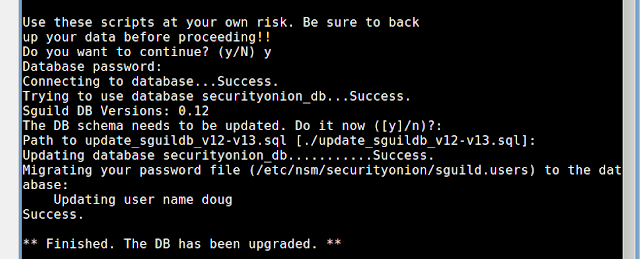
    It will then upgrade your box to the latest tcl/tk, Sguil, Squert, and Setup script.  If you have an existing Sguil database, it will run the Sguil DB upgrade, which will ask:
    Do you want to continue? y
    Database password: Press Enter to accept the default of "null" (unless you've changed the MySQL root password)
    DB schema needs to be updated: Press Enter to accept the default of "y"
    Path to update...Press Enter to accept the default
    Please test the upgrade on test machines before upgrading your production machines.

    Screenshots

    Upgrade process


     Sguil login window

    Squert login window 

    Saturday, June 4, 2011

    Security Onion featured in SANS Student Project

    Security Onion was featured in a SANS Student Project.  Russ McRee, Beth Binde, and Terrence O’Connor recently published Assessing Outbound Traffic to Uncover Advanced Persistent Threat.  Great paper!

    Tuesday, May 24, 2011

    Security Onion Success Stories

    I received a couple of Security Onion Success Stories recently.  I appreciate Brett S. and Gene A. taking the time to say thanks.   It's a great source of encouragement and motivation for me to continue with the project.  If you would like to share your Security Onion Success Story, please post it in the Comments section.  Thanks!
    Doug,

    I wanted to thank you for providing Security Onion and maintaining it
    so diligently.  I was a faculty advisor for the U.S. Coast Guard's
    Cyber Defense Exercise this year.  Every year, the service academies
    set up their networks and have NSA's red team try to bring down
    servers and steal information.  For Coast Guard, the team is recruited
    from the members of the only Networks course.

    It was my first year with the cadets, and I had realized early that
    the team had no IDS experience, and was thoroughly swamped just trying
    to get the network up and running.  Security Onion to the rescue --
    requiring just a few of the less experienced members with some
    guidance, we were able to watch the more obvious attacks from outside
    the firewall as well as the false positives from the exercise scoring
    software.  It really was educational for the group -- rather than just
    wondering what hit us, there was ample information in near real time
    to figure out what was happening.   Knowing how to respond is another
    story, of course.

     In the end, Coast Guard placed 3rd, which is pretty good given the
    size and amount of resources available compared to Air Force and
    Army.  Some of the team have expressed interest in getting more
    involved with configuration and fine-tuning Snort next year, because
    they had first-hand experience with how it behaved under basic
    defaults.

    Thanks again for providing such a useful tool -- it significantly
    enhanced the educational impact of the exercise.

    Brett S.

    Doug, Brett, It wasn't just the USCG that was using Security Onion during the CDX.  We here at the Naval Postgraduate School also used Security Onion as a quick and easy IDS solution.  Of all the tools we employed during the exercise Security Onion was by far the easiest to get up and running and provided us with a great insight into the attacks used during the exercise. 
     Great job, Doug!  Keep up the good work.
    Sincerely, 
    Gene A. 

    Monday, May 2, 2011

    Security Onion featured in ISSA Journal

    I always look forward to Russ McRee's Toolsmith column in the ISSA Journal.  This month's Toolsmith column features Security Onion!  Russ, thanks for the article and your kind words!

    Thursday, April 7, 2011

    Security Onion 20110321: Distributed Sguil Sensors

    Security Onion 20110321 is now available!  This new version includes an updated Setup script that allows you to easily create a Sguil server and then create multiple Sguil sensors that report back to the Sguil server.

    How do I get it?
    New users can download the latest ISO image from here.  Existing Security Onion users can perform an in-place upgrade to version 20110321 using the following commands:

    wget http://downloads.sourceforge.net/project/security-onion/security-onion-upgrade.sh
    sudo bash security-onion-upgrade.sh 
    Existing users, please note that running Setup on a previously configured system will remove any existing configuration.

    How do I create a Sguil server?
    You have three options:
    1.  Launch Setup and choose "Quick Setup".  This will install a Sguil server AND create a Sguil sensor for each ethernet interface on the server.
    2.  Launch Setup, choose "Advanced Setup", and choose "Both".  This will install a Sguil server AND create a Sguil sensor for each ethernet interface on the server, but will give you more options than "Quick Setup".
    3.  Launch Setup, choose "Advanced Setup", and choose "Server".  This will just install a Sguil server.

    How do I create a Sguil sensor?
    Launch Setup, choose "Advanced Setup", and choose "Sensor".  Enter the name/address of the Sguil server and a username that has sudo permissions on the server.  A terminal window will appear prompting you to login to the server to complete the server configuration.

    Demo
    Download the latest ISO image from here.
    Boot the Security Onion ISO and choose Install from the boot menu.
    Standard Ubuntu installer appears.  Follow the prompts to complete your installation.
    Reboot into your new Security Onion installation and login using the username/password you specified in the previous step.
    Double-click the Setup desktop shortcut.
    Administrative password prompt appears.  Enter your password and click OK.

    Welcome screen appears.  Press Enter.

    Quick Setup screen appears.  Press Enter.

    Username screen appears.  Enter your desired Sguil username and press Enter.

    Password screen appears.  Enter your desired Sguil password and press Enter.

    Password confirmation screen appears.  Confirm your desired Sguil password and press Enter.

    Settings confirmation screen appears.  Press Enter.

    Setup creates the Sguil server and sensors and then starts all services.


    Setup Complete screen appears.  Press Enter.

    Double-click the Sguil desktop shortcut.  Login window appears.  Enter the Sguil username/password you specified in Setup.

    Sensors window appears.  Click "Select All" and then click "Start Sguil".

    Sguil main window appears.  Simulate an attack by going to a terminal and typing "curl http://testmyids.com".

    A new alert should appear in the Sguil window.  Notice that the sensor is named server-eth0, where "server" is the hostname and "eth0" is the interface that saw the traffic.

    We've now verified that the Sguil server is running correctly.  Let's go to our second machine and build a sensor.
    Boot the Security Onion ISO and choose Install from the boot menu.
    Standard Ubuntu installer appears.  Follow the prompts to complete your installation.
    Reboot into your new Security Onion installation and login using the username/password you specified in the previous step.
    Double-click the Setup desktop shortcut.
    Administrative password prompt appears.  Enter your password and click OK.

    Welcome screen appears.  Press Enter.

    Quick Setup screen appears.  Click "No, use Advanced Setup".

    Components screen appears.  Click "Sensor" and click "OK".

    Server Hostname screen appears.  Enter server hostname/address and press Enter.

    SSH Username screen appears.  Enter username on server and press Enter.

    IDS Engine screen appears.  Press Enter.

    Interfaces screen appears.  Select your desired interface(s) and click OK.

    Confirm Settings screen appears.  Click "Yes, proceed with the changes!".

    Terminal appears prompting to accept SSH key of server.  Type "yes" and press Enter.


    Password prompt appears.  Enter password and press Enter.

    Sudo prompt appears.  Enter password and press Enter.


    Setup creates the Sguil sensor(s).

     Setup starts all Sguil services.

    Setup Complete screen appears.  Press Enter.

    Simulate an attack by opening a terminal and typing "curl http://testmyids.com".  

    At this point, we can return to our server.  In the Sguil window, click File and then click "Change monitored networks".

    Sensor selection window appears.  Notice that there are new sensors named sensor-eth0, sensor-eth1, sensor-eth2, and sensor-ossec.  Select the new sensors and click "Start Sguil".

    Click the "Agent Status" tab and verify that the the new sensors are checking in.

    Notice that there is a new alert with a sensor name of sensor-eth0, where "sensor" is the hostname of the sensor and "eth0" is the interface which saw the traffic.

    In this blog post, we've demonstrated how Security Onion can build an army of distributed Sguil sensors in just a few minutes.

    Search This Blog

    Featured Post

    Security Onion 3.3.0 Hotfix 20260911 Now Available!

    Earlier this week, we released Security Onion 3.3.0: https://blog.securityonion.net/2026/09/security-onion-330-now-available.html Today we a...

    Popular Posts

    Blog Archive